21
www.feiyu-tech.com
Auto-rotation
360 rotation
Selfie
Portrait
4
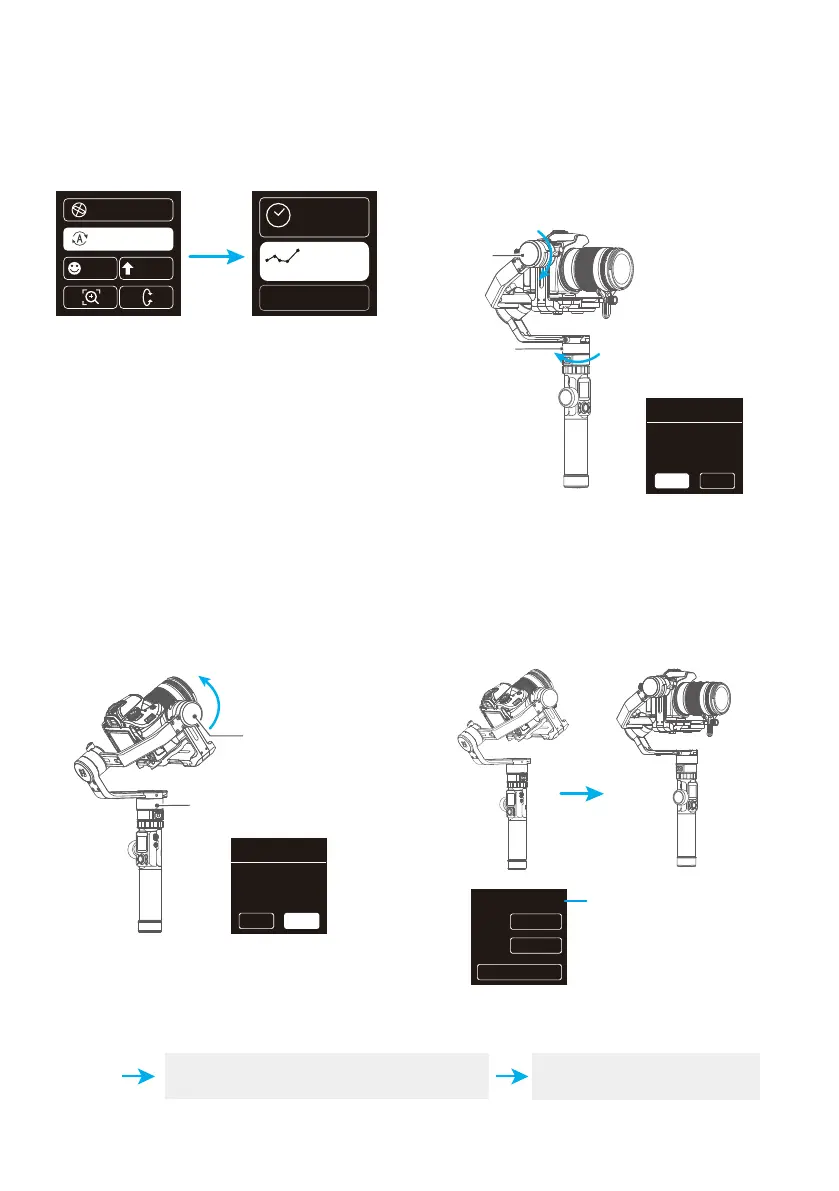
Rotate the panning axis or tilting axis to the
start position and stay for half a second, and
click OK option on the screen to record the
start position.
Rotate the panning axis or tilting axis to the
end position and stay for half a second, and
click OK option on the screen again to record
the end position.
(2) Set rotation start position
(3) Set rotation end position (4) Start auto rotation movements
Double click the Shortcut button
or click the ESC option on the screen
Exit the auto-rotation mode
and reset
Exit
(1) Select auto-rotation to enter the auto-
rotation mode on the display interface.
Auto- rotation mode setting
Tilt Axis
Pan Axis
Tilt Axis
Pan Axis
The gimbal automatically returns to the
start position, the tilting axis and panning
axis start to rotate to the end position
according to the set parameters.
procedure 1
Initial
point
setting
ESCOK
Time
Route
Use the last config
procedure 2
Ending
point
setting
OK ESC
00:09:59
FOTO
PAN
00001/000120
00:09:59
TILT
E S C
Completed photos/ Total photos















 To Next Page