20
www.feiyu-tech.com
Auto-rotation
360 rotation
Selfie
Portrait
4
4.6 Auto-rotation Mode
Adjust and control the options via the touch screen or by pulling the four-directional joystick up
and down or left and right
Enter the parameter setting interface to select the auto-rotation mode for setting. The time
setting for panning and tilting rotation time must less than 8 hours, and the maximum setting
time for photographing stop time and photographing interval is 59 seconds.
0 0 : 0 0 : 0 0
0 0 : 0 0 : 0 0
0 0 : 0 0 : 0 0
0 0 : 0 0 : 0 0
0 7 : 59 : 59
0 7 : 59 : 59
0 0 : 0 0 : 5 9
0 0 : 0 0 : 5 8
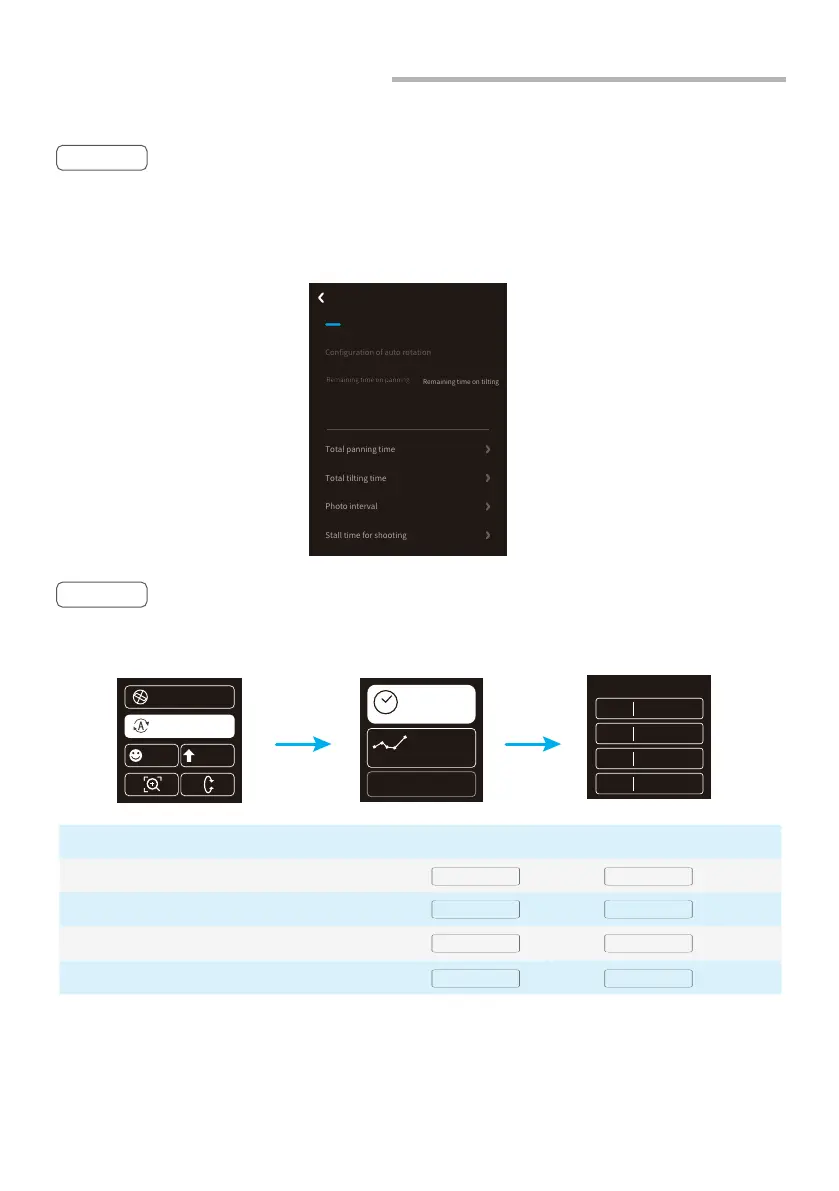
Method 1 Enter the Feiyu ON App to set the auto-rotation mode parameters.
Auto-rotation Mode Parameter Setting
PAN ( T1 )
INVL ( t )
DWELL ( P )
TILT ( T2 )
Panning axis rotation time period
PAN: Time required for the panning axis to rotate from the start point to the end point.
Display icon Mode / Status Minimum time setting Maximum time setting
Tilting axis rotation time period
TILT : Time required for the tilting axis to rotate from the start point to the end point.
Photographing interval
INVL: The time between the end of the previous shooting and the end of the next shooting.
Photographing waiting time
DWELL: Gimbal stop time after issuing a photographing command.
* T1/T2 > t > P
Method 2
Set the auto-rotation mode parameters by entering the "Auto-rotation"
interface through the touch screen.
(Note: The photographing interval setting must be longer than the photographing stop time and
less than the panning rotation time or the tilting rotation time.)
Photos:
PAN 00:00:00
00000
TILT 00:00:00
INVL 00:00:00
DWELL 00:00:00
Time
Route
Use the last config
Remaining time on tilting
Remaining time on panning
00:00:00 00:00:00
Save
00:00:00
00:00:00
5
5
Auto Rotation Mode
Configuration of auto rotation















 To Next Page