- 8 -
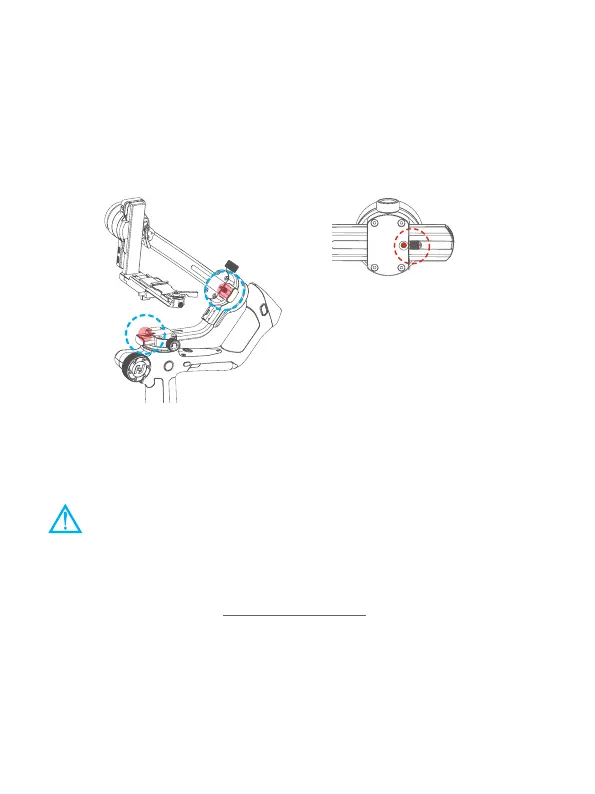
4.4 Using the memory slider
Feiyu SCORP come with the memory slider which can make balancing easier. After
balancing the gimbal, move the memory slider to the hole in axis, and make the
red dot on the memory slider exposing from the hole, in order to mark the current
position.
Next time, If the objects which users mount on are the same, users can just move the
axis to the position which can make the red dot exposing from the hole to make the
gimbal balanced.
↑ Memory slider
←
The position of memory sliders
5. Power ON/ OFF& Wake up
5.1 Power ON/ OFF
(1) Before power on the gimbal, make sure you have balanced gimbal, and
unlocked all the three axes.
(2) If you haven't unlocked all the 3 axes, gimbal will enter sleep mode to
protect itself. Please single tap power button to wake up gimbal after
unlocked all the 3 axes.
! Please set motor power rst after powering on gimbal for the rst time or after
changing a new camera/lens.
(Please refer to chapter 8.3.1)
Long press the power button and release it when you hear the beep sound to power
on/ o.















 To Next Page