- 25 -
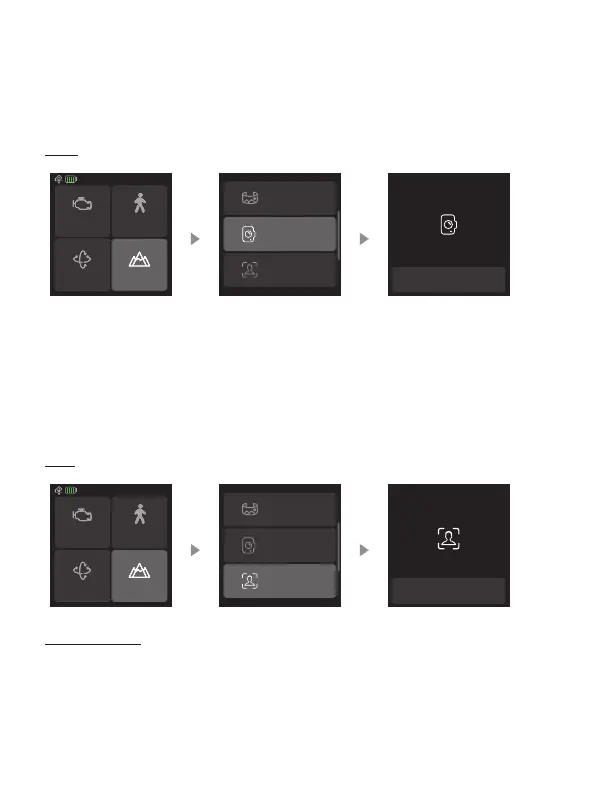
8.3.7 Portrait mode
Select “Scenario” in home page, then select “Portrait mode”. The tilt and pan
axis will rotate 90° counterclockwise to make the camera pointing upward.
Hold the handle to make the lens horizontal to the ground to shoot in portrait mode.
Exit: Tap the icon at the bottom of the screen to exit.
Exit portrait mode
Panorama
Portrait mode
Selfie mode
Motor power
PTF
Follow speed
Scenario
8.3.8 Sele mode
Select “Scenario” in home page, then select “Sele mode”. Gimbal turn 180°
horizontally so that the camera faces you.
Exit: Tap the icon at the bottom of the screen to exit.
Exit selfie mode
Panorama
Portrait mode
Selfie mode
Motor power
PTF
Follow speed
Scenario
Disable sele: Swipe from left to right in home page, then select “Gimbal
settings”, enable the disable sele switch, then the sele mode will not be entered
if the trigger button is tapped three times.















 To Next Page