www.feiyu-tech.com 2928
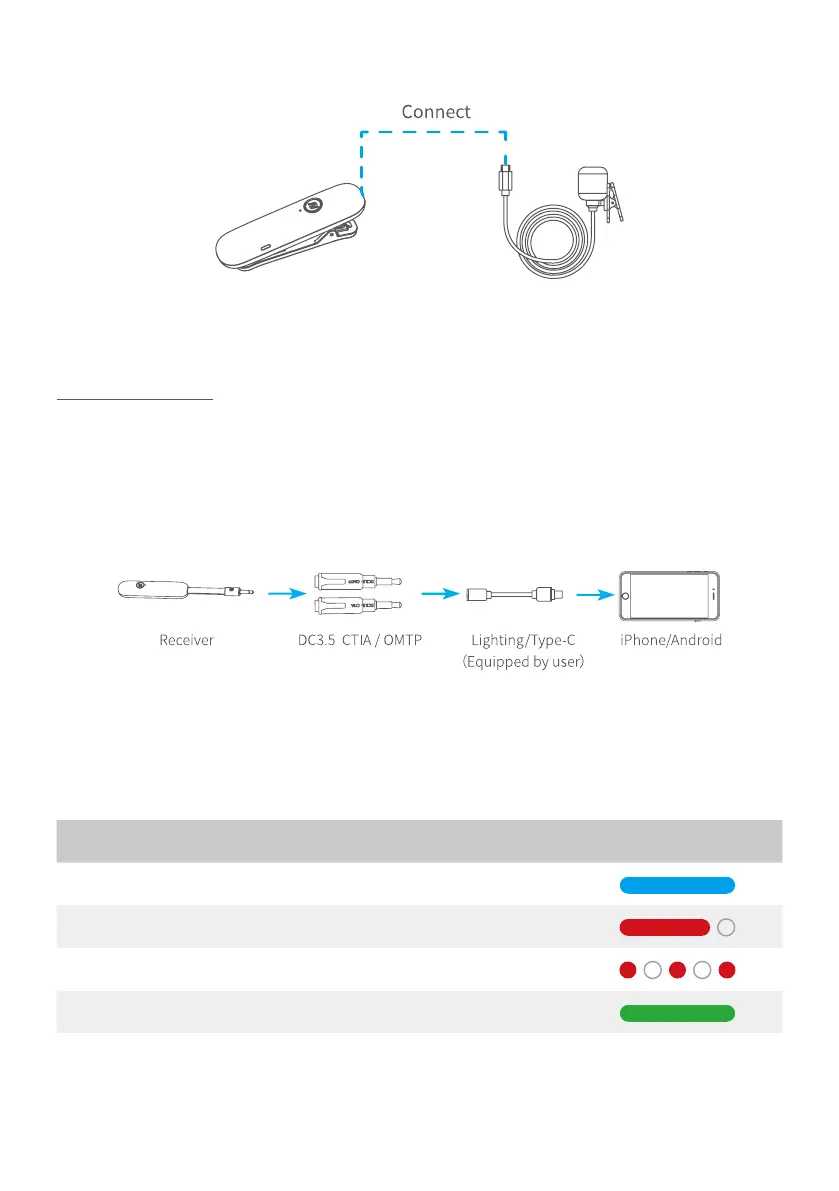
Step 4: Plug the wireless clip-on microphone in the MIC.
*Wireless microphone kit can be used without gimbal, and follow the step 2.3.4
to use it.
Usage scenario 2
Step 1: Connect with smartphone
Plug the wireless microphone (receiving terminal) in DC3.5 CTIA (American
Standard)/ OMTP (GB), then plug it in 3.5mm earphone port adapter. And plug
it in the MIC port on the smartphone rst, then turn the receiver on. Set the
smartphone to video mode.
Step 2: Turn on the MIC, and it is ready to be used.(follow the step 1.3 to use it)
(1) You can plug the wireless clip-on microphone in the MIC mount to use it.
(2) You can plug the DC 3.5mm microphone in DC 3.5 to micro adaptor, then
connect it to MIC for using.
Status Indicator ICON
Power ON Blue light stays on
Power OFF Red light stays on to o
Low battery Red light ashes regularly
Fully charged Green light stays on



 To Next Page