16.6 The printer doesn’t connect to FELIXbuilder
After connecting the FELIX Pro 1 to a computer and after installation of FELIXbuilder, the printer driver
should be automatically installed on the computer. If this is not the case we need to do this manually.not
updated correctly. You can manually download and install the drivers. After installation of the drivers
connecting the 3D printer through FELIXbuilder should be possible.
Drivers for windows:
http://www.felixprinters.com/downloads/software/0_FELIXbuilder/Arduino%20drivers%201.6.5.zip
Drivers for Mac:
http://www.ftdichip.com/Drivers/VCP/MacOSX/FTDIUSBSerialDriver_v2_3.dmg
http://www.ftdichip.com/Drivers/VCP/MacOSX/FTDIUSBSerialDriver_v2_2_18.dmg
16.6.1 INSTALLATION OF DRIVERS IN WINDOWS.
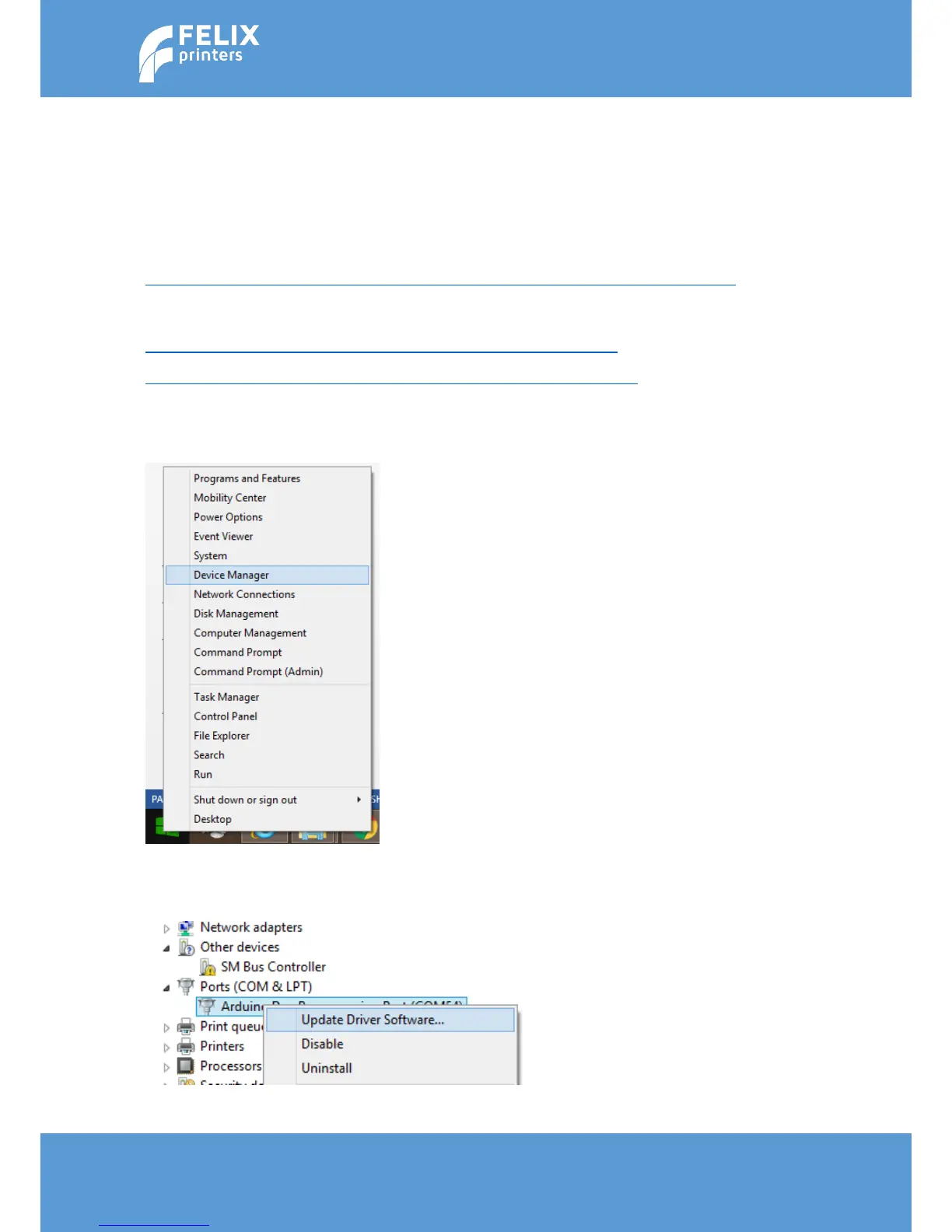
Now goto the device manager. Right click on the windows start icon and select Device Manager
A window will pop up. You will see in the list an item with Arduino due programming port. Right click on it
and select Update Driver Software…



 To Next Page