EasyManua.ls Logo

Fellowes Lunar A4 - User Manual

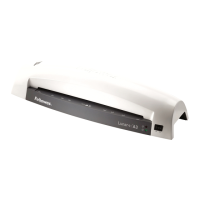
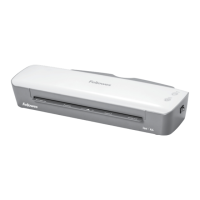
Fellowes Lunar A4
52 pages
Print Icon
To Next Page IconTo Next Page
Loading...
fellowes.com
1789 Norwood Avenue, Itasca, Illinois 60143-1095 USA 630-893-1600
Personal Laminator
Please read these instructions before use.
Lire ces instructions avant utilisation.
Lea estas instrucciones antes de usar la máquina.
Diese Anleitungen vor Gebrauch genau durchlesen.
Primo dell’uso, si raccomanda di leggere questo manuale di
istruzioni.
Lees deze instructies zorgvuldig door voordat u de machine in
gebruik neemt.
Läs dessa anvisningar innan du använder apparaten.
Læs venligst denne vejledning før anvendelse.
Lue nämä ohjeet ennen käyttöä.
Vennligst les nøye igjennom denne bruksanvisningen før bruk.
Przed użyciem proszę zapoznać się z niniejszą instrukcją.
Перед эксплуатацией устройства ознакомьтесь с
содержанием данной инструкции.
Διαβάστε τις παρακάτω οδηγίες πριν από τη χρήση.
Kullanmadan önce lutfen bu talimatlari okuyen.
Pred použitím si pročtěte tyto pokyny.
Pred poużitím si prečítajte tieto pokyny.
Kérjük, hogy használat elött olvassa el az utasításokat.
Leia estas instruções antes da utilização.
Моля, прочетете инструкциите преди употреба.
Vă rugăm să citiţi instrucţiunile înainte de utilizare.
Pažljivo pročitajte ove upute prije korištenja.
Pred uporabo izdelka preberite ta navodila za uporabo.
FR
GB
DE
IT
ES
NL
SE
DK
FI
N0
PL
RU
GR
TR
CZ
SK
HU
PT
BG
RO
HR
SI


Other manuals for Fellowes Lunar A4

Questions and Answers

  • T
    Teresa MendezAug 7, 2025
    Why is the 'ready' lamp not turning on after a long time on my Fellowes Lunar A4 Laminator?
    • P
      Philip LeeAug 7, 2025
      If the green 'ready' lamp on your Fellowes Laminator doesn't light up after a while, the machine may be in a hot or humid area. Move it to a cooler, drier location.
  • S
    shieldskarenAug 11, 2025
    How to fix Fellowes Lunar A4 Laminator when the power on lamp is not working?
    • T
      Tiffany SimpsonAug 11, 2025
      If the red 'power on' lamp isn't lit on your Fellowes Laminator, the machine might not be switched on. Check that the machine is switched on both at the front and at the wall socket.
  • D
    dpopeAug 16, 2025
    What to do if the Fellowes Lunar A4 Laminator pouch has waves or bubbles?
    • J
      John WalkerAug 16, 2025
      If your Fellowes Laminator pouch comes out with waves or bubbles, the temperature setting might be incorrect. Verify that the pouch thickness is correctly selected and pass it through the laminator again.
  • S
    Sarah HowardAug 21, 2025
    How to fix Fellowes Laminator if pouch is lost in the machine?
    • K
      kdunlapAug 22, 2025
      If a pouch gets stuck inside your Fellowes Laminator, it means the pouch is jammed. Press the reverse button and gently pull the item out by hand.
  • K
    kevinhallAug 27, 2025
    What to do if Fellowes Lunar A4 pouch does not completely seal the item?
    • S
      Scott CurtisAug 27, 2025
      If your Fellowes Laminator pouch isn't sealing the item completely, it might be too thick to laminate. Check that the pass-through thickness is correctly selected, and then pass it through the laminator again.
  • E
    Erica RamirezAug 31, 2025
    What to do if Fellowes Lunar A4 pouch is damaged after lamination?
    • L
      Linda AlexanderAug 31, 2025
      If the Fellowes Laminator pouch is damaged after lamination, the rollers may be damaged, or there may be adhesive on them. To test and clean the rollers, pass cleaning sheets through the machine.

Summary

Laminator Controls

On;off Switch

The primary switch to turn the laminator on and off.

Ready Indicator Light

Shows when the laminator has reached the optimal operating temperature.

Release Lever

Used to eject jammed or misaligned pouches from the machine.

Carry Handle

Integrated handle for convenient transportation of the laminator.

Document Entry Slot

The opening where documents are fed into the laminator.

Document Exit Slot

The opening where laminated documents emerge from the machine.

Power Indicator Light

Indicates that the laminator is receiving power and is turned on.

Capabilities

Technical Data

Important Safety Instructions

Features & Tips

Release Function

Allows removal or realignment of pouches during the lamination process.

Setting Up the Laminator

How to Laminate

Troubleshooting

Storage & Cleaning

Product Registration and Warranty

WEEE Information

Declaration of Conformity and Contacts

Help Line

Provides contact information for customer support and assistance.

International Contact Numbers

Lists global Fellowes customer service phone numbers.

Fellowes Lunar A4 Specifications

General IconGeneral
Product colorWhite
Preheating time6 min
Built-in displayNo
Lamination speed300 mm/min
Number of rollers2
Maximum lamination width230 mm
Pouch capacity (per flap)80 µ
Maximum document thickness- mm
Harmonized System (HS) code84729080
Weight and Dimensions IconWeight and Dimensions
Depth122 mm
Width384 mm
Weight1120 g

Related product manuals