PRESETS
16
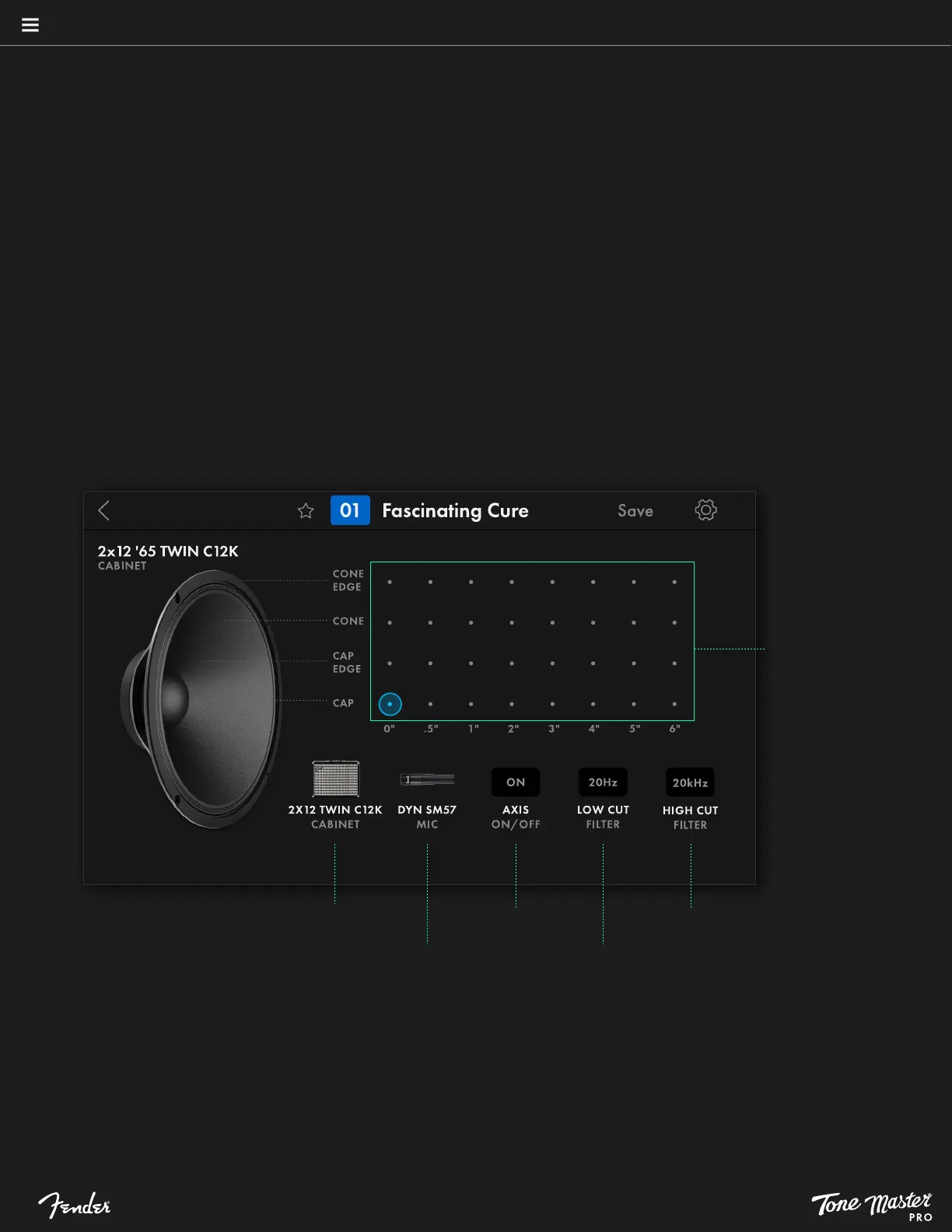
CABINET SETTINGS
For combo and half-stack amplifier blocks, touch the small cabinet image at upper right to view available speaker cabinet options. Touching a
cabinet block from signal path will provide same set of options. A screen appears with cabinet options including cabinet model, microphone
model, microphone position, microphone on/off axis, low-cut and high-cut filters:
• CABINET: Touch the cabinet symbol to see a list of available cabinets. Touch a cabinet to select it and return to cabinet settings.
• MIC: Touch the microphone symbol to see a list of available microphones (see the Tone Master PRO Model Guide for detailed
microphone model descriptions). Touch a microphone to select it and return to cabinet settings.
• MIC POSITION: For each cabinet a microphone can be placed at one of 32 locations that determine its vertical position on the speaker
and horizontal distance from the grill. Touch a dot on the matrix shown to select one of four mic positions (cap, cap edge, cone, cone edge)
at eight different distances (in inches). Each microphone position loads a unique Impulse Response based on the selected cabinet position
and distance.
• MIC AXIS: Touch the Axis button to choose one of two microphone orientations: on-axis (pointed straight at cabinet) and off-axis (pointed
at cabinet at a 45-degree angle to reduce treble frequencies).
• FILTERS: Touch the Low-Cut and High-Cut filter buttons to access a gradient slider control for selecting preferred cut-off frequencies at
either end of the audio spectrum.
Touch to change
cabinet type
Touch to change
microphone type
Touch to change
microphone axis
Touch to edit
low cut filter
Touch to edit
high cut filter
Touch to select
among 32 mic
placement positions





 To Next Page