PRESETS
18
SIGNAL PATH TYPES
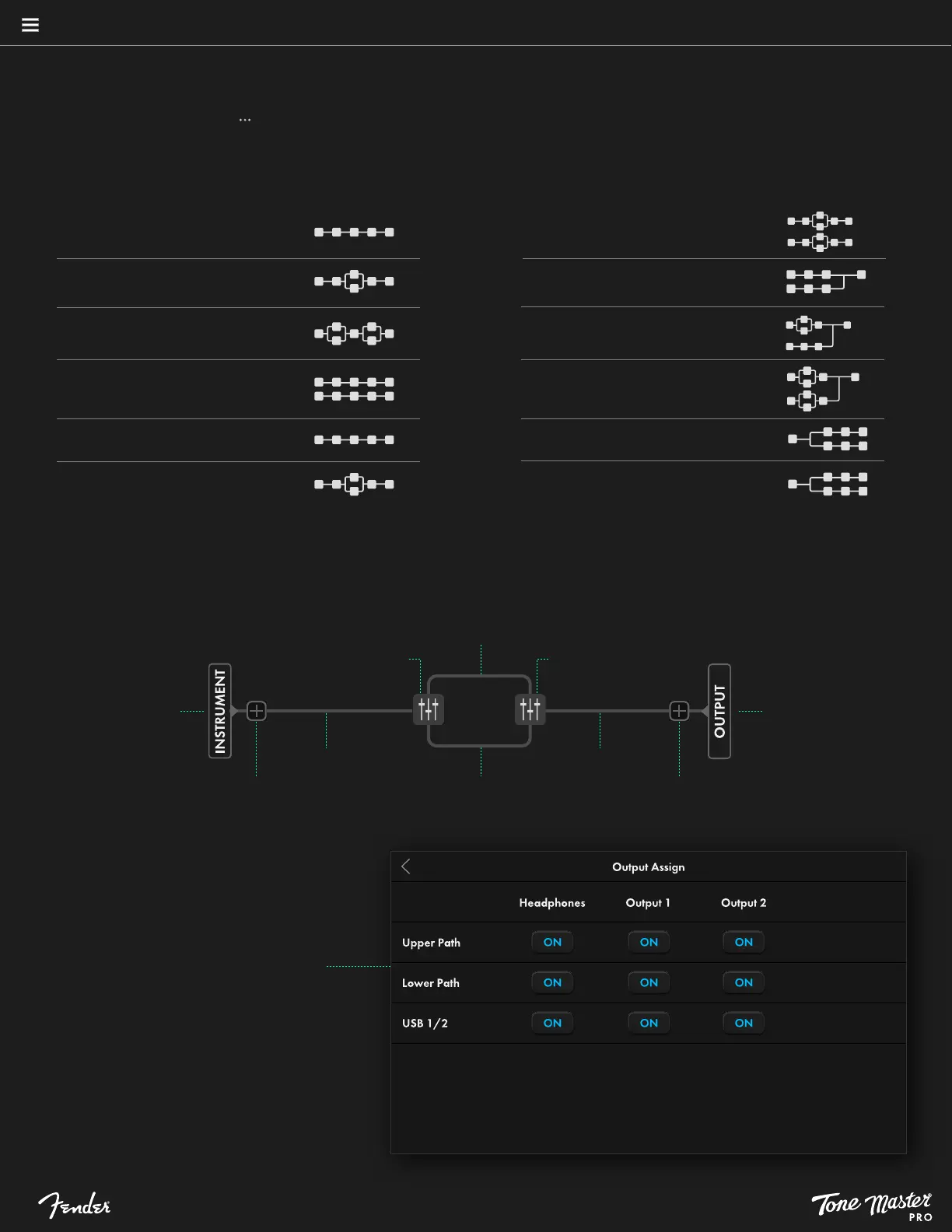
One of the user-adjustable parameters in the signal path lower ribbon is Signal Path Type, of which there are several to choose among.To do so,
touch the Preset Settings symbol ( ) in the lower ribbon, touch Signal Path Type in the Preset Settings menu, then touch one of the signal path
templates to load it. A template can be changed after a signal path is populated with amps, effects and other blocks, which will repopulate the
signal path in the new template. Note that Signal Path Type can also be accessed by selecting either INSTRUMENT or MIC/LINE at far left of
the preset view.
Instrument Series
Instrument Parallel 1
Instrument Parallel 2
Instrument + Mic/Line Series
Mic/Line Series
Mic/Line Parallel 1
SIGNAL PATH COMPONENTS
Illustration below shows example of INSTRUMENT PARALLEL 1 signal path to show various components of signal path.
SPLITTER
Series signal path Series signal path
Add block
Touch OUTPUT to
access OUTPUT
ASSIGN options
Touch INSTRUMENT or
MIC/LINE to change
SIGNAL PATH TYPE
Parallel signal path
Parallel signal path
MIXER
Add block
Instrument + Mic/Line Parallel
Instrument + Mic/Line Mix 1
Instrument + Mic/Line Mix 2
Instrument + Mic/Line Mix 3
Instrument Split
Mic/Line Split
OUTPUT ASSIGN
Output Assign is accessed by selecting OUTPUT
at far right of the preset view, or from the Preset
Settings menu.
The far-left side of the Output Assign menu lists
the preset elements (Upper Path, Lower Path and
USB 1/2) that can be routed to the rear-panel
HEADPHONES, OUTPUT 1 or OUTPUT 2 jacks.
Touch the buttons under each output type to
toggle selections on and off.





 To Next Page