PRESETS
21
ASSIGNING BLOCKS TO FOOTSWITCH ASSIGNMENT
After selecting on/off or parameter change assignment types, select the block(s) to be controlled with the footswitch assignment. The selected
block(s) will have a blue arrow underneath to indicate selection. Touch CONFIRM to complete assignment.
PRESET FOOTSWITCH ASSIGNMENT SETTINGS
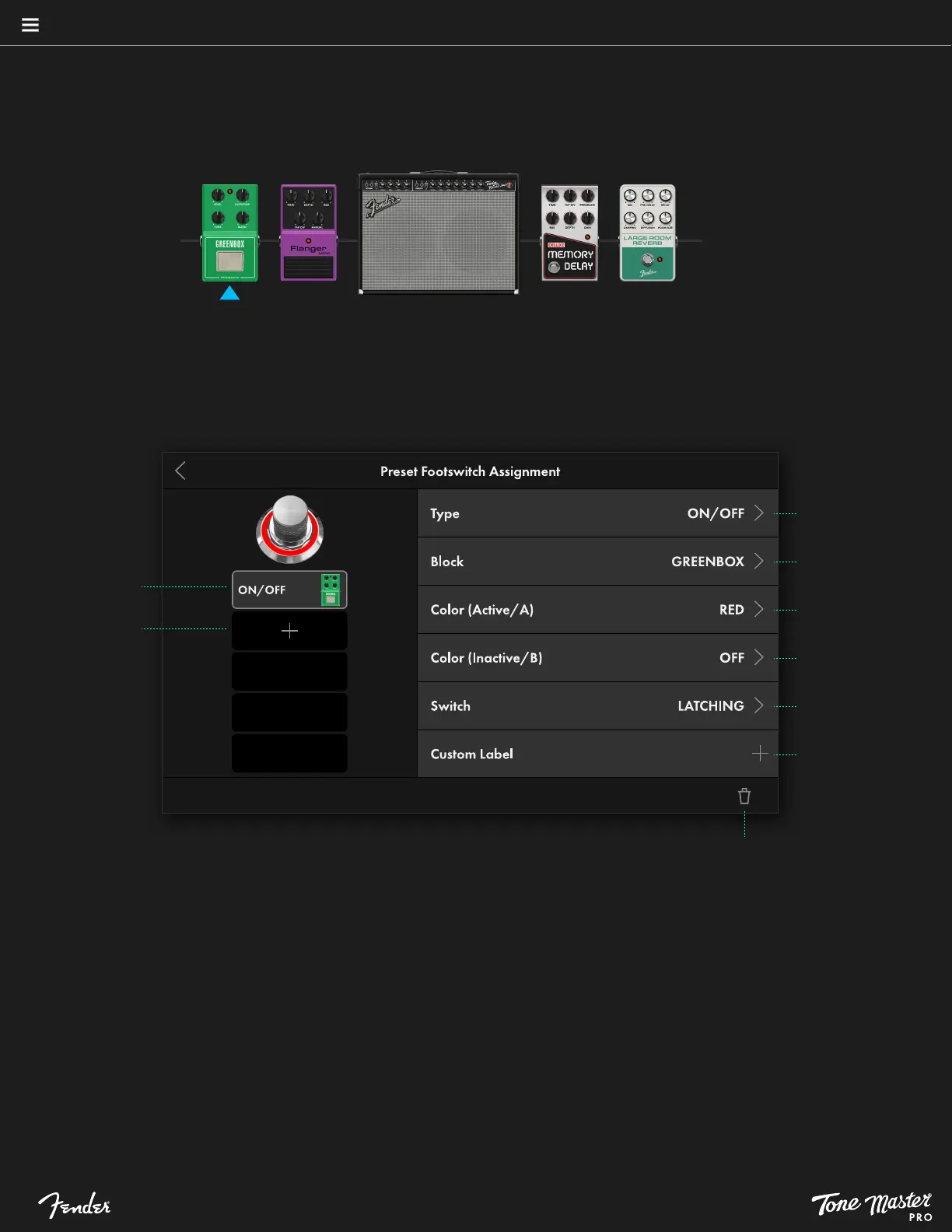
Example below of Preset Footswitch Assignment Settings screen for an ON/OFF assignment. The left side shows up to five assignments for
each footswitch, with configurable parameters for the selected assignment listed at right:
Touch trash can symbol to delete assignment
Touch to create
custom name
Touch to change
switch type
Touch to change
footswitch color for
Inactive/B state
Touch to change
footswitch color for
Active/A state
Touch to change
assigned block
Touch to change
assignment type
Touch plus symbol
(+) to add another
assignment
Touch individual
assignment to see
settings
COMMON FOOTSWITCH PARAMETERS
• TYPE: Lists the assigned function type; touch at any time to change function type.
• BLOCK: Shows block assigned to the footswitch; displays MULTI if more than one block is assigned.
• COLOR (ACTIVE/A): Touch to select footswitch LED color when footswitch is on. Default color is red. Common to all five
footswitch assignments.
• COLOR (INACTIVE/B): Touch to select footswitch LED color when footswitch is off. Default is LED off (no color). Common to
all five footswitch assignments.
• SWITCH: Select latching or momentary switch function. Common to all five footswitch assignments.
• CUSTOM LABEL: Select to enter custom text that will appear on scribble strip. Common to all five footswitch assignments.





 To Next Page