V2.0
TM
FENIEX. 2017 INSTRUCTION MANUAL
WEB. www.feniex.com
5
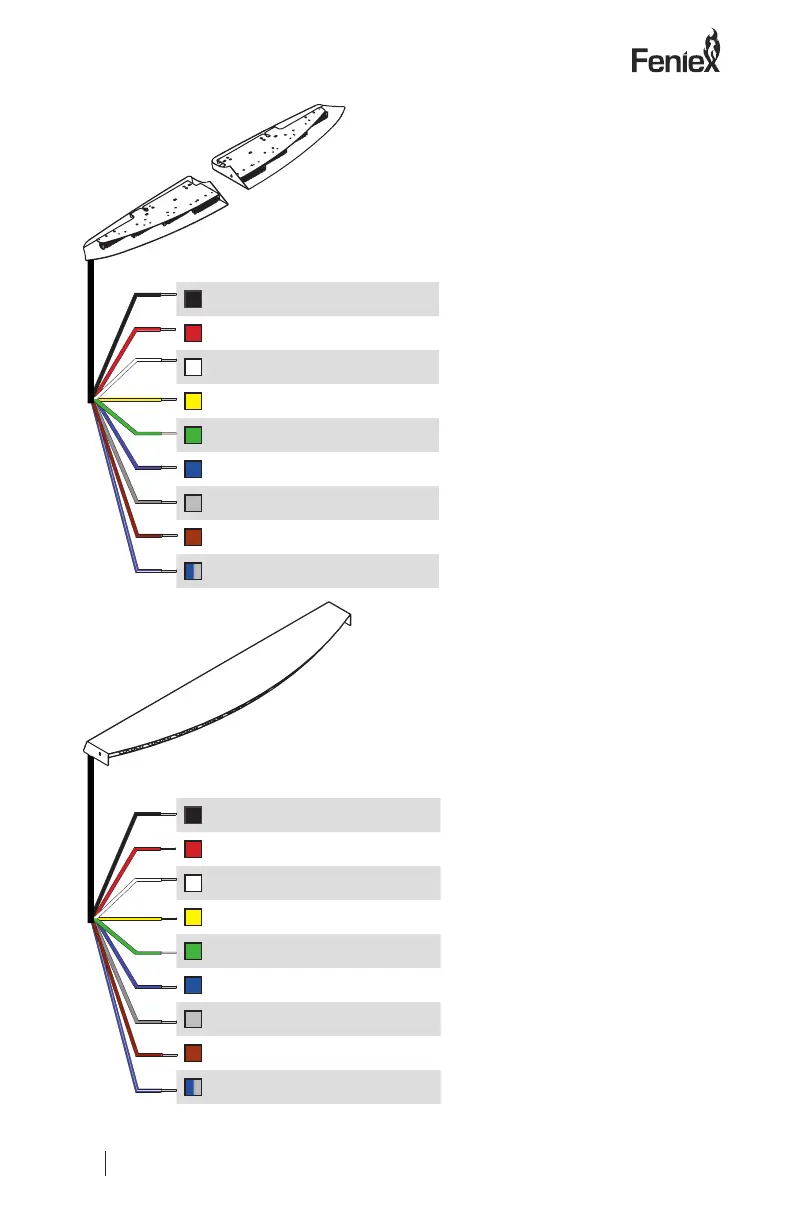
Wiring Diagram
Single Color Fusion:
Wire Color: Function:
Black
12V (
-
)
Red
12V (
+
)
White
Takedown
Yellow
Flash Mode
Green
Takedown Flash
Blue
Left Arrow
Gray
Right Arrow
Brown
Mode 1
Gray/Blue
Center Out
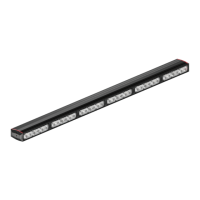
Dual Color Fusion:
Wire Color: Function:
Black
12V (
-
)
Red
12V (
+
)
White
Flood
Yellow
Flash Mode
Green
Mode Two
Blue
Left Arrow
Gray
Right Arrow
Brown
Mode One
Gray/Blue
Center Out
Can I program takedowns
for Fusion Dual Models?
Important Note! Takedown
steady overrides takedown
ashing
Activate takedown
Flashing for Dual Color:
Step 1: Connect the black
wire to the battery’s 12V(-)
ground.
Step 2: Select the wire that
will be set as the takedown
ashing mode wire, either
the green or the brown wire.
Step 3: Twist the selected
mode (green or brown),
red, white and yellow wires
together.
Step 4: Power the
lightbar on by connecting
the twisted wires to the
battery’s positive (+). Once
activated, the takedown
steady function will engage.
To verify takedowns are
ashing, disconnect
takedown steady (white)
wire from power.
Step 5: Repeat steps 1
through 3 to deactivate
takedown ashing.


 To Next Page