31
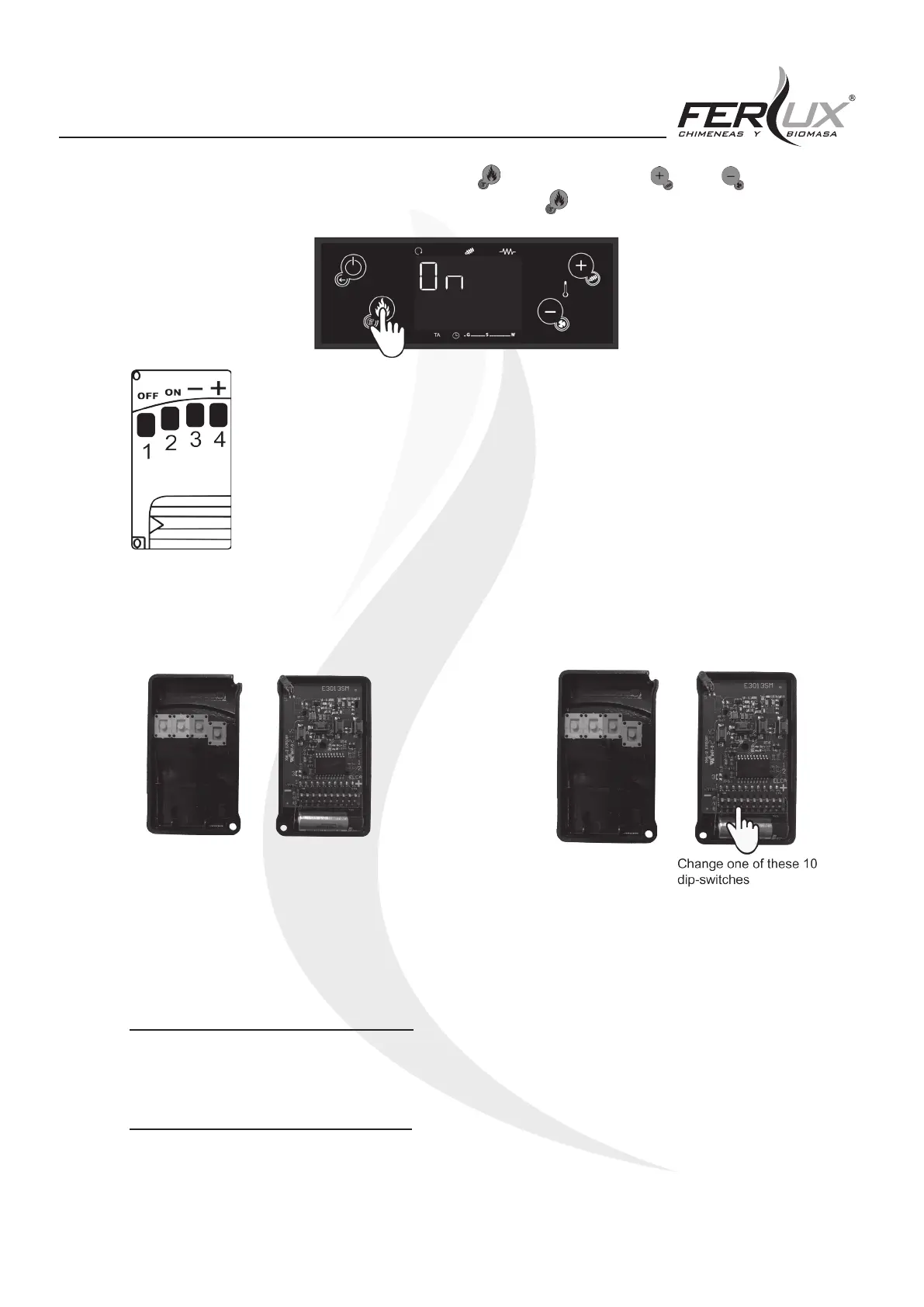
2. After this, the following screen will appear, press the (P3) button and use the (P2) or (P4) to select the
ON option to activate the remote control. To conrm, press the (P3) button again.
The control unit recognises the remote-control signal (remote control) by means of a code that
can be changed.
In order to correctly transmit between the remote control and the control card, the transmission
code must be the same for both devices.
If there are other devices in the household that could cause interference in transmissions
between the remote control and the control card in the heater, it may be required to change the
transmission code by following the instructions shown below:
CONCERNING THE REMOTE CONTROL
Open the remote control and modify the dip-switch as instructed below:
REGARDING THE CONTROL UNIT
Remove the power supply from the electric control board. Reconnect the power supply and at the same time hold any
button on the remote control down for ve seconds until the remote control makes a sound that will conrm the storing
of the new code.
6.2.5 [rCLr] TECHNICAL MENU 1
This function corresponds to a technical menu that can only be accessed by the Service Technician.
6.2.6 [tPAr] TECHNICAL MENU 2
As with the previous one, this function corresponds to a technical menu and is for the exclusive use of the Technical
Support Service.


 To Next Page