Pag 12
VDS - DIRECT - DIGITVDS - DIRECT - DIGIT
VDS - DIRECT - DIGITVDS - DIRECT - DIGIT
VDS - DIRECT - DIGIT
AL - KITAL - KIT
AL - KITAL - KIT
AL - KIT
s 199s 199
s 199s 199
s 199
VDS - DIRECT - DIGITVDS - DIRECT - DIGIT
VDS - DIRECT - DIGITVDS - DIRECT - DIGIT
VDS - DIRECT - DIGIT
AL - KITAL - KIT
AL - KITAL - KIT
AL - KIT
s 199s 199
s 199s 199
s 199
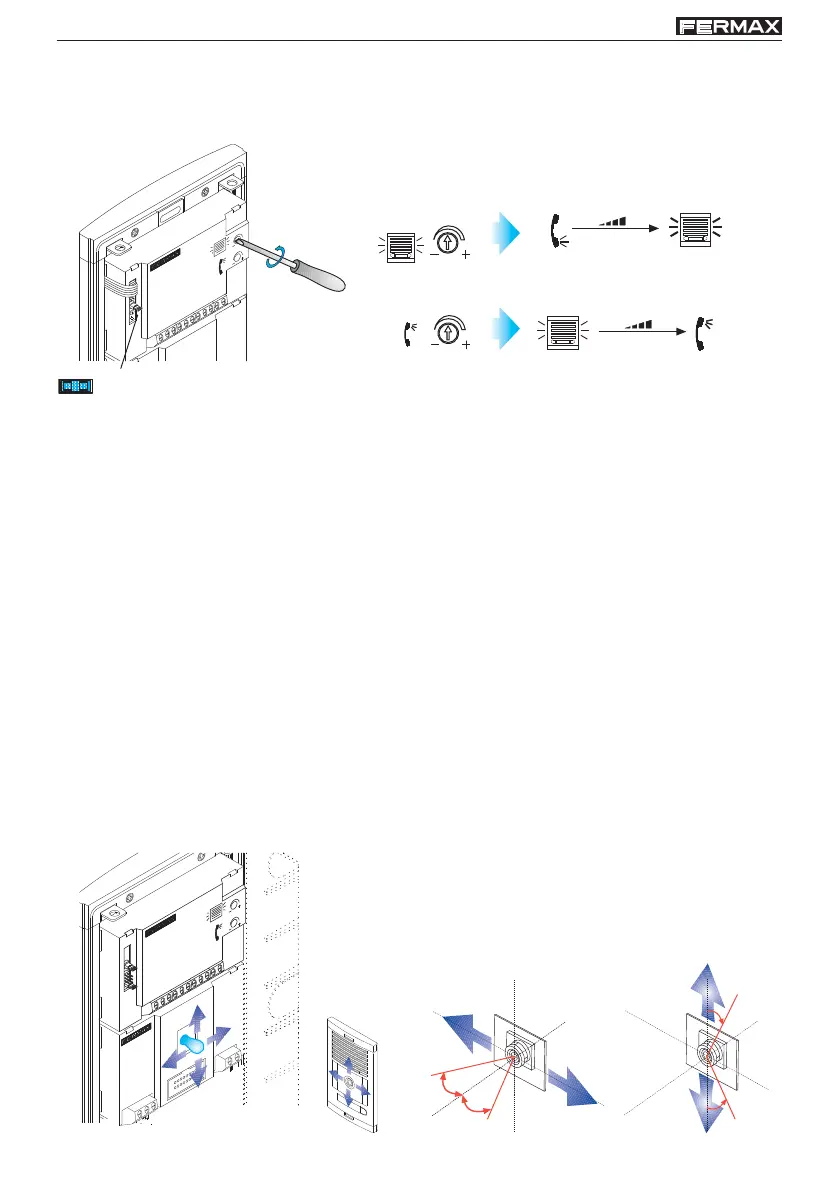
- Enfoque la telecámara - Focus the camera
- Réglez la caméra vidéo - Richten Sie die Kamera
- Focar a telecâmara - Messa a fuoco della telecamera
- Фокусировка видеокамеры
10º
10º
10º
10º
Pan&Tilt (
±
10º)
C
C
D
C
A
M
E
R
A
AN & TIL
EXT.
PLACA
INT.
TELEFONO
- Ajuste audio - Adjust the audio
- Réglez le volume - Audioeinstellung
- Ajuste o áudio - Regolazione audio
- Регулировка аудио
JP2:
JP2: Puente selección Placa principal / Secundaria:
Placa principal: dejar puente.
Placa secundaria: quitar puente.
JP2: Main/secondary panel selection jumper:
Main panel: leave jumper.
Secondary panel: remove jumper.
JP2 : commutateur sélection platine principale/secondaire:
Platine principale : laisser commutateur.
Platine secondaire : retirer commutateur.
JP2: Brücke zur Auswahl Haupt-/Nebentürstation:
Haupttürstation: Steckbrücke nicht umstecken.
Nebentürstation: Steckbrücke entfernen.
JP2: Ponte de selecção Placa principal/secundária:
Placa principal: deixar a ponte.
Placa secundária: retirar a ponte.
JP2: Перемычка Основная / Дополнительная панель:
Основная панель: оставить перемычку.
Дополнительная панель: убрать перемычку.
JP2: Ponticello selezione piastra principale/secondaria:
piastra principale: lasciare ponticello.
Piastra secondaria: smontare ponticello.













 To Next Page