EasyManua.ls Logo

Festo SPC11-POT-TLF - User Manual

Festo SPC11-POT-TLF
120 pages
Print Icon
To Next Page IconTo Next Page
Loading...
Electronics/
pneumatics
manual
System manual
Soft Stop
type SPC11-...-...
Manual
196 724
en 0205a
[664 851]
SPC11 Soft Stop

Table of Contents

Question and Answer IconNeed help?

Do you have a question about the Festo SPC11-POT-TLF and is the answer not in the manual?

Summary

Summary of Components

Structure

Details the different types of SPC11 and their connection capabilities.

Method of Operation

Explains the functional principles and closed-loop control circuit of the SPC11.

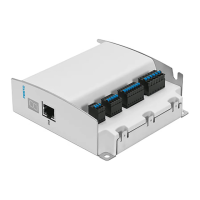
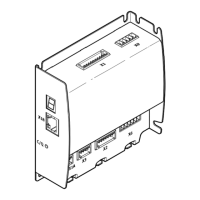
Display and Connecting Elements

Illustrates the physical interface, display, and various connection ports on the SPC11 unit.

Fitting

Fitting the SPC11

Provides mounting instructions, dimensions, and fastening details for the SPC11.

Installation

General Instructions on Installation

Covers essential safety warnings and general guidelines before starting installation.

Notes on Installing Pneumatic Components

Details requirements for compressed air supply, service units, and tubing connections.

Pneumatic Emergency Stop Circuit

Explains the implementation of pneumatic emergency stop functions for system safety.

Fitting the Electronic Components

Guidance on electronic component installation, including cable placement and interference reduction.

Connecting Elements on the SPC11

Identifies and shows the location of key connection interfaces on the SPC11.

Connecting Power Supply and I;Os

Instructions for safely connecting the power supply and input/output signals.

Connecting Control Valve and Measuring System

Procedures for connecting the proportional directional control valve and measuring system.

Commissioning

General Instructions on Commissioning

Provides an overview of the commissioning process, safety, and key functions.

Basic Principles of Configuring and Operating

Explains key parameters like amplification and cushioning stages for SPC11 operation.

Pre-parametrizing without Drive

Steps for setting initial parameters remotely before connecting the drive.

Modify Parameter

Procedures for changing existing parameters and restoring factory defaults.

Proceed as Follows When Commissioning

A comprehensive step-by-step guide for the entire commissioning process.

Preparations for the Teach Procedure

Essential checks and prerequisites before initiating the teach procedure.

Start the Teach Procedure

Detailed instructions on how to begin the automatic teach procedure.

Teaching Mid-positions

Method for manually teaching and saving up to two mid-positions.

Notes on Operation

Important safety instructions for switching the system on and off.

Switching-on Behaviour After Commissioning

Describes the system's status and readiness upon power-up after setup.

The First Positioning Task

How the system verifies direction and handles errors during initial operation.

Controlling the SPC11

Using command inputs and remote inputs for manual and automated control.

Using Taught Mid-positions as Sensor

Explains how to utilize learned mid-positions as sensor inputs for control logic.

Diagnosis and Error Treatment

Error Messages on the SPC11

Lists specific error codes, their meanings, and troubleshooting steps.

Faults During Operation

Identifies common operational problems and provides remedies.

Optimizing Positioning Behaviour

Guidance on adjusting parameters to enhance motion control and performance.

Commissioning via Digital Inputs;Outputs

The Remote Inputs of the SPC11

Details the function and usage of remote inputs (I5-I7) for external control.

Instructions for Commissioning via Digital I;Os

General overview and conditions for parameter setting using digital inputs.

Set Time Diagram for Parameters

Illustrates the timing sequence for setting parameters using digital inputs.

Introduce and Start Teach Procedure Time Diagram

Timing diagram showing how to initiate the teach procedure via digital inputs.

Time Diagram Teach Mid-position

Timing diagram for the process of teaching mid-positions using digital inputs.

Technical Appendix

Technical Specifications

Contains detailed technical data including dimensions, supply, and interface specifications.

Index

An alphabetical listing of terms and their corresponding page numbers for quick reference.

Summary

Summary of Components

Structure

Details the different types of SPC11 and their connection capabilities.

Method of Operation

Explains the functional principles and closed-loop control circuit of the SPC11.

Display and Connecting Elements

Illustrates the physical interface, display, and various connection ports on the SPC11 unit.

Fitting

Fitting the SPC11

Provides mounting instructions, dimensions, and fastening details for the SPC11.

Installation

General Instructions on Installation

Covers essential safety warnings and general guidelines before starting installation.

Notes on Installing Pneumatic Components

Details requirements for compressed air supply, service units, and tubing connections.

Pneumatic Emergency Stop Circuit

Explains the implementation of pneumatic emergency stop functions for system safety.

Fitting the Electronic Components

Guidance on electronic component installation, including cable placement and interference reduction.

Connecting Elements on the SPC11

Identifies and shows the location of key connection interfaces on the SPC11.

Connecting Power Supply and I;Os

Instructions for safely connecting the power supply and input/output signals.

Connecting Control Valve and Measuring System

Procedures for connecting the proportional directional control valve and measuring system.

Commissioning

General Instructions on Commissioning

Provides an overview of the commissioning process, safety, and key functions.

Basic Principles of Configuring and Operating

Explains key parameters like amplification and cushioning stages for SPC11 operation.

Pre-parametrizing without Drive

Steps for setting initial parameters remotely before connecting the drive.

Modify Parameter

Procedures for changing existing parameters and restoring factory defaults.

Proceed as Follows When Commissioning

A comprehensive step-by-step guide for the entire commissioning process.

Preparations for the Teach Procedure

Essential checks and prerequisites before initiating the teach procedure.

Start the Teach Procedure

Detailed instructions on how to begin the automatic teach procedure.

Teaching Mid-positions

Method for manually teaching and saving up to two mid-positions.

Notes on Operation

Important safety instructions for switching the system on and off.

Switching-on Behaviour After Commissioning

Describes the system's status and readiness upon power-up after setup.

The First Positioning Task

How the system verifies direction and handles errors during initial operation.

Controlling the SPC11

Using command inputs and remote inputs for manual and automated control.

Using Taught Mid-positions as Sensor

Explains how to utilize learned mid-positions as sensor inputs for control logic.

Diagnosis and Error Treatment

Error Messages on the SPC11

Lists specific error codes, their meanings, and troubleshooting steps.

Faults During Operation

Identifies common operational problems and provides remedies.

Optimizing Positioning Behaviour

Guidance on adjusting parameters to enhance motion control and performance.

Commissioning via Digital Inputs;Outputs

The Remote Inputs of the SPC11

Details the function and usage of remote inputs (I5-I7) for external control.

Instructions for Commissioning via Digital I;Os

General overview and conditions for parameter setting using digital inputs.

Set Time Diagram for Parameters

Illustrates the timing sequence for setting parameters using digital inputs.

Introduce and Start Teach Procedure Time Diagram

Timing diagram showing how to initiate the teach procedure via digital inputs.

Time Diagram Teach Mid-position

Timing diagram for the process of teaching mid-positions using digital inputs.

Technical Appendix

Technical Specifications

Contains detailed technical data including dimensions, supply, and interface specifications.

Index

An alphabetical listing of terms and their corresponding page numbers for quick reference.

Festo SPC11-POT-TLF Specifications

General IconGeneral
BrandFesto
ModelSPC11-POT-TLF
CategoryController
LanguageEnglish

Related product manuals