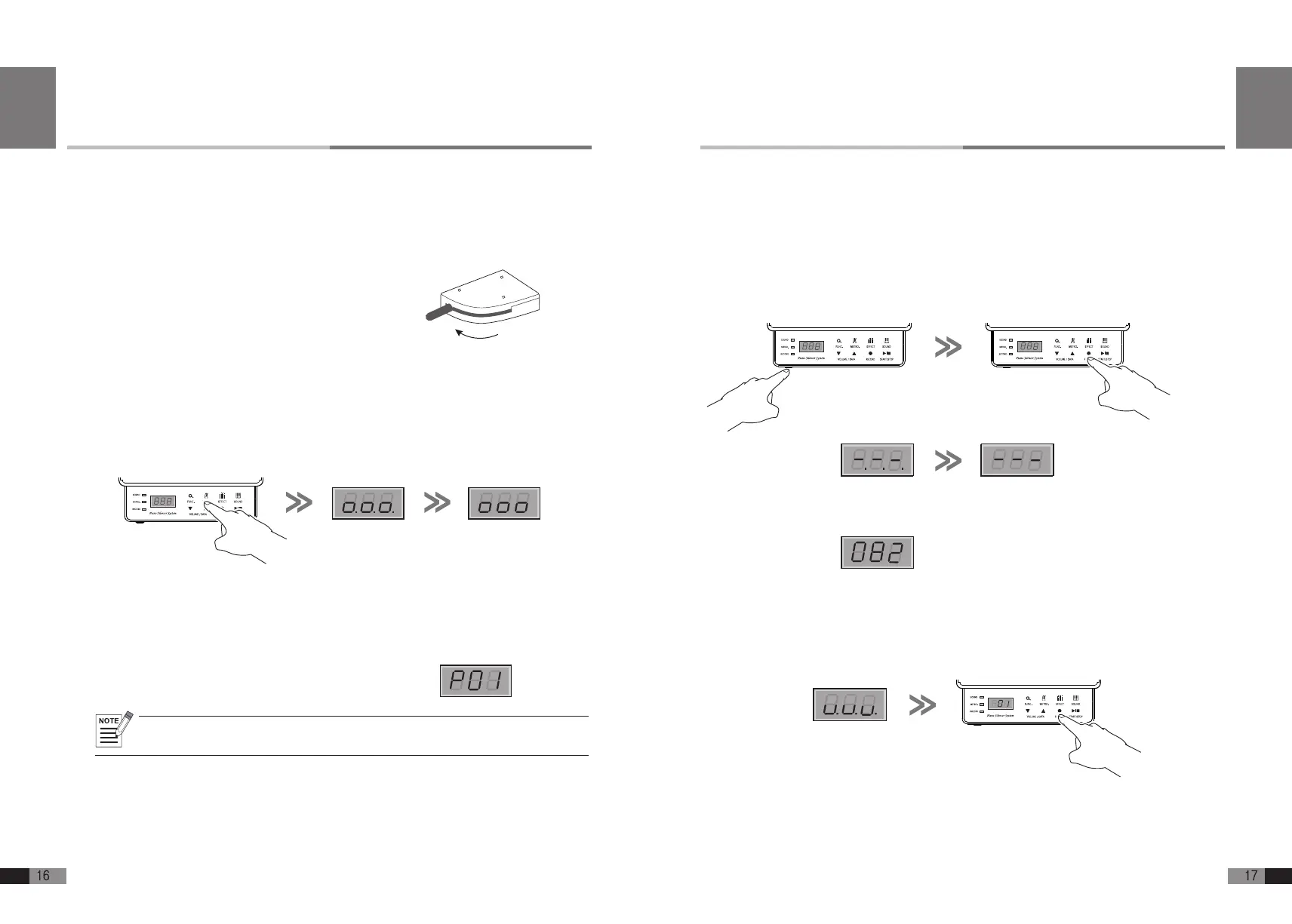
How to adjust the sensitivity of FEURICH BASIC
The initialization procedure on the previous page should make all of the keys equally sensitive.
If you nd that some keys still play too loudly or softly, use the following procedure to adjust the
sensitivity of individual key.
1) Right after turning on the FEURICH BASIC, immediately press and hold [RECORD] button
before the system gets ready to be used. Release [RECORD] button. The display should
now look like this: The system is now ready to be adjusted.
The system is ready to be adjusted when the screen
shows as following.
2) Wearing headphones to monitor the sound, play each key and listen to the volume of the sound.
If the sensitivity needs to be adjusted press
[▼] or [▲]
button to adjust the sound volume for the
key last played down or up so that it matches the other keys.
The display shows the current key’s sensitivity value from 000 to 255.
3) Press [RECORD] button to save the adjustment, then FEURICH BASIC is ready to be played.
Release your hand at
this point.
English
Occasionally you may want to initialize the system in your FEURICH BASIC for accurate response
when in silent mode. A good time to do this when it is new and after the acoustic parts (hammers
and strings) have been tuned. Use the following procedure to initialize the systems.
Initializing of FEURICH BASIC
A. Before initializing
1) The keyboard cable and AC power adaptor
should be plugged into FEURICH BASIC sys-
tem and the power should be OFF.
2) The mute lever should be in the Mute position.
3) Make sure that nothing is sitting on the key-
board that might press a key down.
B. How to initialize FEURICH
BASIC
1) Right after turning on the FEURICH BASIC, immediately press and hold [METRO.] button
before the system gets ready to be used. Release [METRO.] button. The display will look
like this:
Note : Please initialize FEURICH BASIC properly if the piano is not used for a long time or recently moved. (The
height of the keys can be changed)
Release your hand
at this point.
2) Press each of the 88 keys at a time, all the way down with medium force and speed
(not too fast).
3) Press all pedals with medium force.
4) After you have nished steps 2 and 3, press [METRO.] button again to nish the initialization.
When the data is successfully stored, the display will change as
shown and the piano is ready to be played.
Real Touch-Silent
Piano Position
Real Acoustic Piano
Position
Mute Lever
Real Touch-Silent
Piano Position
Real Acoustic Piano
Position
Mute Lever
English


 To Next Page