①
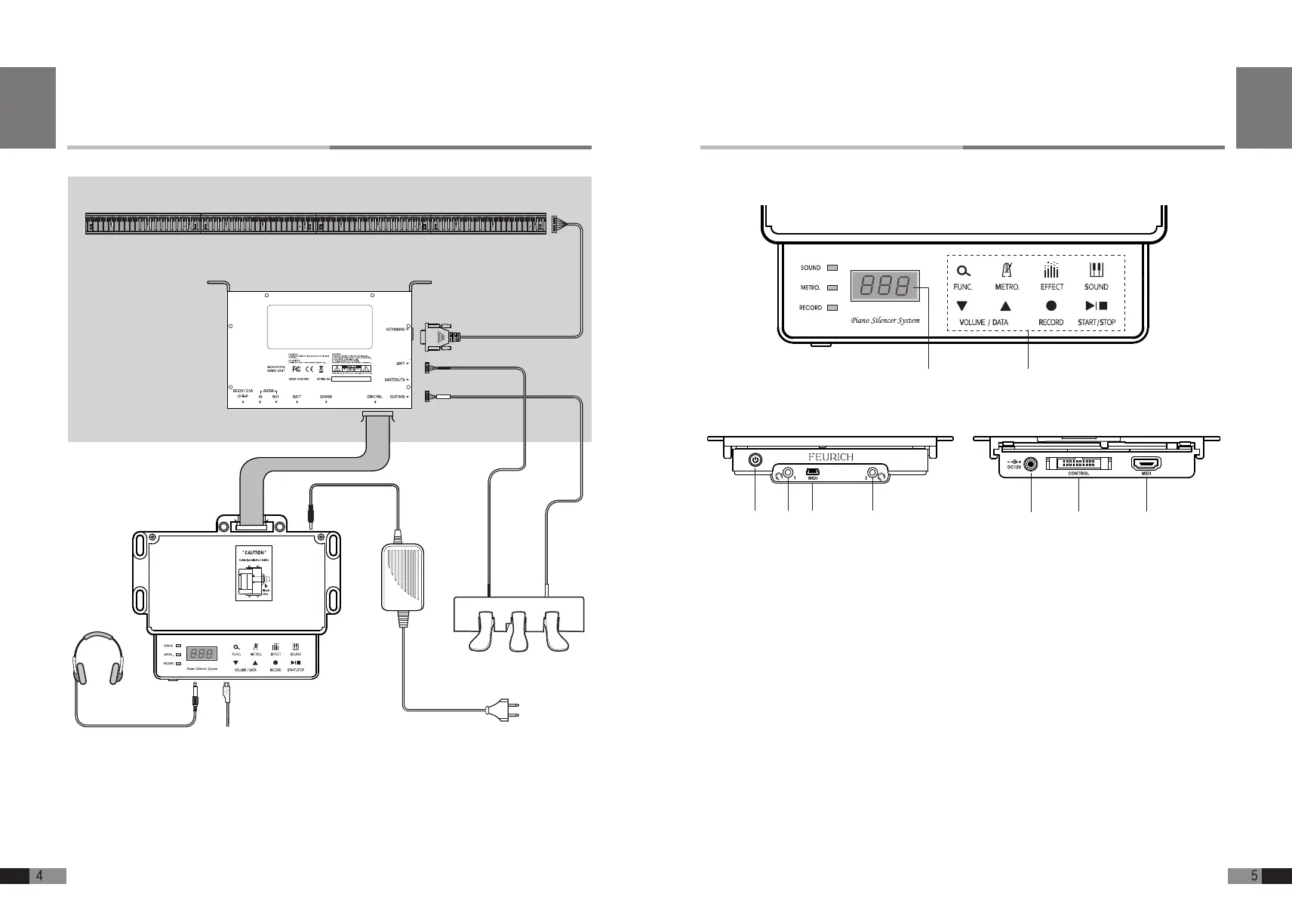
DISPLY: Shows the selected mode and value.
②
TOUCH BUTTONS: Select Function/ Metronome/ Effect/ Sound/ Volume/Data/
Record/ Start/ Stop buttons
③
POWER: Turns the system on and off
④
HEADPHONES: You can monitor the sound by connecting the headphones.
⑤
USB PORT(Device):
Connects with PC through USB (USB MIDI, System Upgrade)
⑥
DC JACK: System power is provided through use of power adaptor
⑦
CONTROL: Connects with Main Unit
⑧
MIDI: Connect with external MIDI device through MIDI extension cable (Option).
① ②
③ ④ ④⑤
Rear view
⑥
⑦
⑧
Front view
Top view
Control Unit
English
Control Unit
Main Unit
MIDI
AC 110~240V
Power Supply
Piano Keyboard Sensor
PIANO
White
Black
White
Black
Soft Damper/Sostenuto
Headphone
USB
Connection Diagram of FEURICH BASIC
English


 To Next Page