FEURICH BASIC Operation
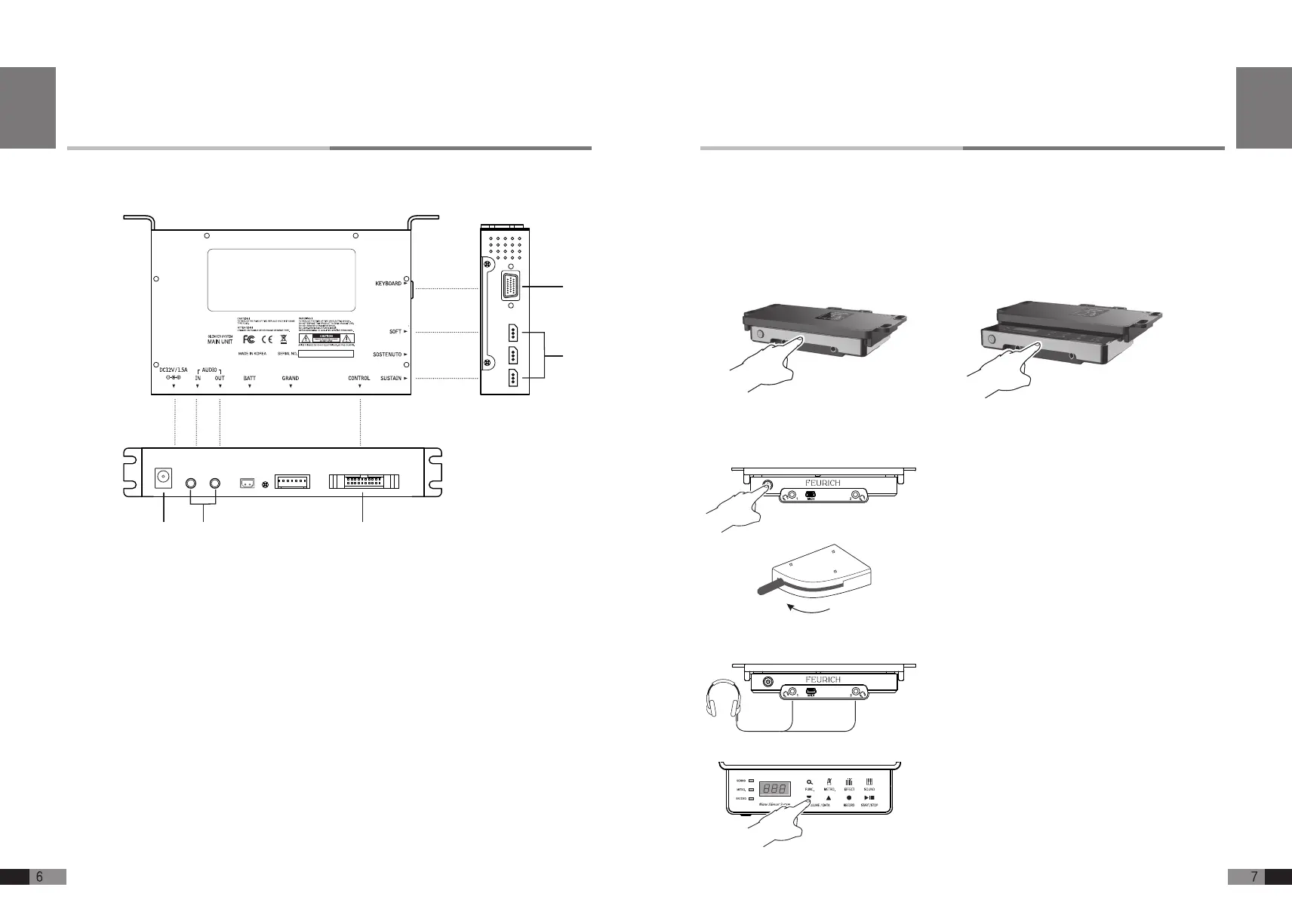
1) Power on
2) Activating the stop rail: Move the lever (left side,
beneath the piano keybed) into the “Mute” posi-
tion.
3) Plugging in and wearing the headphones: Plug
your headphones into one of the headphone jacks.
Then put the headphones on.
4) Controlling the volume: Play something on the
piano.
Adjust the headphone’s volume using the [
▼
] ,
[
▲
]. Establish a pleasant listening volume level.
Ready to use
Pressing softly the FEURICH BASIC
control unit front and it comes out.
Con ning by pushing FEURICH BASIC
control unit front lightly.
Taking out & con ning FEURICH BASIC control unit
English
①
DC JACK: System power is provided through use of power adaptor.
(Please connect the adaptor into either one of Control Unit
or Main Unit)
②
AUDIO IN/OUT: Connects to outer audio equipment in stereo
③
CONTROL: Connects with Control Unit
④
KEYBOARD: Connects to Sensor Rail and Signal Cable
⑤
PEDAL SENSOR: Connects to Pedal Module and Signal Cable
②① ③
④
⑤
Main Unit
English


 To Next Page