Demo
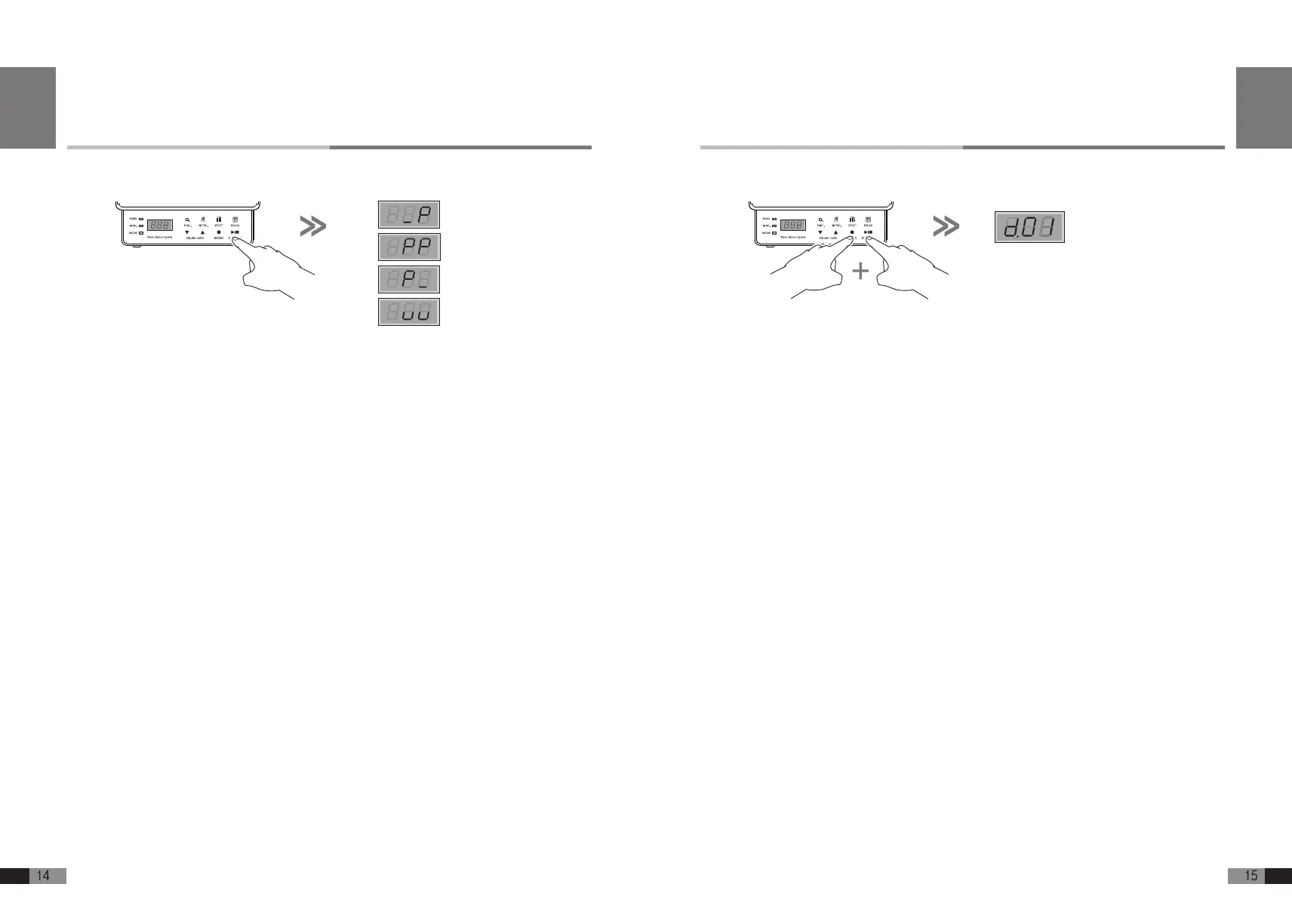
A. Press [RECORD]+ [START/STOP] buttons together during the Home Mode to get into Demo Mode.
B. Press either [▼] or [▲] button to select demo song.
C. Select a song from 10 demo songs and press [START/STOP] button to play.
D. When the selected song is nished, the next song will be played continuously.
E. Press [START/STOP] button again to stop playing.
F. Press [SOUND] button to return to the Home Mode.
Note: You can play the piano along with demo song.
English
Play
A. Press [START/STOP] button during the Home Mode for Play Mode
B. Press [▼] button to select whether to play track 2 or not.
C. Press [▲] button to select whether to play track 1 or not.
D. You can play one or two tracks at one go.
E. Select one or two tracks you want and press [START/STOP] button to play.
F. Press [START/STOP] button again to stop playing.
G. Press [SOUND] button to return to the Home Mode.
PlayTrack1
PlayBoth
PlayTrack2
EmptyTrack
English


 To Next Page