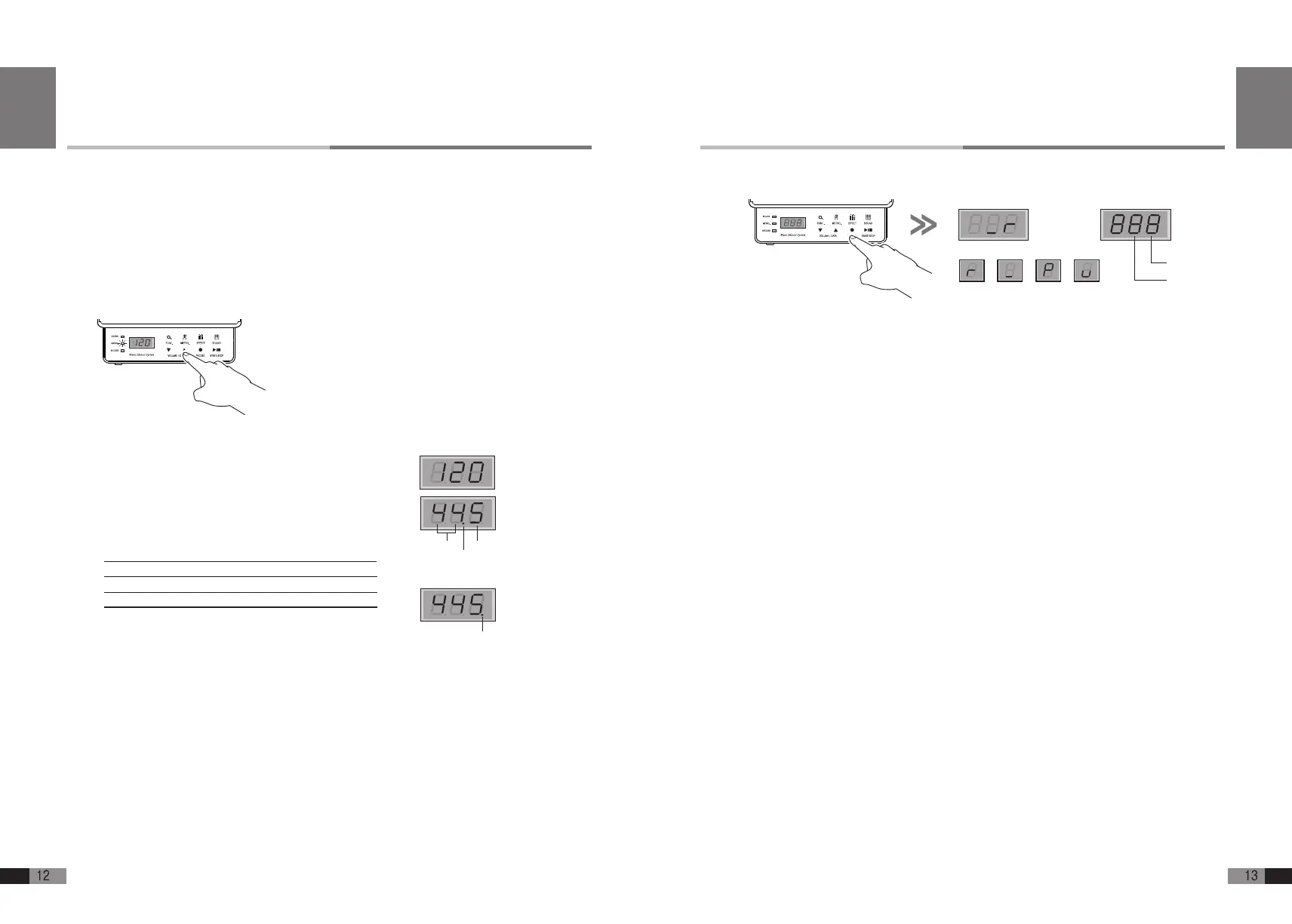
Record
A. Press [RECORD] button during the home mode for recording mode.
Recording in both tracks respectively is available, and you can record a track while playing
another recorded track at the same time
B. Press [
▼
] button to select RECORD/PLAY/OFF from track2.
C. Press [
▲
] button to select RECORD/PLAY/OFF from track1.
D. When you select recording, if the selected track has been recorded already, it is set to PLAY
(you can record just in one track at a time).
E. Select the track you want and press [RECORD] button. Then the recording will be started after
playing count off 1 measure.
F. Press [RECORD] button again to nish recording.
G. You can continue recording on another track after selecting record/play track.
H. Press [SOUND] button to return to the Home Mode.
I. For deleting the recorded data, press and hold [FUNC.] button for more than 2 seconds, the data
would be deleted after one blink of the display.
Track1
Track2
RECORD OFF PLAY EMPTY
English
Metronome
The built-in metronome has adjustables parameter for Tempo, Beat, Rhythm, and Volume.
Here is how to adjust each of these.
1. ON/OFF: Press [METRO.] button for metronome ON or OFF.
When metronome is on, the lamp blinks according to the beat.
2. Setting: Press and hold the [METRO.] button for more than 2 seconds, then the button icon
and METRO lamp (middle left) is on. (“120”= Tempo),
1) Press [FUNC] button to select from Tempo->Beat->Volume.
The dot beside the number indicates the selected menu.
2) Tempo : The display shows the current tempo.
(quarter step/minute, default 120/minute)
3) Beat : The display shows the number of beats per measure
(1/2~9/8)
4 ) Volume : C
ontrol the range of the volume: (0~9, Default:5)
3. Press either [▼] or [▲] button to adjust Tempo, Beat, Volume.
4. Press [▼] and [▲] button together to return to the Default.
5. Press [SOUND] button to return to the home mode.
•BeatChart
1/22/23/24/2
1/42/43/44/45/46/47/48/4
1/82/83/84/85/86/87/88/89/8
Beat(4/4)
Volume
BeatMode
VolumeMode
English


 To Next Page