(Translated from original language) ENGLISH
44 Espresso Coffee MachineCompass MB by fiamma
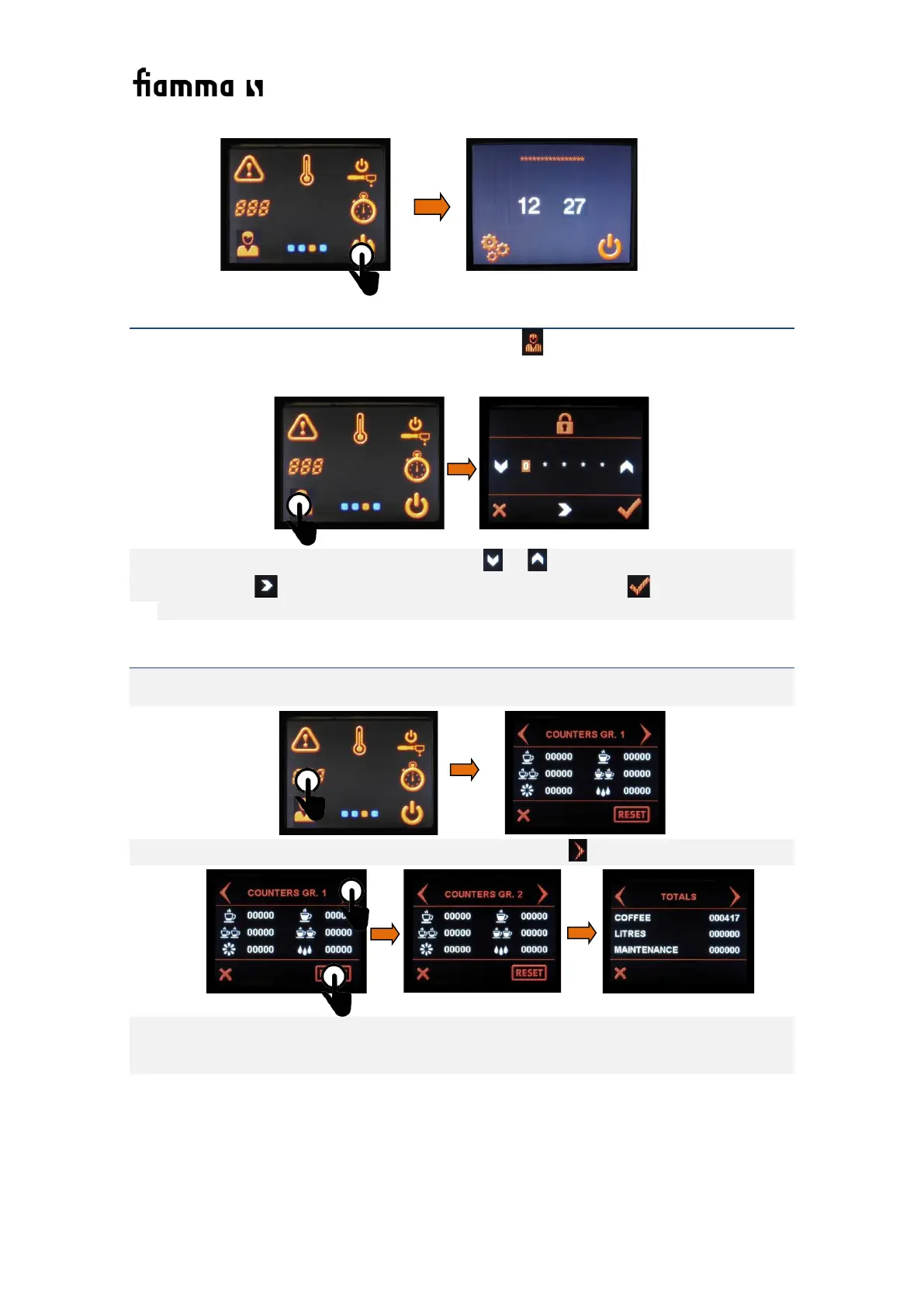
3.2.1.5. SYMBOL 13. PROGRAMMING OF USER SETTINGS
In order to access the programming of the user settings press ,. The display shows the window that
lets you enter the password
In order to enter the password, press the fields or until you have reached the desired
number. Press in order to pass to the next number. At the end, press in order to confirm.
Preset Password is (3) (3) (3) (3) (3) (default setting). (see chapter 8.)
3.2.1.6. SYMBOL 14. CONSUMPTION COUNTERS
Symbol 14 gives access to the consumption counters, showing the quantities of coffee and water
portions that have been produced on each group. In order to access the counters, press symbol 14.
In order to see the consumption counters for each group, press .
The water dosis counters refer to, on group 1 to 1 dose click; on group 2, to the double click dose.
You can reset the values by clicking “RESET”. All counters return to 0, except the counter for Totals
which cannot be reset.


 To Next Page