10. TROUBLE SHOOTING
The most common problems and their solutions are listed below:
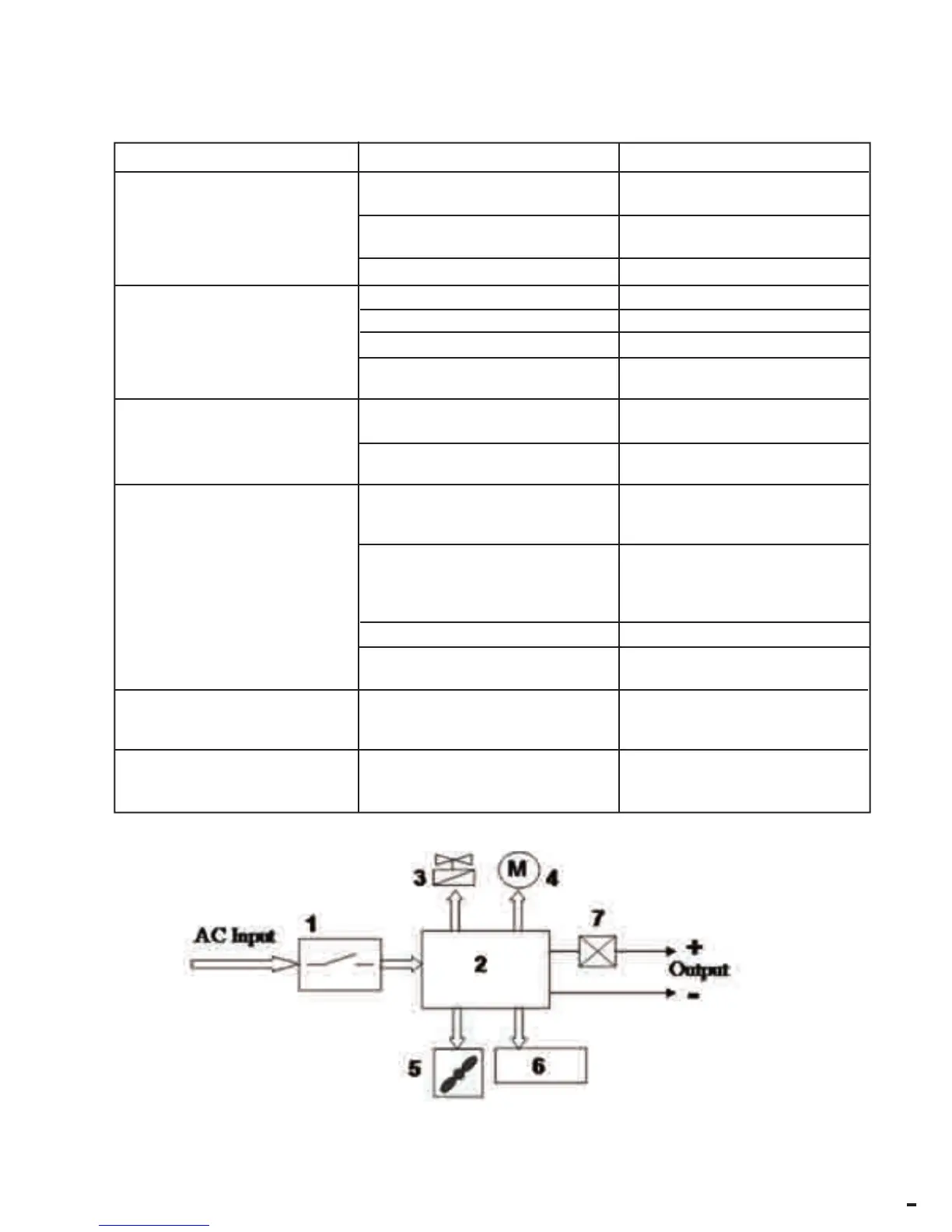
11. BLOCK DIAGRAM
DEFECT
CAUSE
SOLUTION
The wire does not feed when
the wire-feeder roller rotates
Jerky or intermittent wire-
feed.
Arc cut-out
Porous welds
Dirt on the tip of the wire-feeder
Blow with compressed air,
replace nozzle
Excessive spool torque.
Loose
Faulty torch.
Check wire-feeder liner.
Faulty gas nozzle.
Replace.
Scorched gas nozzle.
Replace.
Dirt in wire-feeder roller groove.
Clean.
Worn wire-feeder roller groove
Replace.
Earth clamp not secured to
workpiece..
Tighten clamp grip
Short circuit between contact
nozzle and gas hose.
Lack of shielding gas caused by
build-up in gas nozzle
Torch angle or torch-workpie-
ce gap incorrect.
Gas shortage
Damp workpieces
Clean away build-up
The air gap between the torch
and the workpiece must be 5-10
mm. Ensure 60° torch angle.
Increase gas flow
Dry workpieces with hot-air
gun or suchlike
Unit overheated and thermal pro-
tection device has set in
Welder cuts out after prolonged
use
Leave the unit to cool down for
at least 20-30 minutes.
Insufficient mains voltage.
The welder cuts out and E.Ln
appears on display panel
Check extension cable is not too
long and/or of an inappropriate
cross-section.
Clean or replace contact nozz-
le and wire-feed nozzle
1 Input Switch
2 Control and power card
3 Solenoid Valve
4 Wire-feeder motor
5 FAN
6 Display panel
7 Current sensor (installed on block 2)



 To Next Page