9
Intelligent Flight
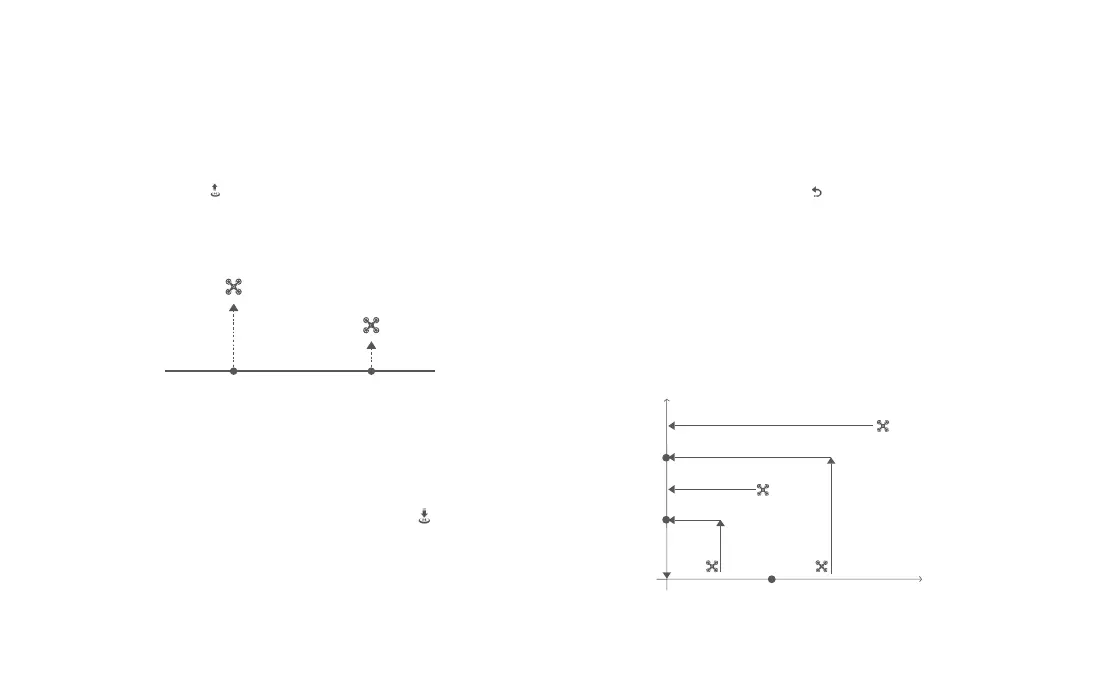
Auto Take-off
When the conditions are right, press Auto Take-off/Landing button for 2
seconds or click the “ ” button in the FIMI Navi 3.0 app. In GNSS mode,the
drone will take off to an altitude of 4 meters and hover for sticks control. In
VPU mode, the drone will take off to an altitude of 1.2 meters and hover for
sticks control.
Auto Landing
When the drone meets the conditions for automatic landing, press and hold the
automatic takeoff/landing button for 2 seconds or click the “ ” button in the
FIMI Navi 3.0 app. The drone will descend vertically to the ground from its current
position. Press the automatic takeoff/landing button briefly or click the “ X ” button
in the FIMI Navi 3.0 app to exit.
Altitude
altitude <3m
distance<10m
altitude ≥3m
distance<10m
altitude ≥30m
distance≥10m
altitude ≤30m
distance≥10m
Distance
30m
3m
10m
home point
Auto Return
When the drone is in flight, the user can toggle the auto return switch to the
right to return the droneor click the “ ” button in the FIMI Navi 3.0 app.
When the return distance is less than 10 meters and flight altitude is less than
3 meters, the drone will ascend to 3 meters first and return to the home point;
if the flight altitude is greater than or equal to 3 meters, the drone will directly
return to the home point. When the return distance of the drone is greater than
or equal to 10 meters and the flight altitude is less than 30 meters, the drone will
ascend to 30 meters and return to the home point; if the flight altitude is 30
meters or more, the drone will directly return to the home point . The user can toggle
the Auto Return Switch or click the " X " button in the FIMI Navi 3.0 app to exit.
GPS Mode VPU Mode
4m
1.2m



 To Next Page