20
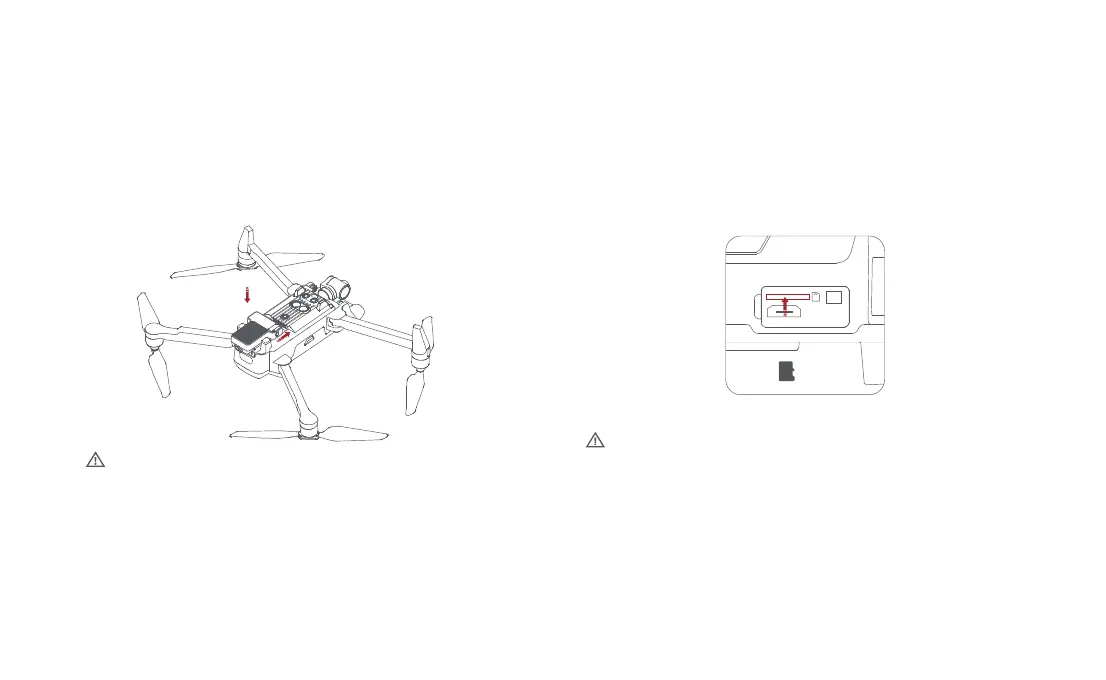
Drone Micro SD card
• When installing SD card to the drone,please unfold the arms of the drone
first and open the protection cover
• Insert the SD card with the head side facing upward into the SD card slot
• When removing SD card, press the SD card to pop it out
• Support Micro SD ( U3 and above ) 8 ~ 256GB.
Megaphone module
• Install the megaphone module as the indicated
direction,there will be a "click" sound.
• After the installation is successful, the corresponding icon will appear on
the APP, click to set the relevant settings.
• Press the lock on the tail of the module and push out the module to
remove it from the drone.
• When using the drop function, the weight of the loaded items should not exceed the
specified weight.
• When using the drop function, check in advance that the locking/unlocking rotation of
the loading motor is normal.
• When using the drop function, make sure that the loading motor locks in the right place.
• Check that the surrounding environment meets the requirements when using the drop
function.
• The drop function can only be used in stable mode or normal mode.



 To Next Page