22
Power On and Off
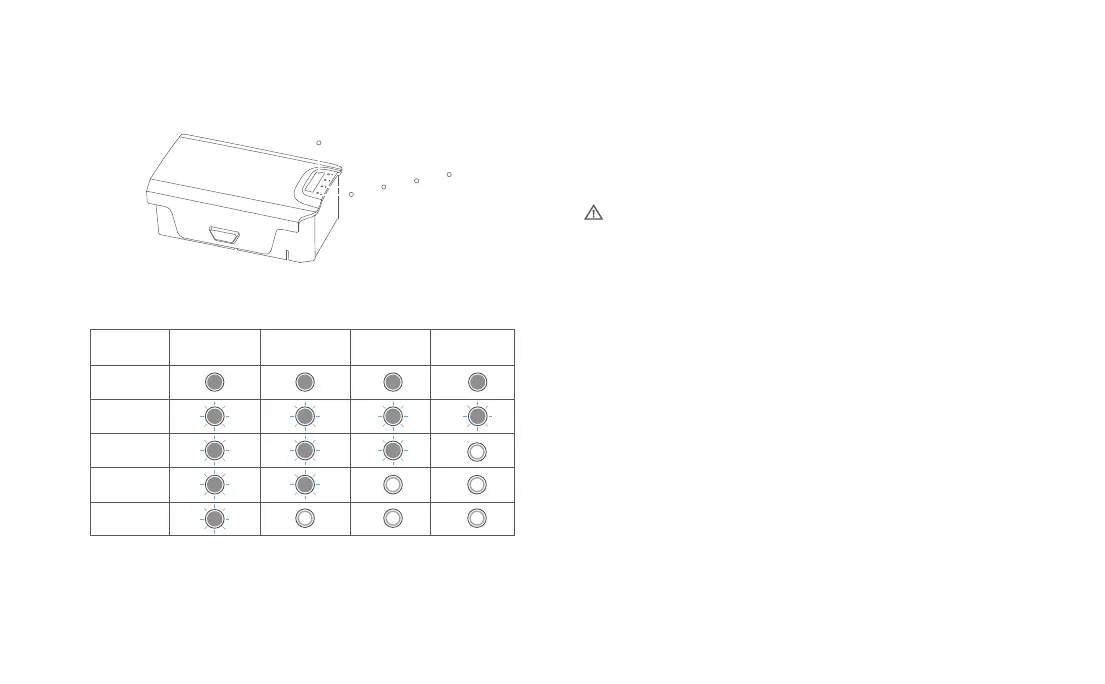
To turn on/off the battery, perform a short or long press on the battery button
for more than 2 seconds. When the battery is on, the power indicator light will
display the current battery level.
Charging
• The power indicator during charging follows the following guidelines:
• Connect the battery, charger, and AC cable as shown in the diagram and turn
on the power.
• The battery indicator will flash while charging is in progress.
• When the battery is fully charged, the battery indicator will turn off.
• It takes approximately 2 hours for the smart battery to fully charge.
Precautions for Low-Temperature Use:
• When using the battery in a low-temperature environment (-5℃ to 15℃), ensure that the
battery is fully charged. The battery's discharge capability is reduced at low temperatures.
Before flying, hover the drone to warm up the battery.
• Flying with the battery in an environment below -5℃ is not permitted.
• If the APP indicates a low temperature, immediately return and stop the flight, allowing
the battery to warm up or reach full charge.
• It is recommended to preheat the battery to above 10℃ or even better, above 20℃, in a
low-temperature environment before flight.
Power level
75%-99%
100%
50%-74%
25%-49%
0%-24%
LED 1 LED 2 LED 3 LED 4
LED 1
LED 2
LED 3
LED 4
Power on/off key



 To Next Page