27
Assemble Device Recording and Photo Shooting
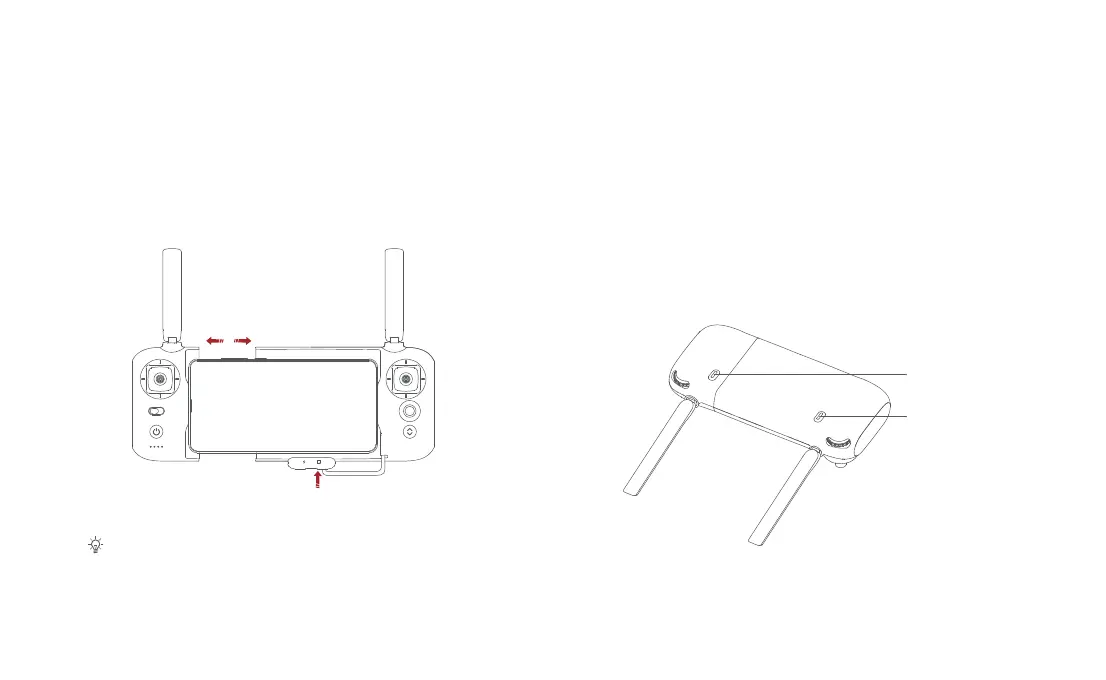
• Tighten the mobile or pad on mobile device holder by extending the holder
to the left.
• Open the interface protection cover on the RC bottom.
• Connect your phone and the RC with a USB cable.
• Connect the drone and update firmware according to instructions in FIMI App.
• The cable slot is reserved on the right side of the RC.
• Press the shoot button to take a photo. A photo is taken when you hear 2 short
sounds.
• Press the record button to record video. Recording starts when you hear 2
short sounds. Press again to stop recording with 4 short sounds.
• The pitch angle of the gimbal can be controlled by toggling the left dial up and
down.
• The right dial can adjust EV/ISO.
Record button
Shoot button



 To Next Page