28
Shortcut Buttons
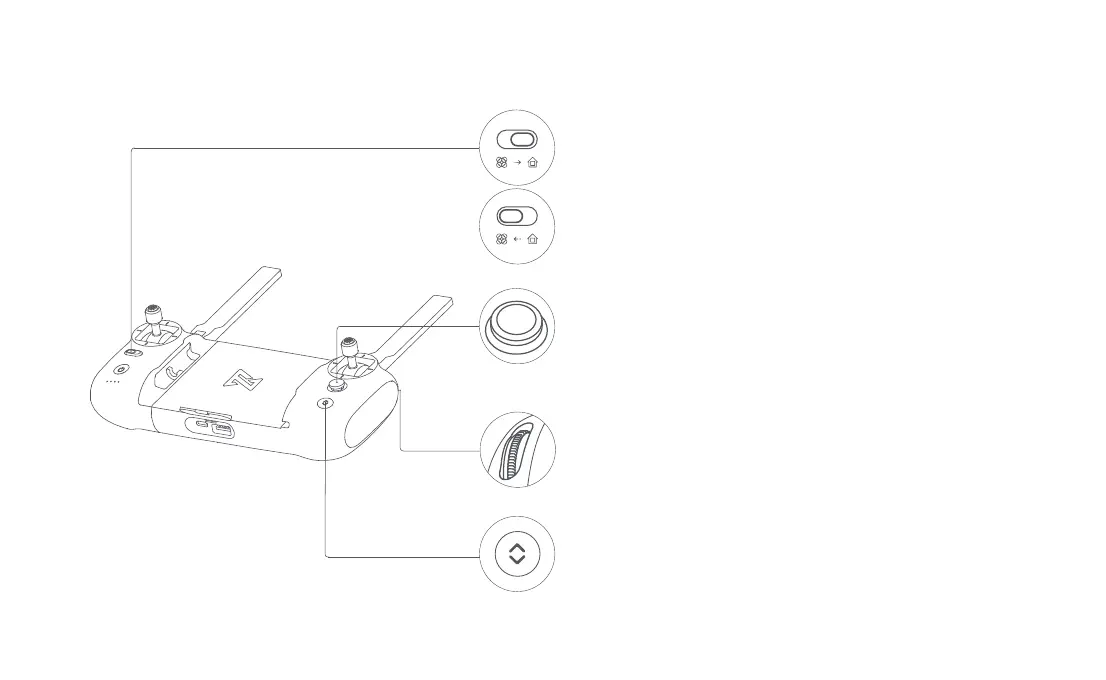
• Push the five-directional button up default to access map or FPV
• Push the five-directional button down default to gimbal center or down
• Toggle the five-directional button left default to turn on/off battery info interface
• Toggle the five-directional button right default to turn on/off self-check interface
• Press the five-directional button center default to turn on/off media
• Toggle the auto return button to the right when the drone is in flight, the drone will
return to the home point.
• In the process of auto return, toggle the auto return button to the left, the drone
will hover at place and wait for sticks instructions.
• When auto take-off/land button turns white, it can be pressed to take off or land
• When the drone meets auto take-off conditions, long press 2 seconds to take off
• When the drone meets auto land conditions,long press 2 seconds to land
• When the drone is executing intelligent flight, short press this button to exit
• Right dial to adjust EV/ISO value
• Left dial to adjust pitch angle of gimbal



 To Next Page