27
CHANGING AND SELECTING SEED MIX SETTINGS
To change your Seed Injection (SI) settings (if equipped), you will need to access the SI menu
screen. To access the SI menu screen, you will need to press the SI Setup button, located in the
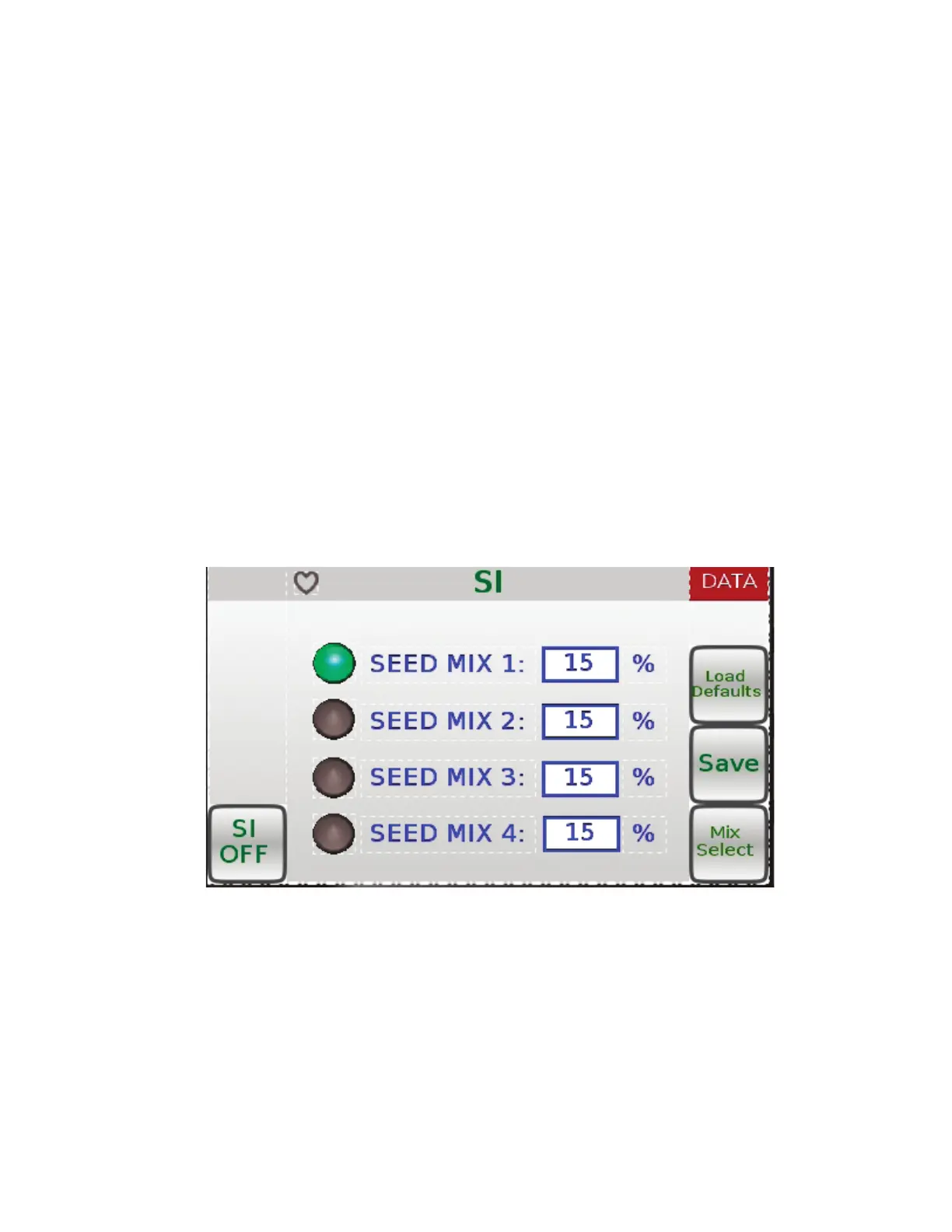
bottom-right of the SET-UP menu screen (see Figure 8). The control knob can be used to change
any of the SEED MIX settings (see Figure 11). Turn the knob either left or right to highlight the set-
ting you want to change. Once you have highlighted the setting you want to change, press in on the
control knob. After pressing in on the control knob, turn the knob either left or right to either increase
or decrease the setting. Once you have changed the setting, press the control knob in to deselect
that setting. If you want to save the settings after you have changed them, press the Save button
on the right side of the screen.
To select a SEED MIX setting to use during blowing, press the button labeled Mix Select. The Mix
Select button will allow you to select one of the four SEED MIX settings for use during blowing. To
determine which SEED MIX setting you have selected to use, look for the Green colored circle to
the left of the SEED MIX in the SI menu screen.
To turn the Seed Injection (SI) on, press the SI ON/OFF toggle on the bottom-left of the SI menu
screen.
If the changed settings are not desireable you can either change them again, or press the button
labeled Load Defaults. By pressing Load Defaults, all of the factory default settings are restored.
Figure 11



 To Next Page