Page 15
INITIAL SETUP
SETUP WIZARD
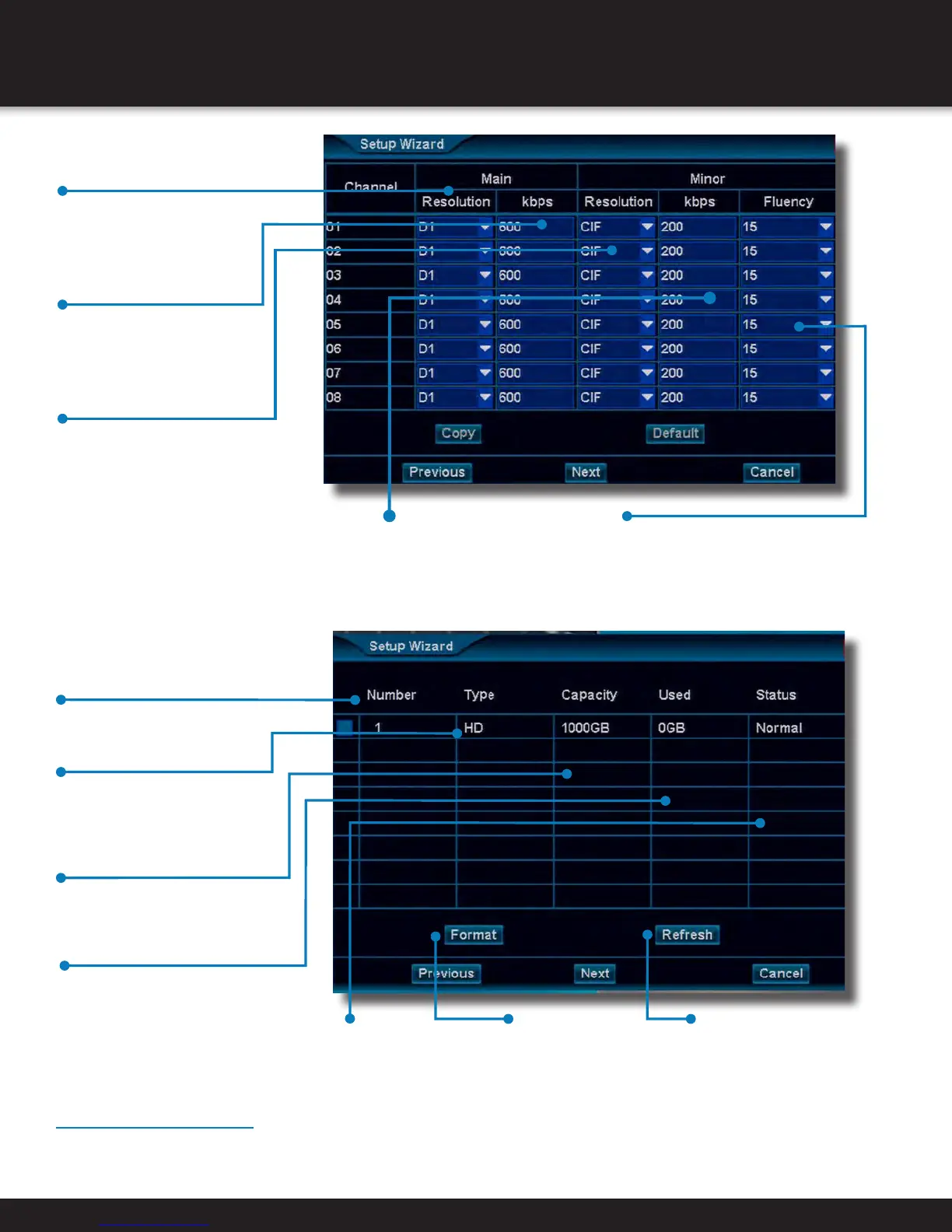
• Resolution (Main)
Choose between
“None(Camera Default)”,
“CIF(352x288)” or
“D1(720x480)” resolutions
• kbps (Main)
Choose transmission rate
for camera channel
NOTE: A higher kbps will
result in larger video files
• Resolution (Minor)
Choose between
“None(Main Setting
Default)”, “QCIF(176×144)”
or “CIF(352x288)”
resolutions over network
• kbps (Minor)
Choose transmission
rate for camera
channel over a
network connection
• Fluency (Minor)
Selects the frame rate that is
transmitted over the network.
A higher frame rate will
increase network data rate
• Number
ID number of the particular
drive device
• Capacity
Drive device’s storage
total capacity
• Used
Amount of currently
stored data on drive
device
• Status
Show status of
Hard Drive
• Format
Will format a selected
drive. NOTE: This will
erase all data on the
drive
• Refresh
Select to update
display of connected
disk drives
• Type
Displays the drive device
type, “HD” for Hard Drive,
“U-Drive” for USB Drive
Finishing the Wizard
After the Drive Device the screen, the Wizard will ask if the Wizard should be launched the next time the DVR boots up. After
clicking “Finish” the system will ask if you would like to run the “interactive demo.” Click “Ok” to run the demo.


 To Next Page