Page 19
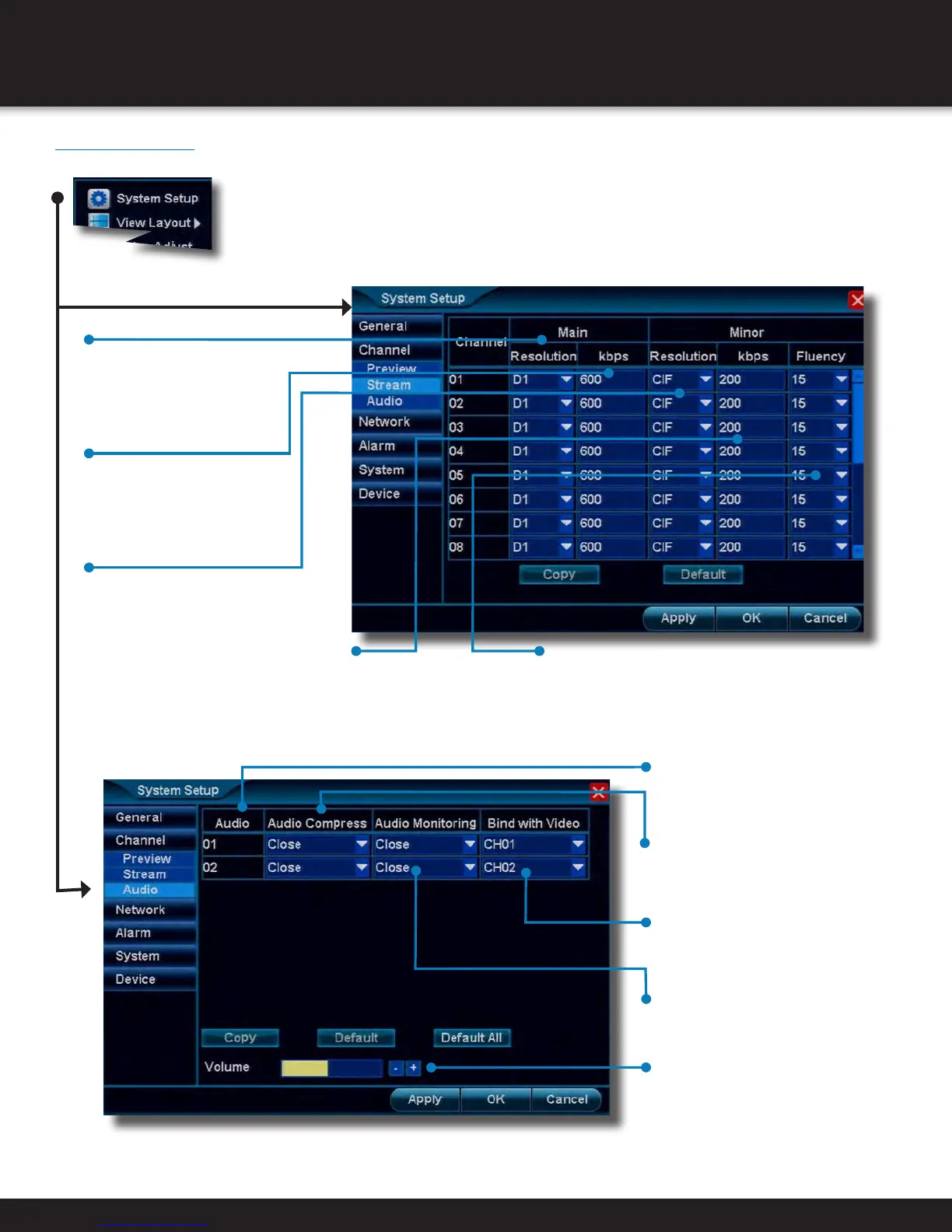
• Volume
Toggles volume level for audio
channels
• Resolution (Main)
Choose between
“None(Camera Default)”,
“CIF(352x288)” or
“D1(720x480)” resolutions
• kbps (Main)
Choose transmission rate
for camera channel
NOTE: A higher kbps will
result in larger video files
• Resolution (Minor)
Choose between
“None(Main Setting
Default)”, “QCIF(176×144)”
or “CIF(352x288)”
resolutions over network
• kbps (Minor)
Choose transmission
rate for camera
channel over a
network connection
• Fluency (Minor)
Selects the frame rate that is
transmitted over the network.
A higher frame rate will
increase network data rate
• Audio
Audio channel number
• Audio Compress
Close or Open audio compression
• Audio Monitoring
Close or Open audio monitoring
• Bind with Audio
Choose which video channel the
audio will match up with
Channel Menu (Continued)
Path: System Setup>Channel
SYSTEM SETUP
CHANNEL MENU


 To Next Page