Page 8
PRODUCT OVERVIEW
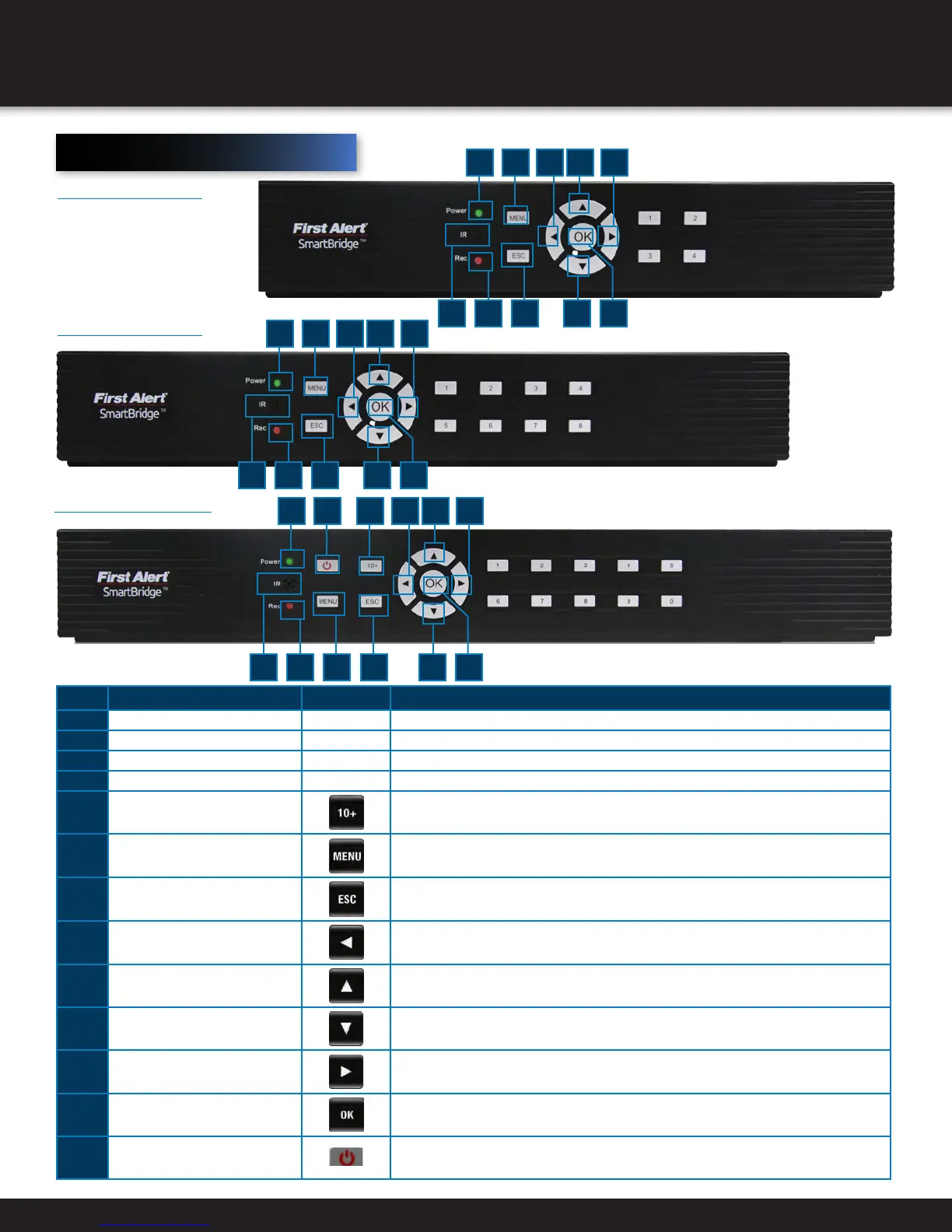
DVR CONTROLS
Front Panel
item Function control DeScription
1 (1) IR remote receiver Direct remote towards this position when using DVR
2 Power indicator light A green light indicates power is on
3 Record indicator light A green flashing light indicates recording
Buttons 1-4(8)(16) Camera Selection
4 10+
Press for camera selection of channels 10-16 (on 16 channel DVR only)
5 Menu Enter menu setup
6 ESC
Brings system previous selection
7 Left
In menu mode: moves to highlight next section
8 Up
In live mode: rotates between single , quad, eight or nine camera screen
9 Down
In live mode: rotates between single , quad, eight or nine camera screen
10 Right In menu mode: moves to highlight previous section
11 OK
Press to make selection
12 Sleep
On 16 Channel DVR only
1
2 12 4
3 6
8 10
115
7
9
8 Channel DVR
16 Channel DVR
1
2 12
3
8 10
115
7
9
4 Channel DVR
1
2 12
3
8 10
115
7
9


 To Next Page