9
Typical set-up time: 20–30 minutes
•
Discovery
of the Bluetooth base by the VX 680 terminal
•
Pairing
of the VX 680 to the VX 680 Bluetooth base
(establishing pair bond with the discovered device)
Activating
the connection (link) between the VX 680
terminal and VX 680 Bluetooth base
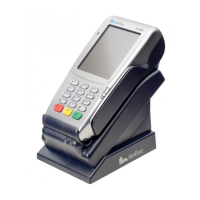
Where to place the VX 680 Bluetooth Base
What you need to connect
The VX 680 Bluetooth base can pair up to 8
individual VX 680 terminals, however only
one transaction can be processed at a time.
When 4 or more VX 680 terminals are in use,
it is recommended that additional Bluetooth
bases be added and postioned in a manner to
maximize radio coverage.
To establish a Bluetooth connection between the VX 680
terminal in Bluetooth mode and the Bluetooth base, you
need to complete the 3 steps listed below.
Place the VX 680 Bluetooth base in a central location in your
business - on top of a desk or countertop - to allow the best
radio coverage. Avoid placing the
VX 680 base in a back
room or underneath counters as environmental factors such
as concrete walls, crowds and furniture can limit the range.
Also, avoid areas with direct sunlight, objects that radiate
head, excessive dust and placing the base beside other
electrical devices.
•
Bluetooth Setup
VX 680 Short Range Wireless Quick Setup Guide


 To Next Page