18 C6.1.6/0513-0515/E
2.13.5 How to program a controller using an Emerson “Hot Key” (download)
Turn the controller off.
Insert a pre-programmed “Hot Key” into the 5-pin receptacle and turn the controller on.
The parameter list of the hot key will be automatically downloaded into the controller
memory. The “doL” message will blink followed a by a flashing “End” label.
After 10 seconds the controller will restart working with the new parameters.
Remove the “Hot Key”.
NOTE: The message “Err” is displayed in case of a failed programming operation. In this
case turn the unit off, then on again if you want to restart the download, or remove the
“Hot Key” to abort the operation.
2.14 Troubleshooting
2.14.1 Alarm menu
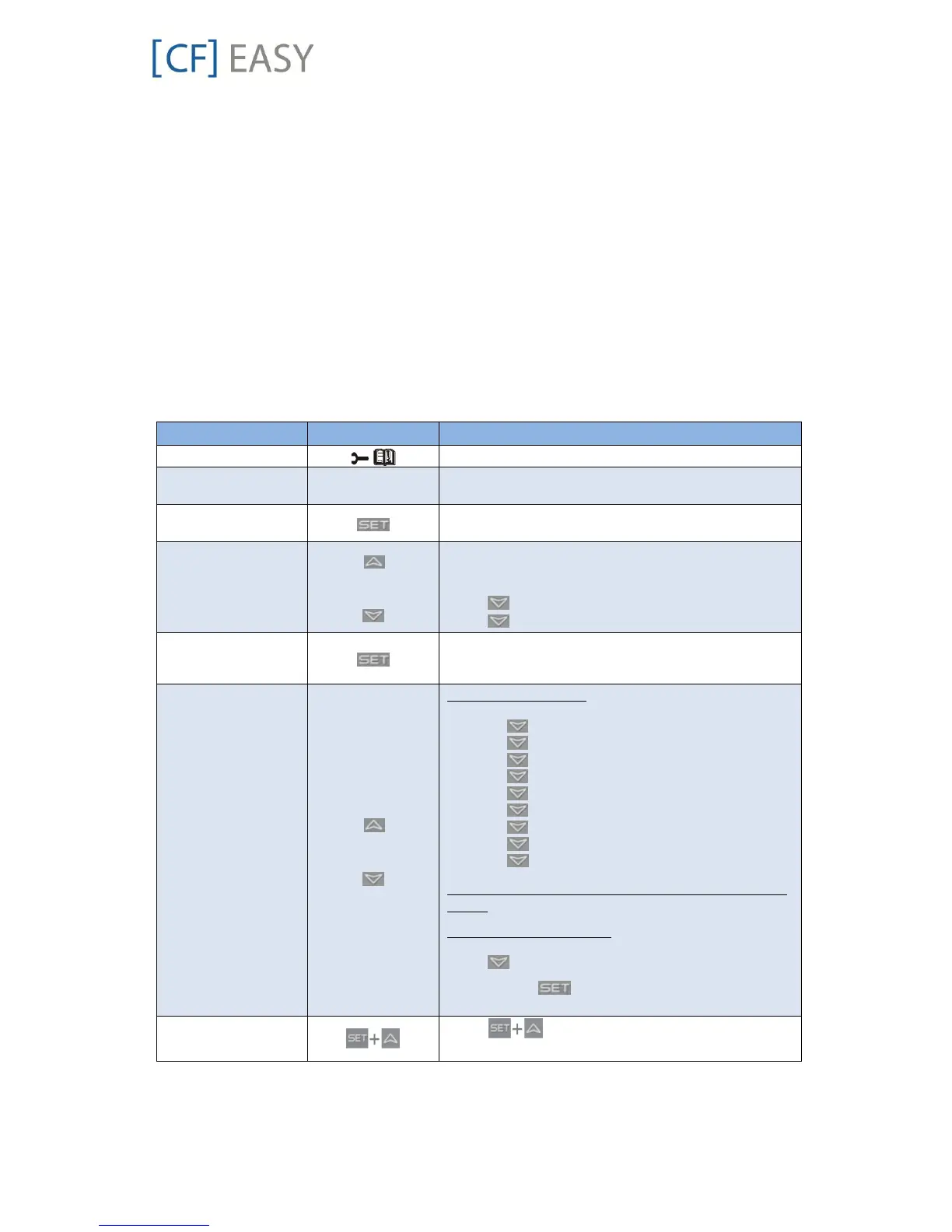
The controller records in the Alarm menu the total number of alarm activations (max 50)
according to the alarm list in Appendix 5.
Push and release the ALR key.
The menu to change the section will be entered. The
alarm list section is active.
Press SET to confirm. The following list will be
available to select the proper network function.
Select active alarm
code from list
Scroll the list of alarms and see the list of active
alarms with the number of the alarm (letter + number,
A01-A50).
Press and see the alarm name or code.
Press and see the next active alarm.
Select the alarm to
see the detailed rtC
information
Enter the sub menu with alarm time details.
Select detailed
information from
active alarm list
With the rtC activated:
The Hur (hour) parameter is displayed.
Press and see the alarm hour.
Press and see the Min.
Press and see the alarm min.
Press and see the dAy.
Press and see the alarm day.
Press and see the Mon(day) parameters.
Press and see the alarm month.
Press and see the alarm YEA.
Press and see the alarm year.
Note: The clock info indicates the START time of the
alarm.
Without the rtC activated:
The COn (hours) parameter is displayed.
Press and see the compressor working hours.
To exit: press or wait for 15 seconds without
pressing any key.
Press simultaneously or wait for about 10
seconds without pressing any key.
Table 19: How to check the alarm list

![FISCHER [CF] EASY](https://data.easymanua.ls/products/636208/200x200/fischer-cf-easy.webp)

 To Next Page