© Copyright 2001-2021 schertechnik GmbH | Klaus-Fischer-Straße 1 | 72178 Waldachtal
28
ROBOTICS TXT 4.0 CONTROLLER
schertechnik TXT Operating manual_EN | 10. November 2021, 9:18 PM
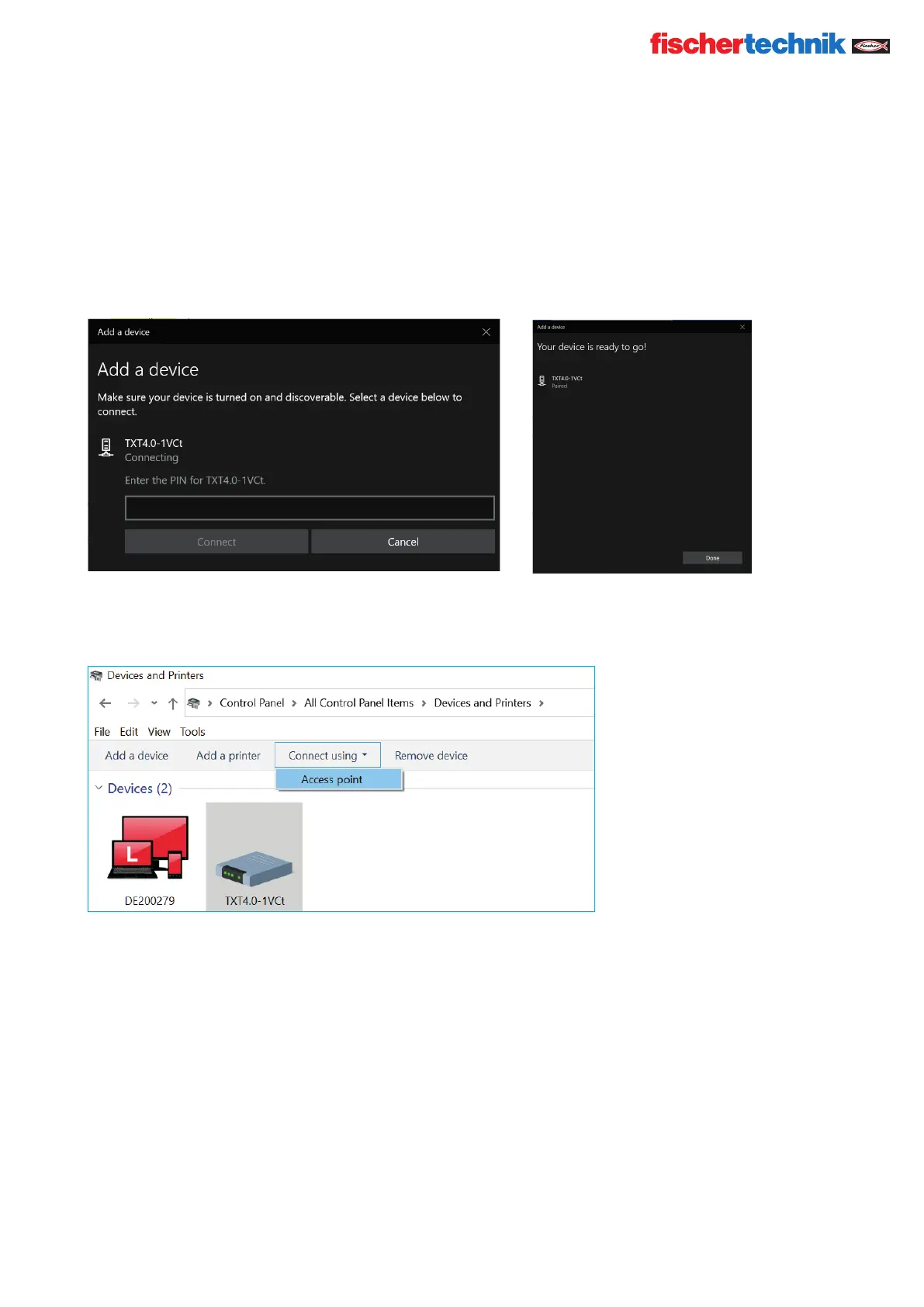
A new window will appear requesting a pairing code or a pin.
The pairing code / PIN is available on the Controller TXT 4.0 under “Network/Bluetooth/Pairing code.”
Click Connect - the connection to the device will be completed.
In the Windows menu, click “Connect using”: and then “Access points” to activate the Bluetooth connection.
Note: Important note!
This last step must be completed each time the PC or the TXT Controller are switched off and back on.
Now, Bluetooth can be selected as the connection in the Connection menu of the Robo Pro Coding software (see
Wi-Fi connection).


 To Next Page
 Loading...