EasyManua.ls Logo

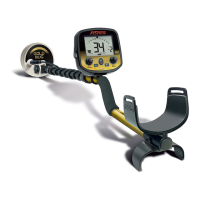
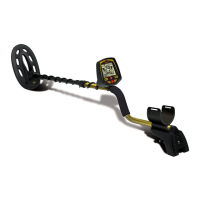
Fisher Research Labs F70 - User Manual

Fisher Research Labs F70
40 pages
Print Icon
To Next Page IconTo Next Page
Loading...
ACCESSORIES
FOR COMPLETE DETAILS VISIT WWW.FISHERLAB.COM • 1-800-685-5050
Fisher Padded Carry Bag
Rugged double stitched construction. Includes handy
exterior pocket for extra batteries or small accessories.
103693000C
Fisher Stereo Headphones
Use with Fisher metal detectors. Lightweight and adjustable with
true stereo sound, adjustable volume, 1/8 jack with 1/4 adaptor,
4’ cable. 9720950000
Fisher Pin Pointer
Pinpoints the exact location of buried metal objects. Audio signal
indicator and vibrator. Runs on 1 – 9-Volt Battery. FPOINT
Metal Sand Scoop
Large galvanized metal scoop with filtering holes.
Strong Rubberized grip. SAND SCOOP
Lesche Knife
Made from high quality heat-treated tempered steel.
The ultimate digging tool. Comes with a durable sheath.
12" in length with a 7" serrated blade. LESCHE KNIFE
Fisher Baseball Cap
One size fits all. FCAP
Fisher T-Shirt*
100% white cotton with Fisher
®
Logo. Sizes – LG, XL & XXL
Replacement/Accessory Search Coils
11” Biaxial Accessory Coil - 11COIL-F75
10” Concentric Standard Coil (replacement)– 10COIL-F70
6.5” Concentric Accessory Coil - 6COIL-E
5” Biaxial Accessory Coil - 5COIL-F75
Coil Covers
Specially made to protect your coil from abrasion and damage.
11” Biaxial Accessory Coil Cover – COVER-11DD
10” Concentric Standard Coil Cover – F70COVER
6.5” Concentric Accessory Coil Cover- 6COVER-E
5” Biaxial Accessory Coil Cover - 5COVER-CZ3
Fisher
®
Face Rain Cover
Specially made to protect your F70 from weather
Gold
Prospecting Kits
*Image not shown.
OPERATING MANUAL
&
GUIDE TO METAL DETECTING
Metal Detector
Users Manual
M70 Rev4 103012
Also available
with 11”DD coil
(Item# F70-11DD)
F70-MANUAL-PROTOTIPE.qx6 10/30/12 3:17 PM Page 1
Question and Answer IconNeed help?

Do you have a question about the Fisher Research Labs F70 and is the answer not in the manual?

Summary

Fisher F70 Specifications

Fisher F70 Quick Start Guide

Fisher F70 Assembly Instructions

Fisher F70 Controls Overview

Fisher F70 Control Functions

Ground Grab and Frequency Shift

Activating automatic ground balancing and changing operating frequency.

The F70 Menu System Guide

Ground Balancing the F70

Ground Balancing Procedure (GROUNDGRAB)

Step-by-step guide to performing automatic ground balancing using the GROUND GRAB feature.

F70 Autotune Mode

F70 Sensitivity Control

Adjusting sensitivity for optimal performance and managing interference.

F70 Discrimination Mode

Discrimination Level Setting

Setting the discrimination level to reject unwanted metal objects.

F70 Discrimination Settings

F70 Discrimination Features

Notch Feature Operation

Using the NOTCH feature to eliminate or re-include specific target ranges.

F70 Pinpoint Feature

How to Pinpoint Targets

Techniques for accurately locating buried targets using the Pinpoint feature.

F70 LCD Visual Display

Numeric Target ID (2-digits)

Interpreting the 2-digit numeric display for identifying metal objects.

F70 LCD Display Indicators

F70 Hz: Frequency Shifting

F70 Capabilities and Limitations

Target Identification Accuracy

Factors affecting the accuracy of target identification, including conductivity and soil conditions.

F70 Operational Capabilities

Ground Balancing for Depth

Achieving maximum depth by canceling ground minerals using GROUNDGRAB.

Discrimination for Pleasant Searching

Ability to ignore metal objects like iron and aluminum for pleasant searching.

F70 Search Techniques

Pinpointing Buried Targets

Using the Pinpoint feature to find the exact location of buried targets.

F70 Target Estimation Techniques

Estimating Target Size, Depth, and Shape

Methods to estimate target characteristics based on detector response.

F70 Search Techniques: Signal Issues

False Signals and Chatter

Identifying and troubleshooting causes of false signals and chatter.

F70 Search Techniques: Environment

F70 Search Techniques: Advanced

Using the Sensitivity Control

Adjusting sensitivity for different searching conditions and managing noise.

F70 Ground Balancing Tips

Tips on Ground Balancing

Practical advice and best practices for performing ground balancing.

F70 Detecting Activities: Relic Hunting

F70 Detecting Activities: Gold Prospecting

Fisher F70 5-Year Limited Warranty

Summary

Fisher F70 Specifications

Fisher F70 Quick Start Guide

Fisher F70 Assembly Instructions

Fisher F70 Controls Overview

Fisher F70 Control Functions

Ground Grab and Frequency Shift

Activating automatic ground balancing and changing operating frequency.

The F70 Menu System Guide

Ground Balancing the F70

Ground Balancing Procedure (GROUNDGRAB)

Step-by-step guide to performing automatic ground balancing using the GROUND GRAB feature.

F70 Autotune Mode

F70 Sensitivity Control

Adjusting sensitivity for optimal performance and managing interference.

F70 Discrimination Mode

Discrimination Level Setting

Setting the discrimination level to reject unwanted metal objects.

F70 Discrimination Settings

F70 Discrimination Features

Notch Feature Operation

Using the NOTCH feature to eliminate or re-include specific target ranges.

F70 Pinpoint Feature

How to Pinpoint Targets

Techniques for accurately locating buried targets using the Pinpoint feature.

F70 LCD Visual Display

Numeric Target ID (2-digits)

Interpreting the 2-digit numeric display for identifying metal objects.

F70 LCD Display Indicators

F70 Hz: Frequency Shifting

F70 Capabilities and Limitations

Target Identification Accuracy

Factors affecting the accuracy of target identification, including conductivity and soil conditions.

F70 Operational Capabilities

Ground Balancing for Depth

Achieving maximum depth by canceling ground minerals using GROUNDGRAB.

Discrimination for Pleasant Searching

Ability to ignore metal objects like iron and aluminum for pleasant searching.

F70 Search Techniques

Pinpointing Buried Targets

Using the Pinpoint feature to find the exact location of buried targets.

F70 Target Estimation Techniques

Estimating Target Size, Depth, and Shape

Methods to estimate target characteristics based on detector response.

F70 Search Techniques: Signal Issues

False Signals and Chatter

Identifying and troubleshooting causes of false signals and chatter.

F70 Search Techniques: Environment

F70 Search Techniques: Advanced

Using the Sensitivity Control

Adjusting sensitivity for different searching conditions and managing noise.

F70 Ground Balancing Tips

Tips on Ground Balancing

Practical advice and best practices for performing ground balancing.

F70 Detecting Activities: Relic Hunting

F70 Detecting Activities: Gold Prospecting

Fisher F70 5-Year Limited Warranty

Fisher Research Labs F70 Specifications

General IconGeneral
Frequency13 kHz
DiscriminationYes
SensitivityAdjustable
Operating ModesAll Metal, Discrimination
DisplayLCD
Search Coil Size11 inches
Battery Type4 x AA
Ground BalanceAutomatic
Target IDYes
WaterproofSearchcoil only

Related product manuals