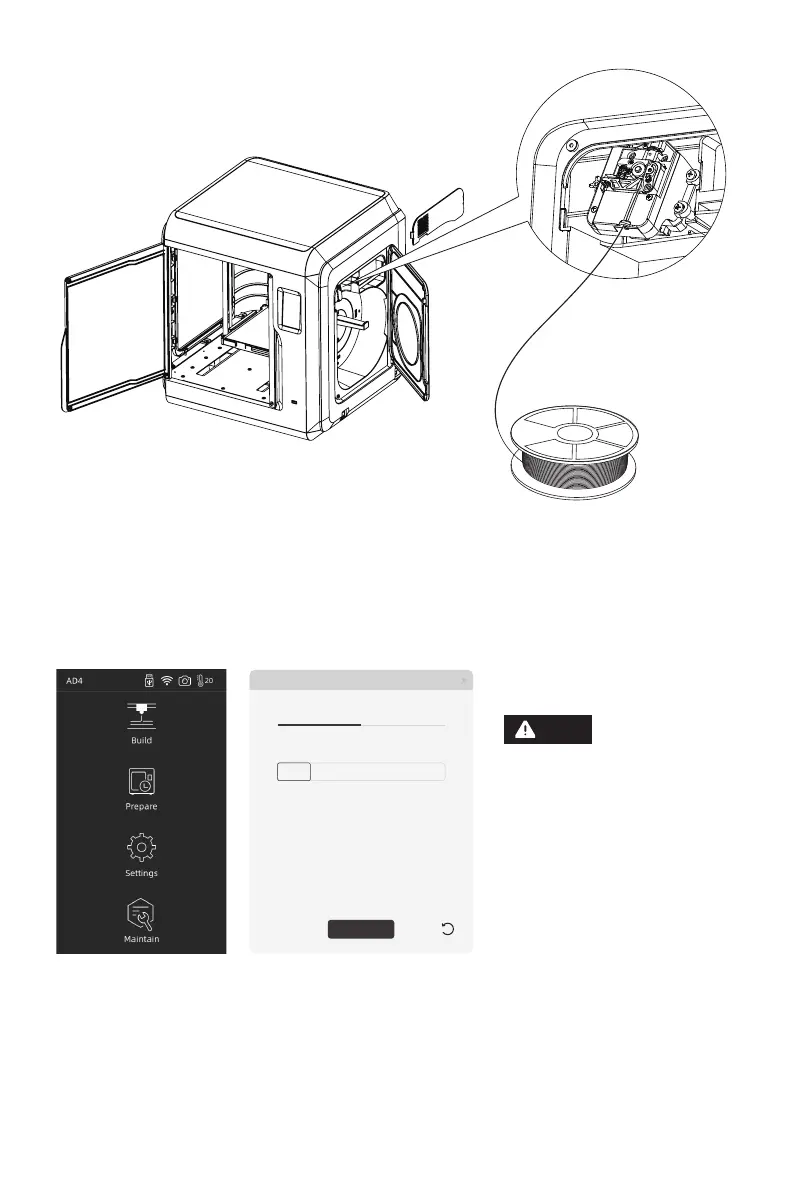
2. Load Filament: open the filament cover on the right side, insert the filament into
the filament intake, push filament into the feeding wheel until some resistance is
felt. Please make sure filaments are in the feeding wheel. Tap
[Prepare]-[Filament]-[Load]. Follow the instruction, filament coming out of the
nozzle indicates a success.
3.Model File Transfer
Method 1: Wi-Fi Connection
Tap [Settings]-[Network]-[WIFI], operate according to the instruction. Open
FlashPrint, click [Print], then click [Machine Type], select [FlashForge Adventurer 4].
You can try to enter the IP address or scan it automatically. The IP address can be
viewed in [settings] - [about].
When the user wants to use
the browser to view images,
the printer and PC must be
in an intranet (that is, the
printer and PC connect to
the same router).
IP Address
IP Port:
192 . . . :168 2 122 8899
Auto-scan
Connection
Connect
Note
04















 To Next Page