01 02
03
04
05 06
07 08 09 10
11 12 13
14
15 16 17
18
19
20
21
22
23
24
25 26
27
28
29
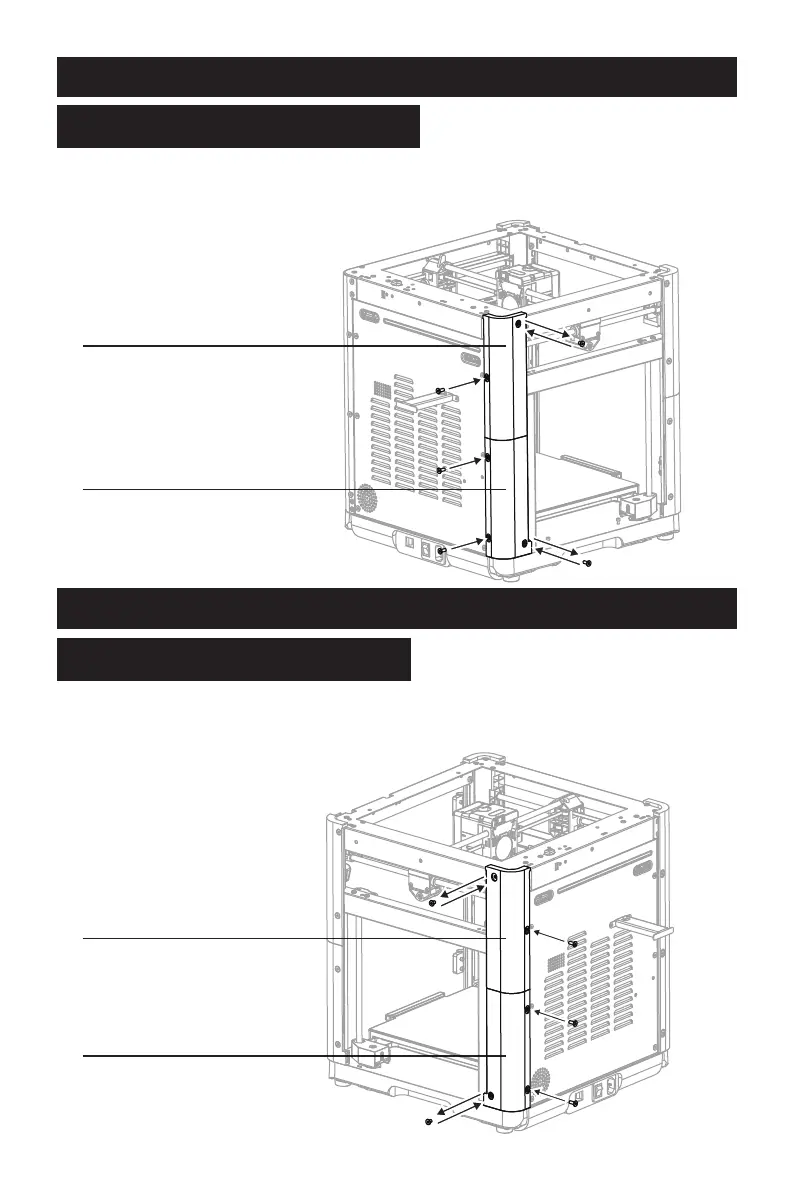
1. Assemble the guard plates C1 and C2.
2. Remove the two screws from the left rear side of the machine, install the assembled
guard plates C1 and C2 and lock them, and secure the back with three M4*6 screws.
Re-install the two M4*6 screws.
Step 4
Install Guard Plates C1 and C2
1. Assemble the guard plates D1 and D2.
2. Remove the two screws from the right rear side of the machine, install the assembled
guard plates D1 and D2 and lock them, and secure the back with three M4*6 screws.
Re-install the two M4*6 screws.
Step 5
Install Guard Plates D1 and D2
Guard Plate C1
Screw M4*6 ×3
Guard Plate C2
Screw M4*6 ×3
Guard Plate D1
Guard Plate D2
30
31
32




 To Next Page