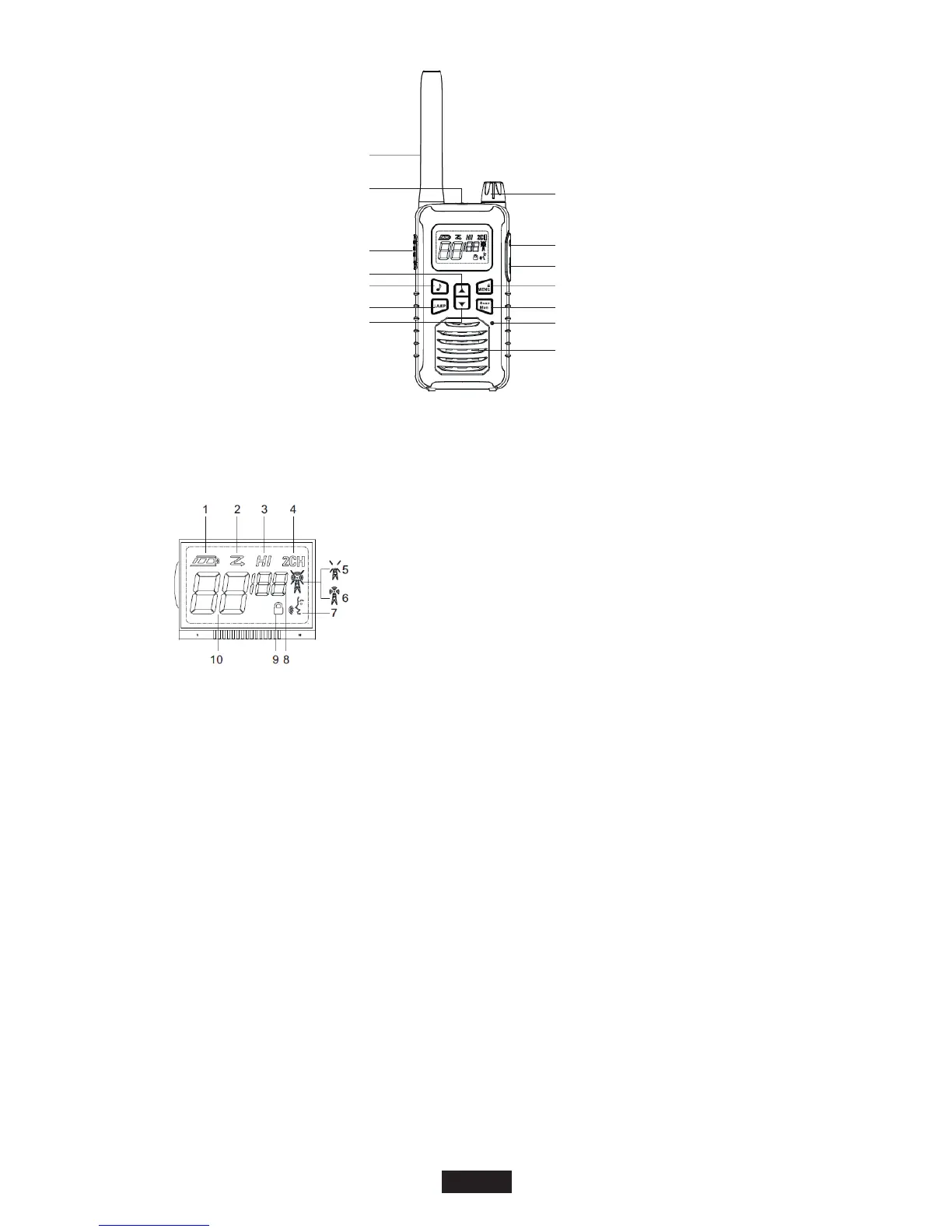
Channel/Sub-Code Up Key
Call Tone Button
Lamp Button
Channel/Sub-Code Down Key
PTT Button
Flash Light/Lamp
Antenna
Radio On/Off,Volumn Knob
Accessory Port
USB Charging Port
Menu/Lock Button
Scan/Monitor/Button
Mic
Speaker
Control Buttons
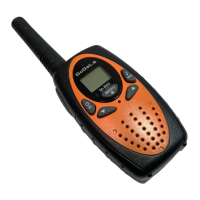
Display Screen Guide
EN-2
1. Battery Indicator
2. Scan
3. High Power
4. Dual Watch
5. Receive
6. Transmit
7. IVox
8. Interference Eliminator code
9. Keypad Lock
10. Channel
Transmit and Receive Procedure
Your two-way radio contains a transmitter and a receiver. To control your exposure and ensure
compliance with the general population/uncontrolled environment exposure limits, always
adhere to the following procedure:
• Transmit no more than 50% of the time.
• To receive calls, release the PTT button.
• To transmit (talk), press the Push-to-Talk (PTT) button in front of the face.
• Hold the radio in a vertical position with the microphone (and other parts of the radio including
the antenna) at least one inch (2.5 centimeters) away from the nose or lips. Keeping the radio
at a proper distance is important to ensure compliance.
Note: RF exposure decreases with increasing distance from the antenna.
• Body Worn Operation. When worn on the body, always place the radio in a approved clip for
this product.
Two-way Radio Operation
• Use only approved supplied or replacement antennas and audio accessories. Use of
non-approved antennas and wired or wireless accessories may exceed the applicable RF
exposure guidelines (iEEE, ICNIRP or FCC).
Installing the Three AA NiMH Rechargeable Batteries(or Alkaline Batteries)
Keypad Tones
You may enable or disable the keypad tones. You will hear the key tone each time a button
pushed.
• To disable/disable keypad tones, power OFF your radio. Press ▼ button & power ON radio at
the same time until you see the display.
Roger Tone
You can set your radio to transmit a unique tone when you finish transmitting.
• To disable/enable roger tone, power OFF your radio. Press ▲ button & power ON radio at the
same time until you see the display.
Setting High Low Power
1. Press Menu until ‘Pr’ appears on the display.
2. Press ▲/▼ to select HI or LO. (HI- High Power, LO- Low Power)
3. Press the PTT button to exit menu or menu to continue setup.
Keypad Lock
To avoid accidentally changing your radio settings:
1. To lock the radio, press and hold MENU/ button until the key lock indicator icon on
display appear.
2. To unlock the radio, press and hold MENU/ button until key lock indicator icon on
display disappear.
Scanning Channels
Use the scan function search all channels for transmission from unknown sources; find
someone in your group who has accidentally changed channels or find unused channels quickly
for own usage.
To Start Scanning
1. Press the Scan/Mon button briefly to turn on the scan function. The scan icon will appear
on the display and the radio begins to scan through the channel & sub-codes.
2. When the radio detects channel activities matching the channel and sub-code combination,
the radio stops scanning and you can hear the transmission. Press the PTT/Menu/Scan/Call
button to exit the scan function.
Advanced Scanning
3. If the radio stops scanning on a channel you do not want to listen to, you may temporarily
remove that channel from the scan list by long press the ▲ or▼ key for more than 3 seconds.
This channel will be temporarily removed from the scan list. Press ▲ or ▼to resume
scanning. To restore the channel, turn the radio off and then back on.
Priority scan
4. Before entering scan, current channel and sub-code are the priority channel and sub-code.
When a radio receives transmission from priority channel and a sub-code, the radio will switch
to priority channel and sub-code without completing the whole scanning cycle.
LED Lamp
Your radio has a built-in-LED Lamp.
Press ‘LAMP’ button once to turn ON the lamp, press again to turn OFF the lamp.


 To Next Page