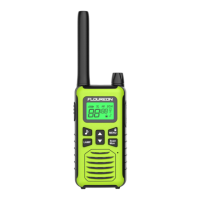
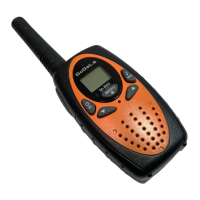
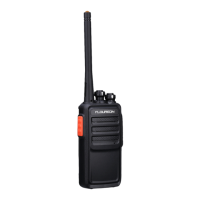
Press and hold Scan/Mon for 3 seconds to enter monitor mode and listen for weak signals on
the current channel. You can also listen to the volume level of the radio when you are not
receiving. This allows you to adjust the volume if necessary.
Push-to-Talk Timeout Timer
To prevent accidental transmissions and save battery life, radio will stop transmitting if you press
PTT button for 180 seconds continuously.
Selecting the Channel
The channel is the frequency of the radio uses to transmit.
1. Press the Menu/Lock button until the channel number starts to flash.
2. Press ▲/▼ to change the channel.
3. Press the PTT button to exit menu or menu to continue setup.
Selecting the Interference Eliminator Code
Sub-Codes help minimize interference by blocking transmission from unknown sources. Your
radio has 121 Sub-Codes.
To set the code for a channel:
1. Press Menu until the code starts to flash.
2. Press ▲/▼ to select code.
3. Press the PTT button to exit menu or menu to continue setup.
help minimize interference by blocking transmission from unknown sources. Your radio has
121 Sub-Codes.
4. To set the code for a channel:
5. Press Menu until the code starts to flash.
6. Press ▲/▼ to select code.
7. Press the PTT button to exit menu or menu to continue setup.
Setting and Transmitting Call Tones
Your radio can transmit different call tones to other radios in your group when you pressed
button.
To set a call tone:
1. Press Menu until call tone ‘CA’ appears. The current call tone setting flashes.
2. Press ▲/▼ to change and listen to the call tone.
3. Press the PTT button to exit menu or menu to continue setup.
Voice Operated Transmission (VOX)
Transmission is initiated by speaking into the microphone of the radio instead of pressing the
PTT button.
1. To activate VOX, press Menu button with four times until appears on the display. The
current setting will flash..
2. Sensitivity level. Press menu until icon appears on the display. Press ▲/▼ to select
sensitivity.
3. Press the PTT button to exit menu or menu to continue setup.
L3 = High Sensitivity for quiet environments
L2 = Medium Sensitivity for most environments
L1 = Low Sensitivity for noisy environments
L0 = Turn Off VOX function
Dual Channel Monitor
Enable you to scan current channel and another channel alternately.
1. Press Menu until ‘CH’ appears on the display.
2. Press ▲/▼ to select channels.
3. Press the PTT button to exit menu or menu to continue setup.
EN-4
Keypad Tones
You may enable or disable the keypad tones. You will hear the key tone each time a button
pushed.
• To disable/disable keypad tones, power OFF your radio. Press ▼ button & power ON radio at
the same time until you see the display.
Roger Tone
You can set your radio to transmit a unique tone when you finish transmitting.
• To disable/enable roger tone, power OFF your radio. Press ▲ button & power ON radio at the
same time until you see the display.
Setting High Low Power
1. Press Menu until ‘Pr’ appears on the display.
2. Press ▲/▼ to select HI or LO. (HI- High Power, LO- Low Power)
3. Press the PTT button to exit menu or menu to continue setup.
Keypad Lock
To avoid accidentally changing your radio settings:
1. To lock the radio, press and hold MENU/ button until the key lock indicator icon on
display appear.
2. To unlock the radio, press and hold MENU/ button until key lock indicator icon on
display disappear.
Scanning Channels
Use the scan function search all channels for transmission from unknown sources; find
someone in your group who has accidentally changed channels or find unused channels quickly
for own usage.
To Start Scanning
1. Press the Scan/Mon button briefly to turn on the scan function. The scan icon will appear
on the display and the radio begins to scan through the channel & sub-codes.
2. When the radio detects channel activities matching the channel and sub-code combination,
the radio stops scanning and you can hear the transmission. Press the PTT/Menu/Scan/Call
button to exit the scan function.
Advanced Scanning
3. If the radio stops scanning on a channel you do not want to listen to, you may temporarily
remove that channel from the scan list by long press the ▲ or▼ key for more than 3 seconds.
This channel will be temporarily removed from the scan list. Press ▲ or ▼to resume
scanning. To restore the channel, turn the radio off and then back on.
Priority scan
4. Before entering scan, current channel and sub-code are the priority channel and sub-code.
When a radio receives transmission from priority channel and a sub-code, the radio will switch
to priority channel and sub-code without completing the whole scanning cycle.
LED Lamp
Your radio has a built-in-LED Lamp.
Press ‘LAMP’ button once to turn ON the lamp, press again to turn OFF the lamp.
L0 = VOX-Funktion ausschalten.
Zweikanal-Monitor
Ermöglicht Ihnen, den aktuellen Kanal und einen anderen Kanal abwechselnd zu scannen.
1. Drücken Sie Menü, bis "CH" auf dem Display erscheint.
2. Drücken Sie ▲ / ▼, um Kanäle auszuwählen.
3. Drücken Sie die PTT-Taste, um das Menü oder Menü zu verlassen und mit der Einrichtung
fortzufahren.
Tastentöne
Sie können die Tastentöne aktivieren oder deaktivieren. Sie hören den Tastenton jedes Mal,
wenn eine Taste gedrückt wird.
• Um die Tastentöne zu deaktivieren / deaktivieren, schalten Sie Ihr Radio aus. Drücken Sie ▼
und Radio gleichzeitig, bis Sie das Display sehen.
Roger Ton
Sie können Ihr Radio so einstellen, dass es nach Abschluss der Übertragung einen eindeutigen
Ton sendet.
• Um den Roger-Ton zu deaktivieren / aktivieren, schalten Sie Ihr Radio aus. Drücken Sie die
Taste ▲ und gleichzeitig das Radio ON, bis das Display angezeigt wird.
Einstellung High Low Power
1. Drücken Sie Menü, bis "Pr" auf dem Display erscheint.
2. Drücken Sie ▲ / ▼, um HI oder LO auszuwählen. (HI- High Power, LO- Niedrige Leistung)
3. Drücken Sie die PTT-Taste, um das Menü oder Menü zu verlassen und mit der Einrichtung
fortzufahren.
Tastensperre
Um zu vermeiden, dass Sie Ihre Radioeinstellungen versehentlich ändern:
1. Um das Radio zu sperren, drücken und halten Sie die Taste MENU / , bis das Symbol
für die Tastensperre auf dem Display erscheint.
2. Um das Funkgerät zu entsperren, halten Sie die Taste MENU / gedrückt, bis das Symbol
für die Tastensperre auf dem Display verschwindet.
Kanäle scannen
Verwenden Sie die Suchfunktion, um alle Kanäle nach unbekannten Quellen zu durchsuchen.
Finde jemanden in deiner Gruppe, der aus Versehen die Kanäle gewechselt oder unbenutzte
Kanäle schnell für den eigenen Gebrauch gefunden hat.
Um mit dem Scannen zu beginnen
1. Drücken Sie kurz die Scan / Mon-Taste, um die Scan-Funktion einzuschalten. Das
Scan-Symbol erscheint auf dem Display und das Radio beginnt, den Kanal und die
Subcodes zu scannen.
2. Wenn das Radio erkennt, dass die Kanalaktivitäten mit der Kanal- und Subcode-Kombination
übereinstimmen, hört das Radio auf zu scannen und Sie können die Übertragung hören.
Drücken Sie die Taste PTT / Menü / Scan / Anrufen, um die Scan-Funktion zu beenden.
Erweitertes Scannen
3. Wenn das Radio den Suchlauf auf einem Kanal stoppt, den Sie nicht hören möchten, können
Sie diesen Kanal vorübergehend aus der Scan-Liste entfernen, indem Sie länger als 3
Sekunden die Taste ▲ oder ▼ drücken. Dieser Kanal wird vorübergehend aus der Scan-Liste
entfernt. Drücken Sie ▲ oder ▼, um den Scanvorgang fortzusetzen. Um den Kanal
wiederherzustellen, schalten Sie das Radio aus und dann wieder ein.
Prioritätsscan
4. Vor dem Eingeben des Scans sind der aktuelle Kanal und der Subcode der Prioritätskanal
und der Subcode. Wenn ein Funkgerät die Übertragung vom Prioritätskanal und einen
Subcode empfängt, schaltet das Funkgerät auf Prioritätskanal und Subcode um, ohne den
gesamten Abfragezyklus abzuschließen.
LED Lampe
Das Radio hat eine eingebaute LED-Lampe.
Drücken Sie die LAMP-Taste einmal, um die Lampe einzuschalten, und drücken Sie sie erneut,
um die Lampe auszuschalten.
Kanäle und Frequenzen


 To Next Page
 Loading...