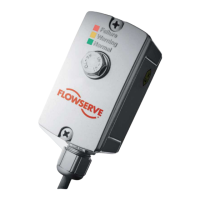
The SEM-10 and SEM-10FT are electronic flow meters manufactured by Flowserve Scienco Products. These devices are designed for non-commercial use to measure fluid flow.
Function Description
The SEM-10/SEM-10FT flow meter operates on a positive displacement, nutating disk principle. As fluid passes through the unit, it causes a nutating disk to move, which in turn rotates a hermetically sealed magnet disk. The meter's electronic assembly counts these magnet revolutions and, based on a calibration number, calculates the quantity of liquid that has passed through the meter. The self-contained electronic assembly features a large Liquid Crystal Display (LCD) and simple four-button operation.
The SEM-10 is intended for fixed mounting to a pump or other supporting device, while the SEM-10FT is designed for hose-end mounting. The SEM-10FT has a female threaded connection for the hose and a male threaded connection for a ball valve. Flow can be metered in either direction through both models.
Important Technical Specifications
General:
- Inlet Port, SEM-10: 1-inch Male NPT
- Outlet Port, SEM-10: 1-inch Male NPT
- Inlet Port, SEM-10FT: 1-inch Female NPT
- Outlet Port, SEM-10FT: 1-inch Male NPT
- Flow Range: 2 to 30 GPM
- Maximum Pressure: 60 PSI (410 kPa)
- Accuracy: +/- 0.5%
- Maximum Total: 999,999.9
- Battery: Lithium CR 2032 (3 Volt)
- Auto Shut Off: 40 Seconds
- Auto Wake Up: With Flow
Material of Construction:
- Fluid Housing/Form Cover: Nylon or Polypropylene
- Meter Chamber: Polypropylene Sulfide (PPS), Stainless Steel
- O-rings: Viton or EPDM
- Electronic Housing: Nylon
- Screws: Stainless Steel
Important Notes:
- The Polypropylene SEM-10 and SEM-10FT are designed for pumping chemicals with a low pH. Users must ensure chemical compatibility between the metered liquid and the meter's wetted parts.
- The meter should NOT be used to transfer flammable petroleum products or fluids with a flashpoint lower than 100°F.
Usage Features
Simple Operation:
- ON button: Wakes up the display in Current Total mode. The unit automatically shuts off after 40 seconds of inactivity. Press and hold for two seconds to display flow rate ("FX.X" in units of volume per minute); press and hold again to return to total volume dispensed.
- RESET CAL-3 button: Resets Current Total to zero when held for 3 seconds. Also used to enter CAL-3 mode and increase the CAL-3 number during calibration.
- TOTAL 2 CAL-2 button: When depressed and held with Current Total displayed, it shows Total 2 (which cannot be reset). Also used to enter CAL-2 mode and decrease the CAL-3 number.
- CAL-1 button: Pushes to enter into the three calibration modes, starting with CAL-1.
Calibration Options:
The meter offers three calibration options: CAL-1, CAL-2, and CAL-3, allowing calibration in any desired unit (e.g., gallons, liters, pounds).
- CAL-1: Requires pumping 5 units of fluid into a calibrated container. The display blinks during pumping and returns to the Current Total screen upon completion.
- CAL-2: Requires dispensing a known quantity of fluid (minimum 2.5 gallons or 9.5 liters for greatest accuracy, minimum 0.5 gallons or 1.9 liters required). The user then enters the actual pumped amount using the UP or DOWN ARROW KEYS.
- CAL-3: Allows calibration without pumping fluid by manually changing the calibration constant. This function overrides previous CAL-2 settings. A typical CAL-3 number for water is 600. Recording CAL-3 numbers for various products allows for quick and accurate measurement when switching liquids.
Maintenance Features
Battery Removal/Replacement:
- If the LCD display becomes dim, the battery needs replacement.
- The meter electronics can be removed without exposing the fluid inside the meter.
- To replace the battery, remove the eight (8) PH-13 screws holding the electronic assembly to the meter assembly. Remove the electronic housing, locate the CR 2032 (3 Volt) battery on the back side, and replace it, observing polarity markings (+ and -). Re-install the gasket and electronic assembly, securing with the eight screws.
- CAUTION: Open the valve to relieve system pressure and do not pressurize the system during this procedure.
Meter Chamber Removal (for cleaning or replacement):
- CAUTION: Before disassembling, thoroughly flush the meter with water. Always wear gloves and proper eye protection when working with chemicals. Ensure the meter is not under pressure.
- Remove the eight (8) PH-13 screws to detach the electronic assembly (S10-11 COMPLETE).
- Remove the four (4) PH-03 screws that secure the meter plate (S10-02N) to the fluid housing (S10-05N).
- Remove the meter plate and O-ring (S10-03). The meter chamber can then be removed.
Meter Assembly Procedure:
- Ensure the bottom O-ring (S10-04) is in place.
- Insert the meter chamber into the fluid housing (S10-05N).
- Place O-ring (S10-03) around the bottom of the meter plate (S10-02N) and position it on top of the fluid housing.
- Secure with four (4) short PH-03 screws, torquing them to 25-28 inch-pounds.
- Install the gasket (S10-06) and the electronic assembly (S10-01N-ASSY-R1) using the eight (8) long PH-13 screws, torquing them to 25-28 inch-pounds.
Troubleshooting Guide:
- Meter reads high or low: Check for trapped air, pump sucking air, or calibration at different flow rates/viscosities than operating conditions.
- Meter flashes "ERR" during calibration: Indicates too few or too many counts received. Verify the electronics are sensing magnet rotation (display should "BLINK" in CAL-1/CAL-2 mode). If not, disassemble and clean/replace the meter chamber. Ensure the dispensed volume for calibration is between 0.5 and 20 units.
- No liquid passes or meter doesn't register flow: Check for foreign material obstructing the metering cartridge or preventing the nutating disk from moving freely. Remove and clean the meter cartridge.
- Meter won't power up or display is dim: Replace the battery.
For additional assistance, Flowserve-Scienco Technical Service & Support can be reached at 1-800-343-PUMP (7867).

 Need help?
 General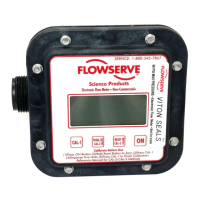

 To Next Page