414D/419D/424D
Users Manual
22
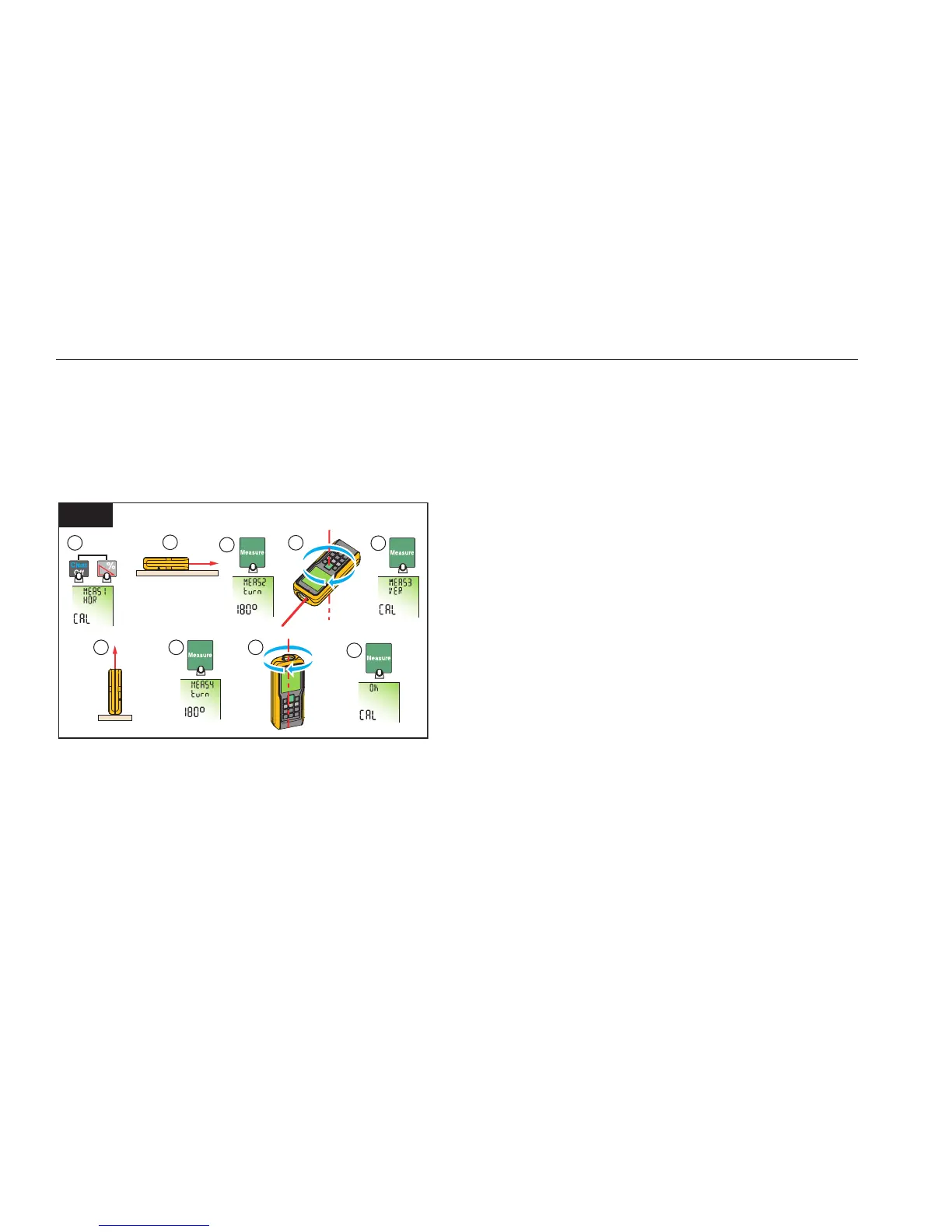
Tilt Sensor Calibration
To calibrate the tilt sensor:
1. Push at the same time for 2 seconds.
The display shows message and the instructions
for the first measurement. See Figure 13.
2 Sec.
1
2
3
4
7 8
5
6
9
13
180°
gwo23.eps
2. Put the Meter on a flat horizontal surface.
3. Push
.
The display shows the instructions for the
subsequent measurement.
4. Turn the Meter horizontally 180 ° on the same flat
horizontal surface.
5. Push
.
The display shows the instructions for the
subsequent measurement.
6. Put the Meter upright on a flat horizontal surface.
7. Push
.
The display shows the instructions for the
subsequent measurement.
8. Turn the upright Meter 180 ° on the same flat
surface.
9. Push .
The display shows the calibration results as .
Shop for Fluke products online at:
1.877.766.5412
www.MyFlukeStore.com



 To Next Page