8270A/8370A
Operators Manual
60
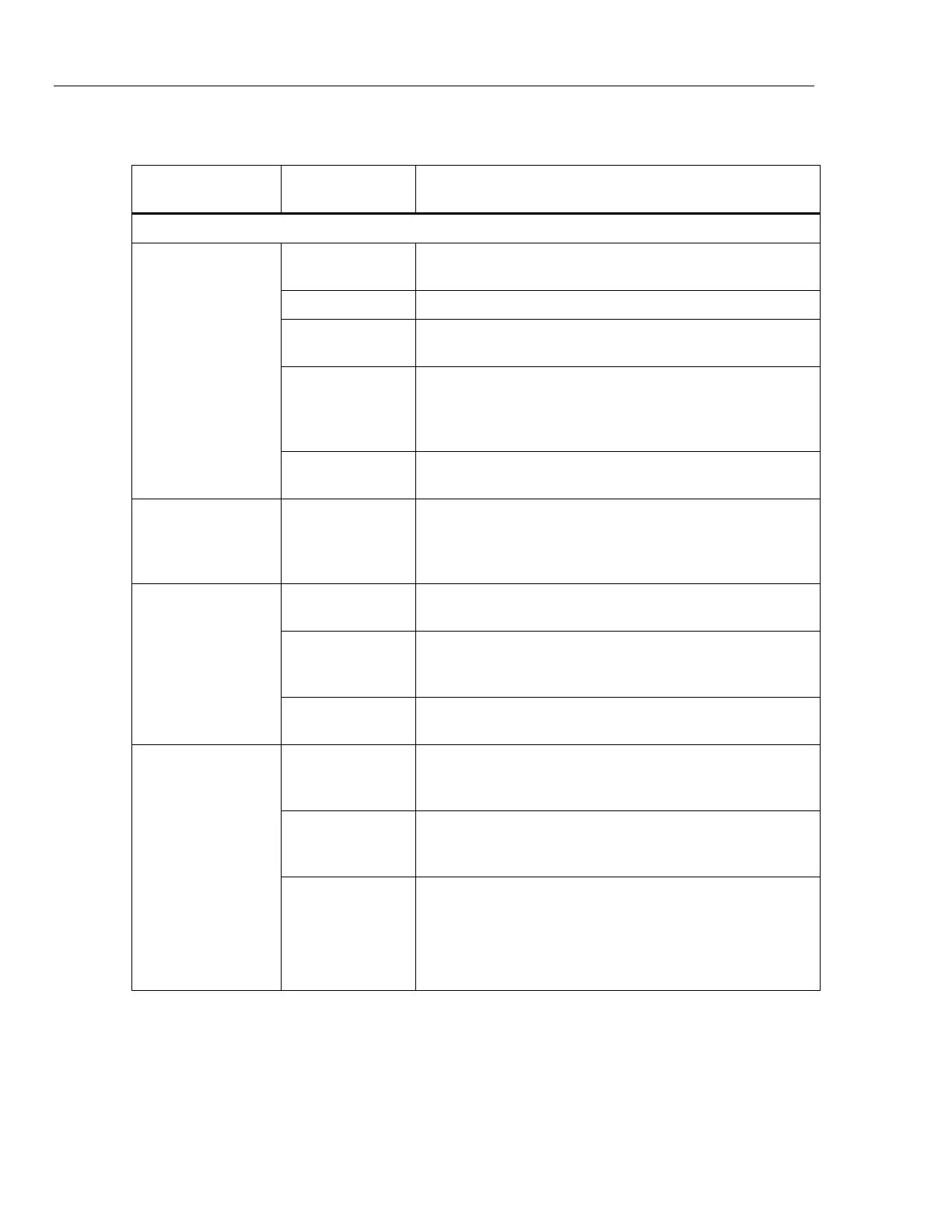
Table 19. Troubleshooting (cont.)
Problem
Probable
Cause
Action
Pressure Generation or Indication Problems
Product does not
reach target
pressure
Pressure
supply too low
Verify pressure supply, perform leak check.
Leak Verify Test port is leak tight.
Valves require
service
Send the Product to Fluke Calibration for repair.
Target pressure
set higher than
the highest
ranged PMM
Install a PMM with the appropriate range.
Slew Rate set
to zero
Increase slew rate.
While using
measure mode,
pressure is
leaking
No supply
pressure
Provide supply pressure if not connected.
Product does not
control down
Blocked
exhaust port
Remove shipping plugs or excessive restriction.
Setpoint
applied below
atmosphere
Connect vacuum pump.
Slew Rate set
to zero
Increase slew rate.
No remote
communications
Communication
settings are not
correct
See Remote Port Menu.
Improper
command
syntax
Verify cable type (null modem).
Cables are the
wrong type or
not properly
connected
Use the correct cables and connections.


 To Next Page