5
BK120
Users Guide
Non-contact voltage detection
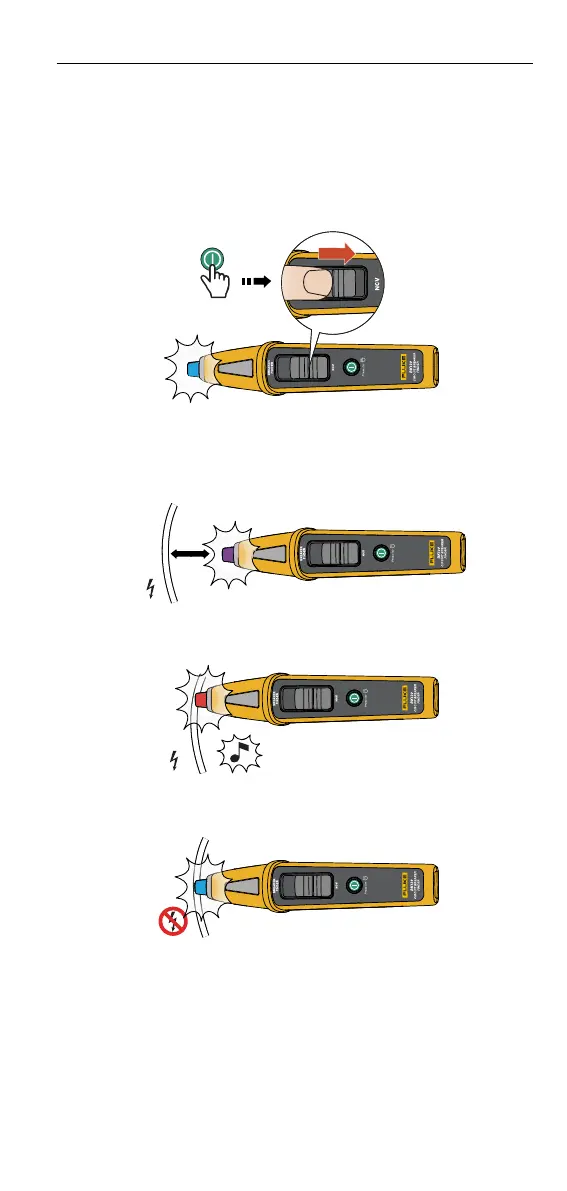
1. Press
momentarily to turn ON the Product.
2. Slide the switch to NCV position.
3. Put the tip of the Product near an AC voltage until the Product produces a
steady glow (purple or red) at the tip and produces a continual single beep
when at the AC voltage source (See Figure 9.).
Figure 9.
1 sec.
The Product features dual sensitivity detection –
• Proximity to the AC voltage source: Purple (See Figure 10.).
Figure 10.
• At the AC voltage source: Beeping red (See Figure 11.).
Figure 11.
• No voltage is detected: Flashing blue (See Figure 12.).
Figure 12.









 To Next Page