4
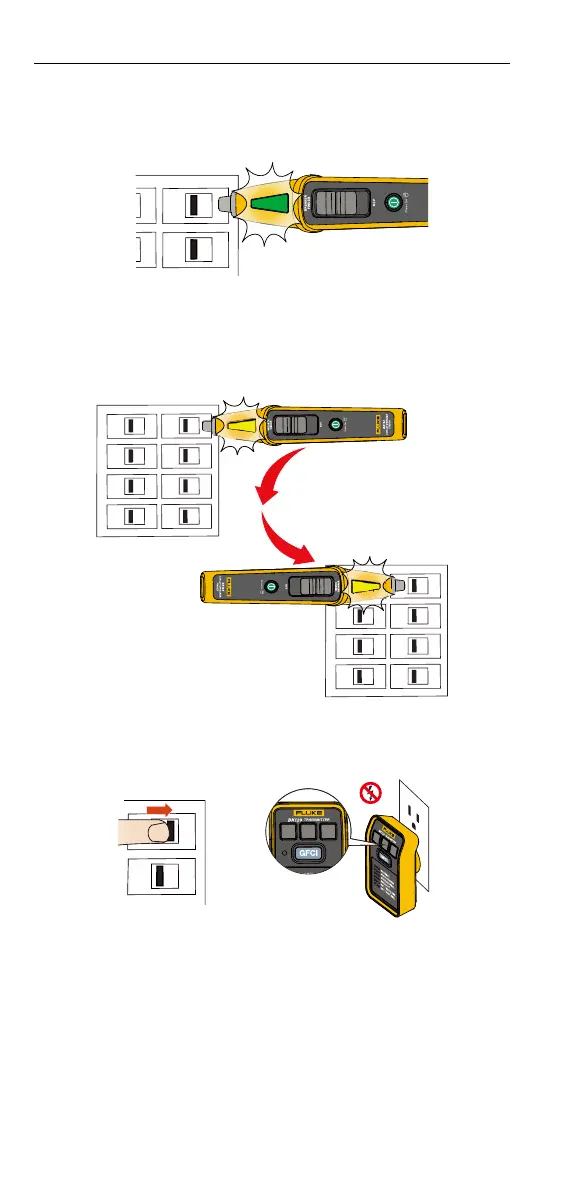
4. Repeat step 3 for the second scan, solid green indication illuminates when
the Breaker Finder identies the breaker that is powering the Transmitter
(See Figure 6.).
Figure 6.
For optimal results or if the Breaker Finder detects two adjacent
breakers on the second scan, reset the Breaker Finder, and turn the
Breaker Finder 180⁰ (see Figure7). Repeat step 3 and 4.
Figure 7.
5. To conrm you have found the correct breaker, trip o the breaker and
check that the Transmitter in the socket is o (See Figure 8.).
Figure 8.
OFF
SmartTrace
TM
Breaker Finder
Product Use








 To Next Page