3
BK120
Users Guide
Breaker and Fuse identication
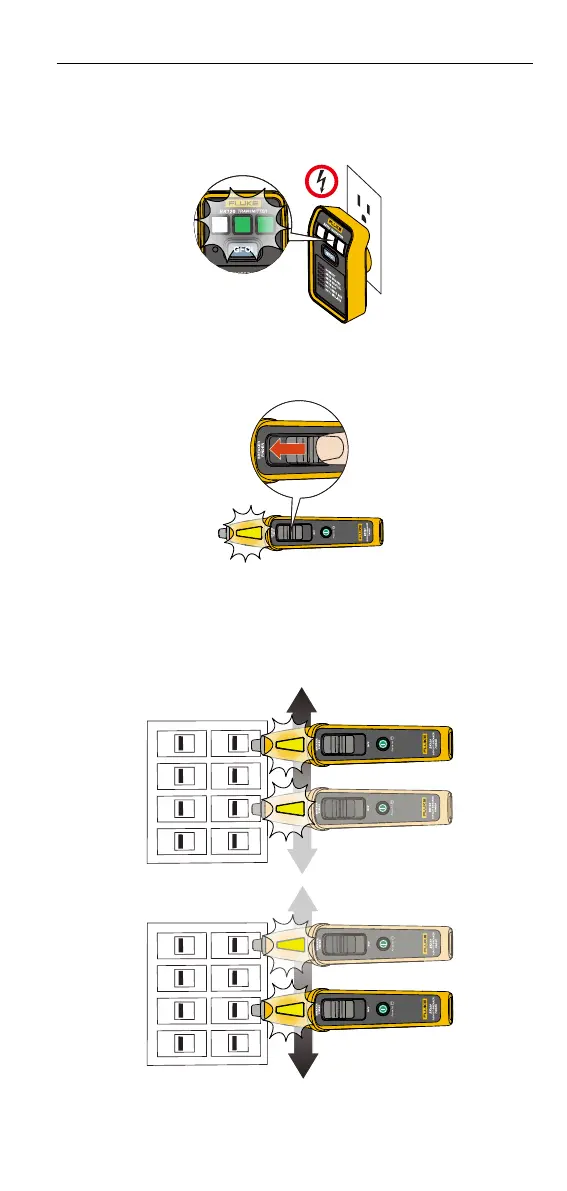
To identify a breaker:
1. Plug the Transmitter into the socket (See Figure 3.).
Figure 3. Transmitter in socket
2. Turn ON the Breaker Finder and slide the function selector to BREAKER
FINDER position (See Figure 4.).
Figure 4. Turn on the Breaker Finder
3. Hold the Breaker Finder perpendicular to the breakers and scan slowly at
the breaker panel with the at surface of the tip end directly on the circuit
breaker. During this scan, it may beep and/or have visual indication at
several breakers as it measures the relative signal strength during the rst
scan process (See Figure 5.).
Figure 5.
Note
Inaccurate reading may occur if the tip is placed at any other angle.









 To Next Page