Need help?
Do you have a question about the Fluke v3000 FC and is the answer not in the manual?
Verify all segments of the product display function correctly during diagnostic mode.
Check if the product's backlight illuminates when the designated button is pressed.
Confirm that each product button activates a display annunciator when pressed.
Measure AC voltage accuracy against specified limits using a calibrator.
Access the product's maintenance mode for parameter settings, auto power off, and backlight adjustment.
Enter the required password to gain access to the product's calibration mode.
Procedure to modify the existing password for accessing calibration functions.
Manually reset the calibration password to its default value (1234) if lost.
Instructions for cleaning the product using a mild solution and soft cloth to avoid damage.
Guide for safely replacing the product's AA batteries, noting polarity and precautions.
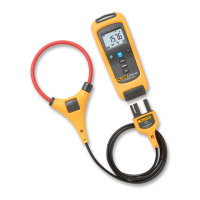
The Fluke v3000 FC is a wireless AC voltage module designed for efficient and safe voltage measurements. This device is part of a system that allows for remote monitoring and data logging, enhancing safety by keeping users away from hazardous live conductors.
The v3000 FC module is primarily used for measuring AC voltage. It operates as a standalone unit that can wirelessly transmit measurement data to a compatible Fluke Connect master unit (not included in this manual's scope, but implied by the "FC" designation). This wireless capability is a key feature, allowing for measurements in hard-to-reach or dangerous locations while the user remains at a safe distance. The module features a clear LCD with backlight, displaying voltage readings and other relevant information. It also includes data logging capabilities, allowing it to record up to 65,000 readings, which can then be analyzed for trends or intermittent issues. The device is designed for use in various industrial and commercial environments, adhering to high safety standards for electrical measurements.
The v3000 FC is designed for straightforward operation. To begin, users should ensure the product is fully assembled and the battery door is closed and locked. The device is powered by two AA batteries, which provide approximately 400 hours of operation. A low battery indicator prompts users to replace batteries to prevent inaccurate measurements.
Before taking measurements, it's crucial to perform a display test to ensure all segments are functioning correctly. This involves holding the "LOG" button while powering on the device until all display segments are shown. Similarly, a keypad test can be performed by pressing each button individually while the device is on, verifying that each button push triggers a display annunciator. The backlight function can be tested by simply pressing the backlight button while the device is on.
For AC voltage measurements, the module connects to a calibrator (such as a Fluke 5522A) via its COM and VAC jacks. The device supports autoranging, simplifying the measurement process by automatically selecting the appropriate range. The wireless communication operates on a 2.4 GHz ISM Band, with a range of up to 20 meters (66 feet), enabling flexible placement of the module relative to the master unit.
The v3000 FC also supports a "Maintenance Mode," which allows users to configure various parameters, including auto power off settings, backlight adjustments, and calibration. Accessing this mode requires a password, which defaults to "1234" but can be changed by the user. This password protection ensures that critical settings, especially calibration, are not accidentally altered. If the password is lost, there's a manual reset procedure involving shorting specific points on the printed circuit assembly (pca) while applying 3.0 V to the battery contacts.
The data logging function is a significant advantage, enabling the module to record measurements over extended periods. The log rate/interval can be adjusted via PC from 1 second to 1 hour, with a default of 1 minute. This allows for detailed monitoring of voltage fluctuations or stability over time, which is invaluable for troubleshooting and preventative maintenance.
Maintaining the v3000 FC involves several key practices to ensure its longevity and accurate performance.
Cleaning: The product should be cleaned with a cloth and a mild cleaning solution. Abrasive cleaners should be avoided as they can damage the case.
Battery Replacement: Battery replacement is a routine maintenance task. When the low battery indicator appears, the two AA batteries should be replaced. To do this, the product must be turned off. The battery compartment door screw is loosened with a Phillips screwdriver, and the door is lifted off. The old batteries are replaced, ensuring correct polarity, and then the door is reattached and tightened. It is important to remove batteries if the product will not be used for an extended period to prevent battery leakage and potential damage to the device.
Calibration Adjustment: The v3000 FC features a closed-case calibration adjustment procedure, which means the device does not need to be opened for calibration. This process uses known reference sources to measure applied signals, calculate correction factors, and store them in nonvolatile memory. If the device fails any performance tests, calibration adjustment is necessary.
To perform calibration, the device must first be put into maintenance mode and the correct password entered. Once in calibration mode, the device will display "C-01" for the first calibration step. The user then applies the correct input signal from a calibrator (e.g., 60 mV ac, 55 Hz for C-01) and presses a confirmation button. The device then advances to the next calibration step (e.g., C-02), and the process is repeated for all specified calibration points. It's important to wait for the calibration step number to advance before changing the calibrator source, as some steps may take several seconds. The necessary frequency for all calibration steps is 55 Hz. The device can also display the necessary voltage input for each step by pressing the "LOG" button during calibration. Upon completion of all steps, "End" will be displayed.
Safety Considerations: Throughout its usage and maintenance, strict adherence to safety guidelines is paramount. Users are warned against touching voltages above 30 V ac rms, 42 V ac peak, or 60 V dc. The product should not be used in explosive atmospheres or wet environments, and it must be disabled if damaged or operating incorrectly. Only specified replacement parts should be used, and repairs should be carried out by an approved technician. When opening the product for tasks like password reset, all input signals must be removed to prevent electrical shock or personal injury. The device's Measurement Category (CAT) rating should always be respected, and appropriate probes, test leads, and adapters must be used for measurements. Regular inspection of the case and test leads for damage is also crucial.
The v3000 FC is designed to comply with various international safety and EMC standards, including IEC 61010-1, IEC 61010-2-033, IEC CISPR 11, and European Union directives, ensuring its reliability and safety in professional applications. It also adheres to WEEE Directive requirements for proper disposal and recycling.
 General
| Type | Digital Multimeter |
|---|---|
| Measurement Categories | CAT III 1000V, CAT IV 600V |
| Voltage Measurement | Yes |
| Current Measurement | Yes |
| Resistance Measurement | Yes |
| Capacitance Measurement | Yes |
| Frequency Measurement | Yes |
| Temperature Measurement | Yes |
| Wireless Connectivity | Bluetooth |
| Battery Life | Up to 400 hours |
| Operating Temperature | -10 °C to +50 °C |
| Display | LCD |
| AC Voltage Range | 0 to 1000V |
| AC Voltage Resolution | 0.1 mV |
| AC Voltage Accuracy | ±1.5% + 3 digits |
| DC Voltage Resolution | 0.1 mV |
| DC Voltage Accuracy | ±0.5% + 2 digits |
| AC Current Range | 0 to 10A |
| AC Current Accuracy | ±1.5% + 3 digits |
| DC Current Range | 0 to 10A |
| DC Current Accuracy | 0.5% + 2 digits |
| Resistance Resolution | 0.1 Ω |
| Safety Rating | IEC 61010-1 |
| Temperature Range | -40°C to +400°C |


 To Next Page