Web Configuration FIP11/FIP11W/FIP11WP User Manual
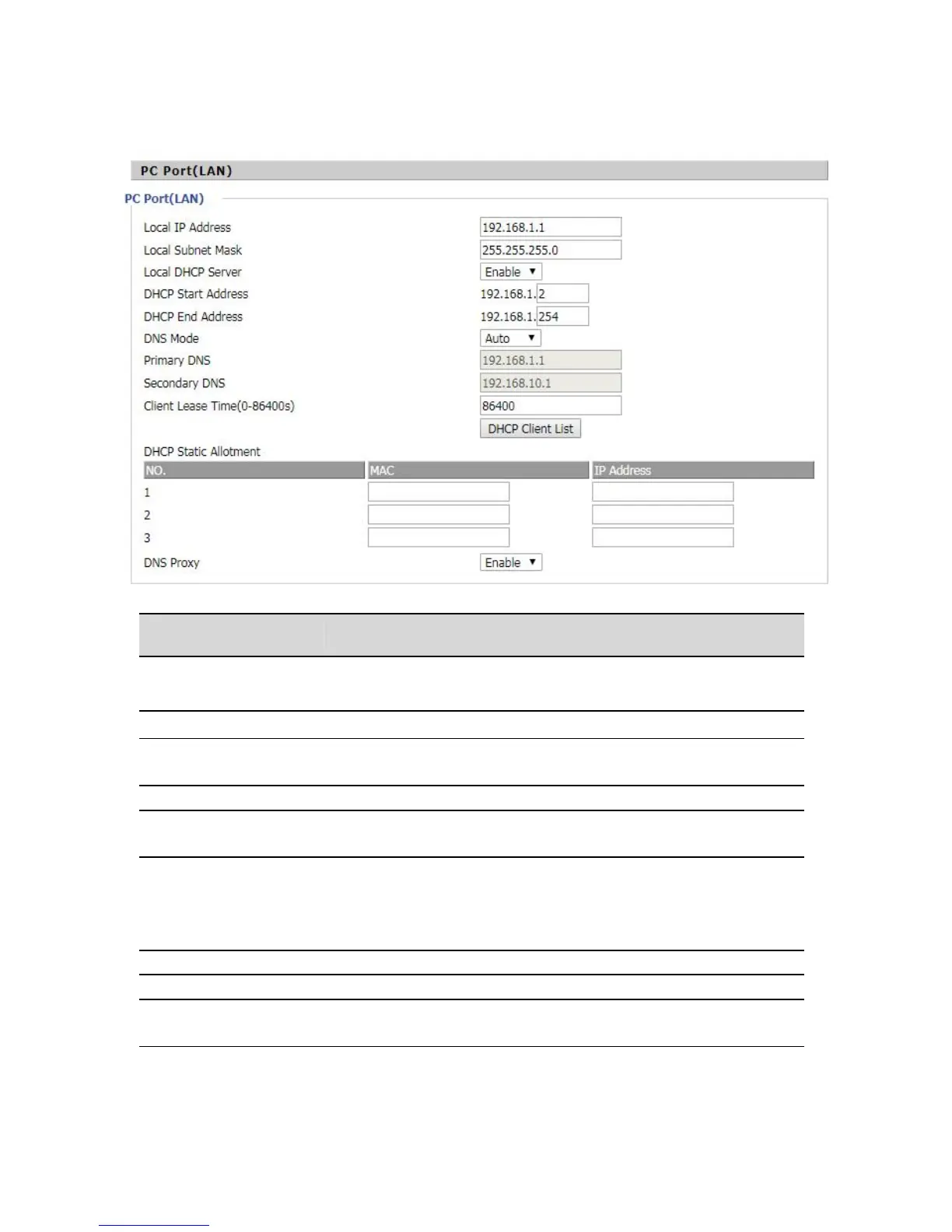
Set the IP address of the PC port.
Whether to enable the DHCP server. If the LAN port is not in NAT mode,
the user can not enable the DHCP server.
Start IP address, assign the address of the address to the DHCP client.
End the IP address and assign the address of the address to the DHCP
client.
The DNS type is specified: the user should manually set the preferred
DNS and alternate DNS.
The DNS type is Automatic: The IP phone will automatically obtain the
preferred DNS and alternate DNS from the DHCP server.
The preferred DNS address for the Internet port.
Alternative DNS for Internet ports.
Client Lease
Time(0-86400s)
DHCP Client to obtain IP lease, in seconds, the default is 86400s.


 To Next Page