4.8.13 Airspace settings
Figure 4.34: Airspace Settings
This menu allows the user to dene certain parameters related with airspaces. Each of the parameters
can be changed using UP, and DOWN, keys. Pressing the ENTER key conrms the value and jumps to
next parameter. Changes can be undone by pressing the MENU key. As shown in Figure 4.34 there are 5
parameters related to the airspace which are explained in Table 4.9.
Table 4.9: Airspace Menu Settings
Function Description
CTR dist. Th Minimum
horizontal
distance that a pilot can be from an
airspace without triggering an airspace warning. If this thresh-
old is passed a warning is emitted (event).
CTR alt. Th Minimum
vertical
distance that a pilot can be from an airspace
without triggering an airspace warning. If this threshold is passed
a warning is emitted (event).
Enable If this parameter is set to YES, when a pilot is inside an airspace
area (as shown in a 2D representation, but not necessarily inside
the airspace), the airspace is drawn in Black. In this case all other
airspaces are drawn in Grey.
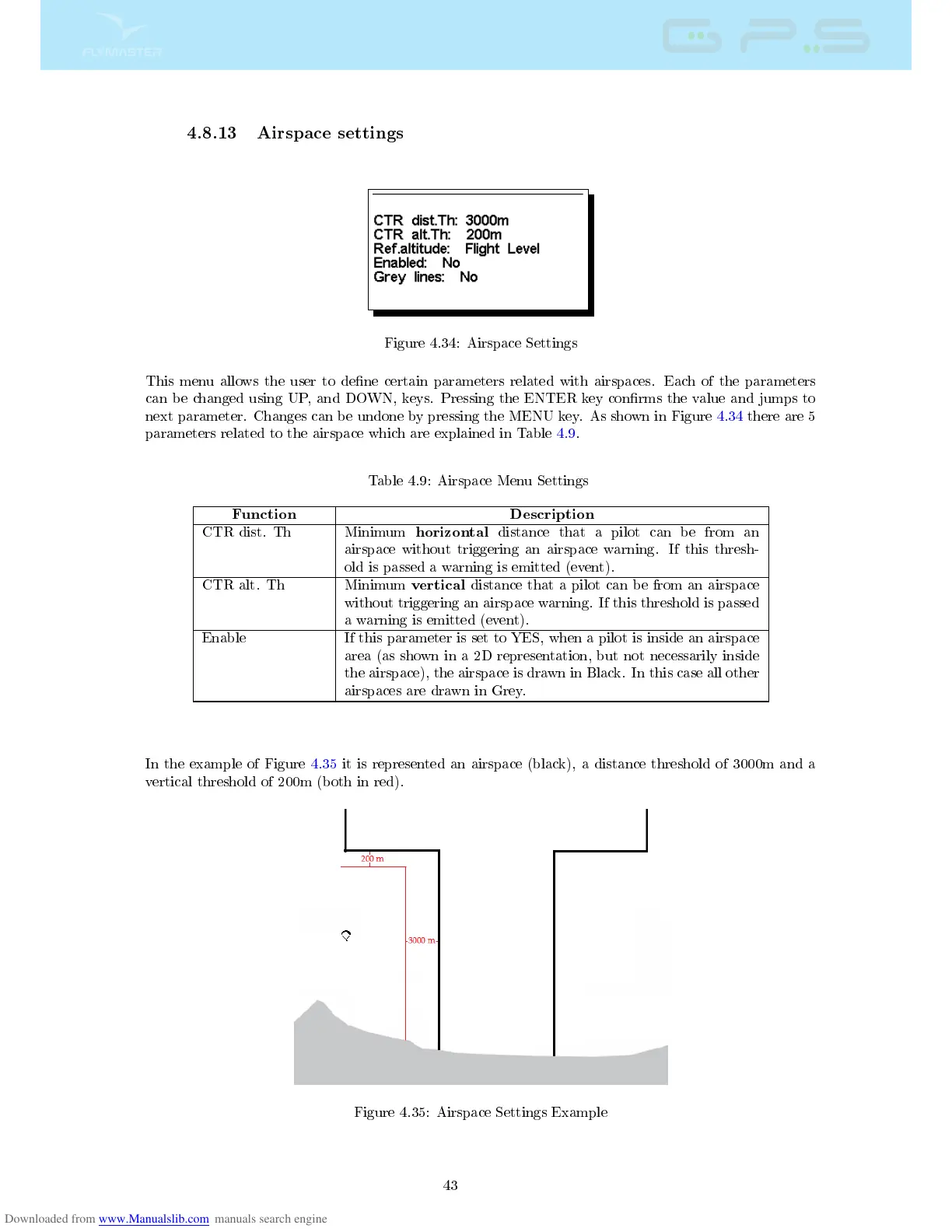
In the example of Figure 4.35 it is represented an airspace (black), a distance threshold of 3000m and a
vertical threshold of 200m (both in red).
Figure 4.35: Airspace Settings Example
43



 To Next Page