4.8.14 GPS status
In the main menu the GPS provides a detailed view of the
GPS
status,the current
position dilution of
precision
(pdop) value ,and the current
GPS
coordinates of the pilot.
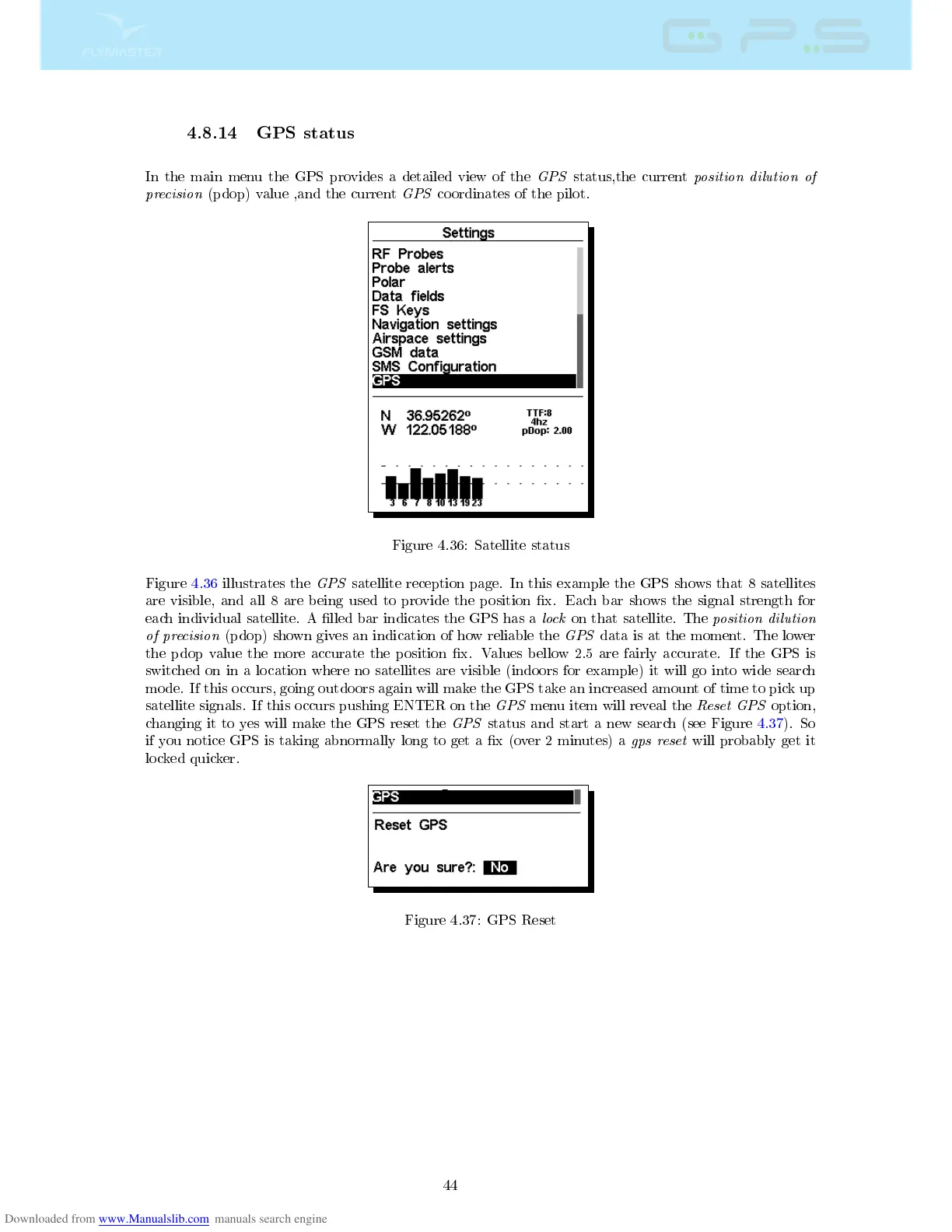
Figure 4.36: Satellite status
Figure 4.36 illustrates the
GPS
satellite reception page. In this example the GPS shows that 8 satellites
are visible, and all 8 are being used to provide the position x. Each bar shows the signal strength for
each individual satellite. A lled bar indicates the GPS has a
lock
on that satellite. The
position dilution
of precision
(pdop) shown gives an indication of how reliable the
GPS
data is at the moment. The lower
the pdop value the more accurate the position x. Values bellow 2.5 are fairly accurate. If the GPS is
switched on in a location where no satellites are visible (indoors for example) it will go into wide search
mode. If this occurs, going outdoors again will make the GPS take an increased amount of time to pick up
satellite signals. If this occurs pushing ENTER on the
GPS
menu item will reveal the
Reset GPS
option,
changing it to yes will make the GPS reset the
GPS
status and start a new search (see Figure 4.37). So
if you notice GPS is taking abnormally long to get a x (over 2 minutes) a
gps reset
will probably get it
locked quicker.
Figure 4.37: GPS Reset
44



 To Next Page