6.4.4 “OFF” action / STAND-BY mode
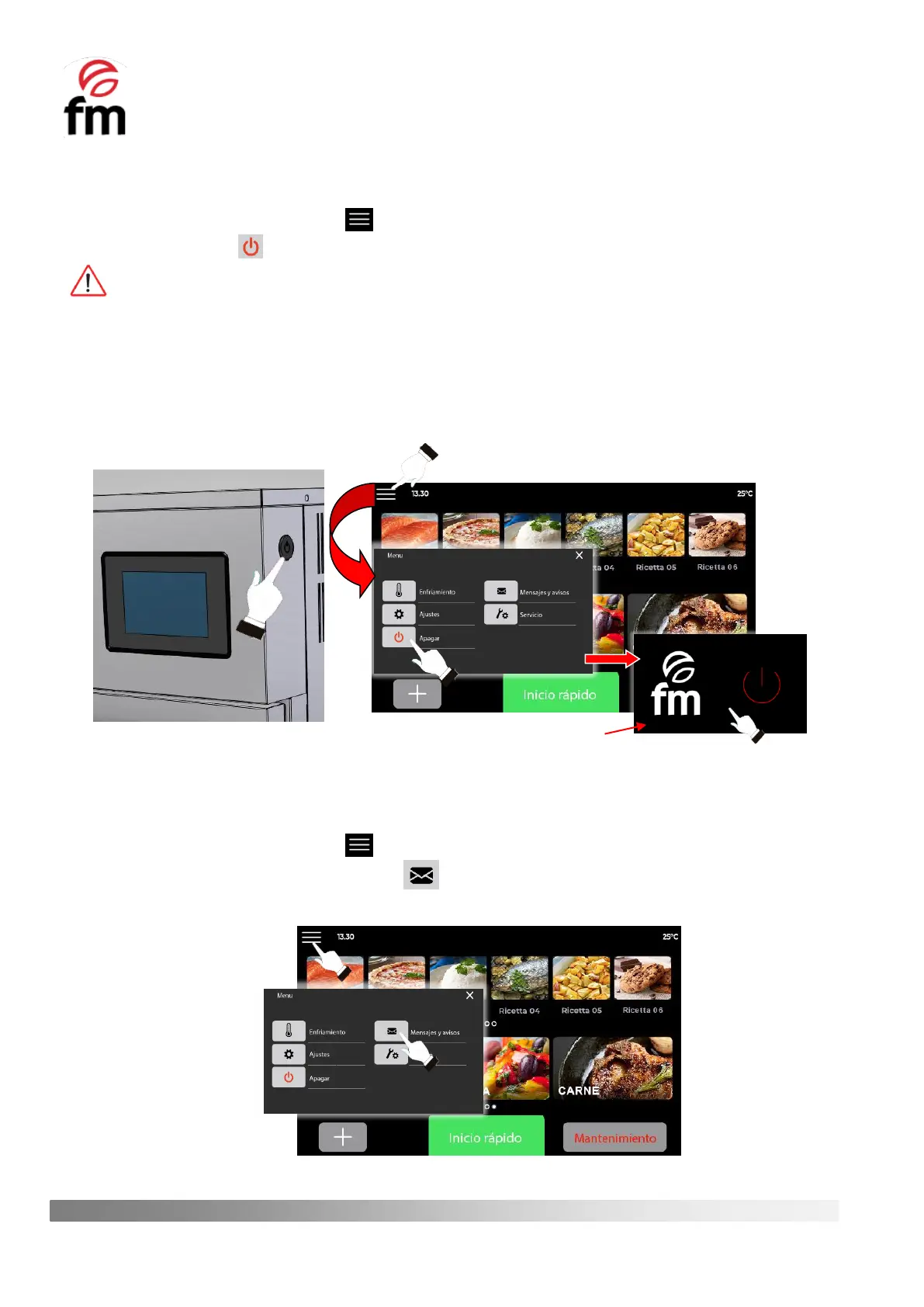
1. Make sure that the device is switched on and no operation is in progress.
2. From the home screen, click on the icon.
3. Click on the “OFF” icon .
In this shutdown mode, the auxiliary cooling system of the appliance will also remain running, so it is COMPLETELY
NORMAL to hear the sound of the fan motor of the auxiliary cooling system.
4. To exit the stand-by mode and access the initial screen, simply press any area of the stand-by screen to access
the initial screen of the oven again.
5. To COMPLETELY switch off all the systems of the control unit, simply press the button on the right-hand side of
the control panel (see front view of the unit). In this way, it will also be possible to
6.4.5 “MESSAGES AND ALERTS” Action
1. Make sure that the device is switched on and no operation is in progress.
2. From the home screen, click on the icon.
3. Click on the icon “MESSAGES AND ALERTS” . In this way, you will have access to and up-to-date overview
of the latest alarms and events that have occurred while using the device.



 To Next Page