6.6 “Main recipe menu” Icon. Actions and submenus
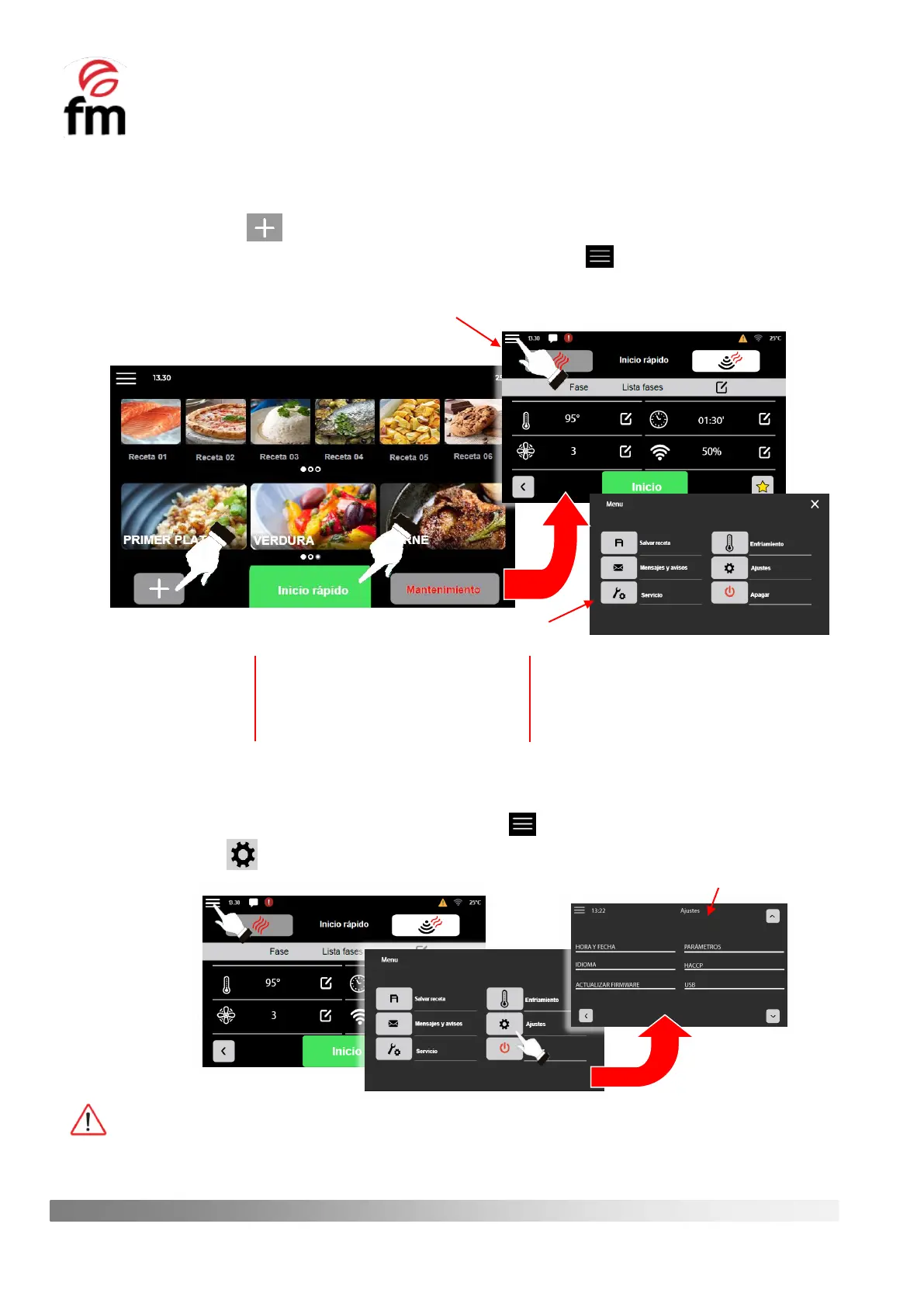
1. 1. To view the recipe menu, you must first access the parameter configuration screen of a recipe. To do this, you
can click on the icon for creating a new recipe or in the “QUICK START”.
2. From the parameter configuration screen of a recipe, click on the icon . This will take you to a window
showing the most relevant options and actions in the recipe creation section.
6.6.1 “SETTINGS” submenu (access from "main menu recipes")
1. Make sure that the device is switched on and no operation is in progress.
2. From the recipe parameters configuration screen, click on the icon.
3. Click on the icon to access the settings submenu.
All actions found in the recipe settings submenu window are similar to those specified in Section 6.3.1
Save (+rename+delete) recipe (section 6.6.3)
Messages and warnings (section 6.6.4)
Cooling (section 6.6.5)
Switch off (section 6.6.6)



 To Next Page